13
STARTUP AND SETTING OF Ez Capture for DC-4
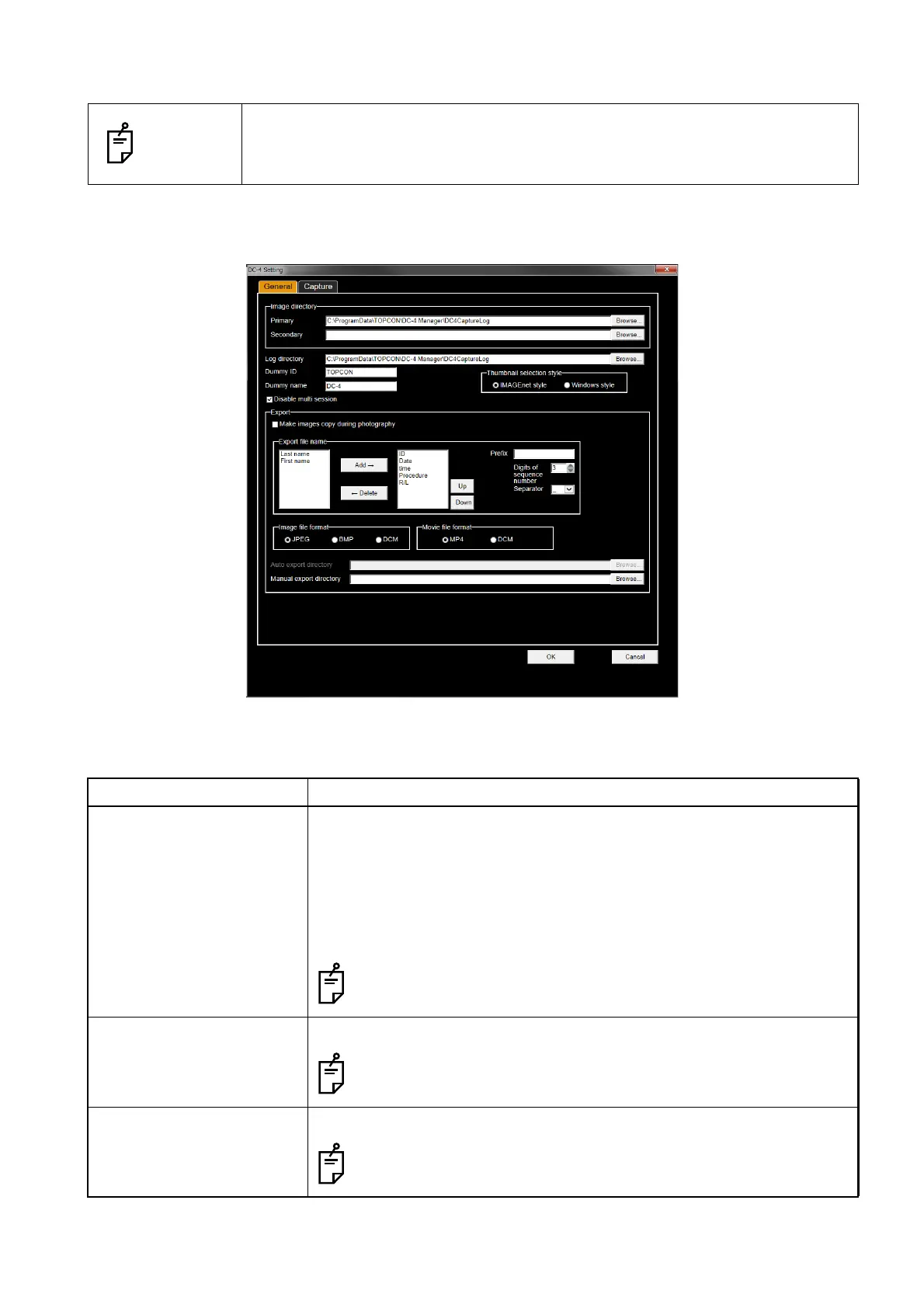
DC-4 Setting page
Select [Open DC-4 Setting] from the "DC-4 Grabber Setup" screen, and the "DC-4 Setting" page is dis-
played. On the [General] tab of "DC-4 Setting page", you can set the following items.
NOTES
The "User account control" screen appears by clicking the [OK] button on the
"DC-4 Setting" page, when Windows UAC (User account control) is set to ON.
Click the [Yes] button on the screen to proceed to the next step.
Setting item Description
Image directory Primary
Specifies the place where the image log file is temporarily saved during
photography.
Secondary
Specifies the place where the image log file is temporarily saved when
the capacity for Primary is insufficient.
The free capacity of 20GB or more is necessary in one of the
specified "Primary" and "Secondary" drives.
Log directory Specifies the place where the photography log file is temporarily saved.
The free capacity of 512MB or more is necessary in the specified
drive.
Dummy ID Sets the patient ID to be used when a patient is not specified.
This setting does not use for Ez Capture. Setting will be not avail-
able.
[General] tab of the "DC-4 Setting" page












 To Next Page