Getting Started
mmGPS 3D Paver Reference Manual
5-14
Setting up the PZL-1Transmitter in
3DMC
PZL-1 Transmitter information is saved in the control point file.
Ensure the correct control point file is selected for the jobsite.
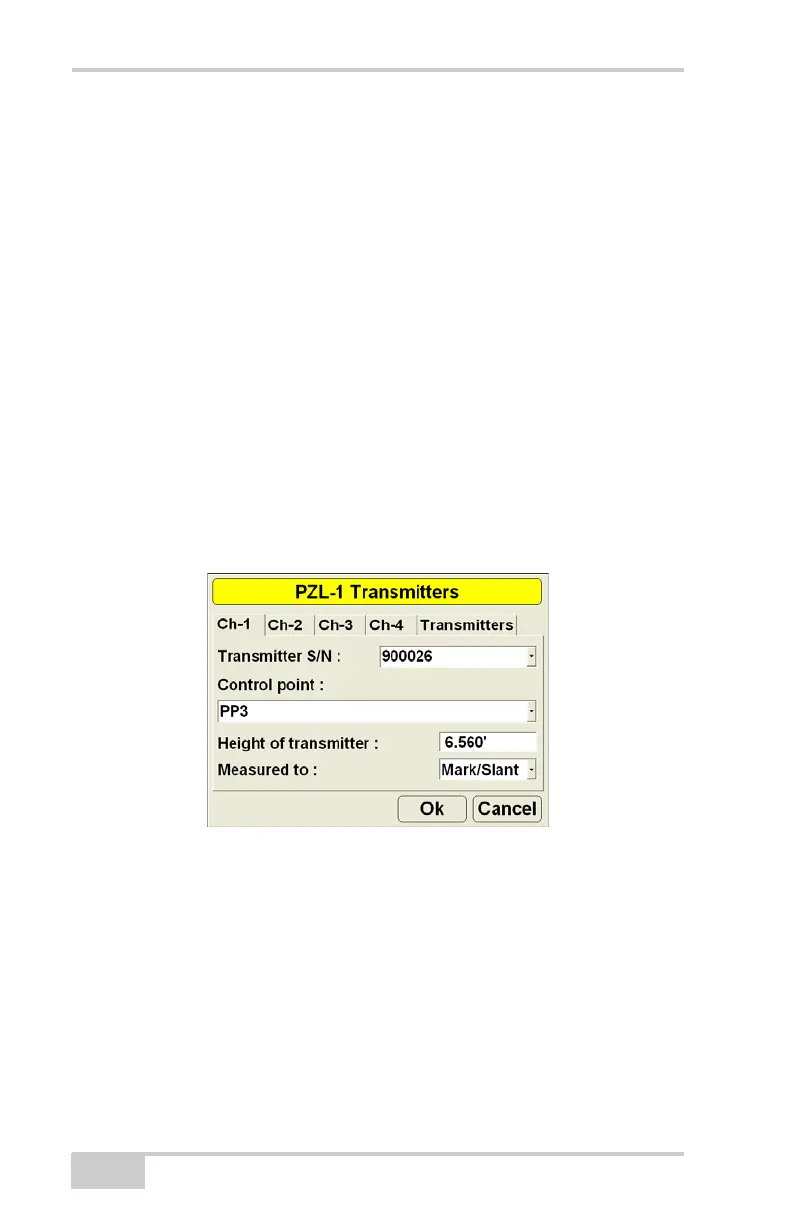
1. Press Topcon LogoControlPZL-1 transmitters.
2. Tap the channel tab that corresponds to the channel at the
transmitter (Figure 5-9).
3. Enter the following information and press Ok (Figure 5-9).
• Select the serial number of the transmitter on this channel.
• Select the control point over which the transmitter is
installed.
• Enter the height of the transmitter.
• Select the method used to measure the height of the
transmitter.
Figure 5-9. Set up PZL-1 Laser Transmitter in 3DMC



 To Next Page