26
mark (X2). No calibration is necessary if distance is within 5mm (0.2 inches).
If the distance is greater than 5mm (0.2 inches), adjust as follows.
11
Repeat procedure for the Y axis.
(2) Adjusting Calibration
To calibrate the X axis:
1
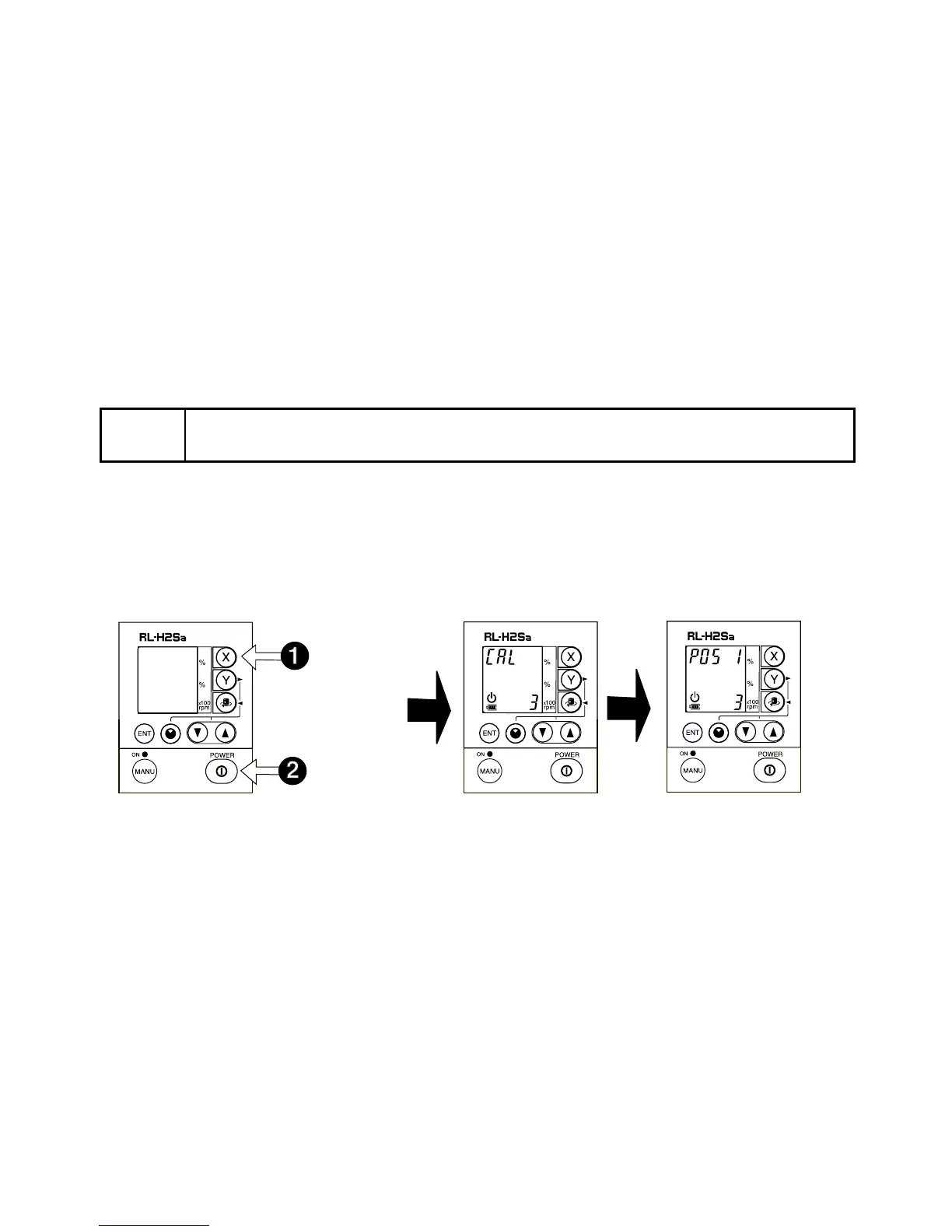
Press the Power button once to turn off the laser.
Turn the laser back on by pressing the Power button down while pressing the X AXIS but-
ton. This activates the X axis calibration mode. Confirm that rotation speed is set to 1.
2
After the “CAL” display changes to “POS 1”, move the level sensor up or down until it
“finds” the rotating laser beam and signals “on-grade”.
Note
• Please contact your Topcon dealer if the distance between the first and sec-
ond mark exceeds ±40mm (1.6 inches).
Press
Press and
Hold



 To Next Page