3 Service Search
11
Chapter 3
Service Search
After connecting up the digital receiver, you will need to perform a
service search.
NOTE
If there is no service stored, you will be not able to access all menus.
A is another name for a .
3.1 Searching for broadcasting services
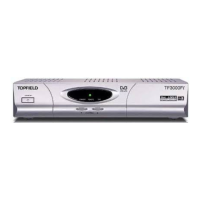
To perform service search, select the Instal-
lation > Searching menu. You should see
a screen like the left figure.
You should set the Search Mode option to
Auto for the first time after connecting up
the digital receiver.
You may choose to only search for the services of a specific transponder
since more than one service are provided via each transponder. Set the
Search Mode option to Manual, then select your desired transponder
at the Channel option. The number ranges from 6 to 12 in VHF and 28
to 69 in UHF.











 To Next Page