24 Every Day Use
5.2.3 Viewing programme information
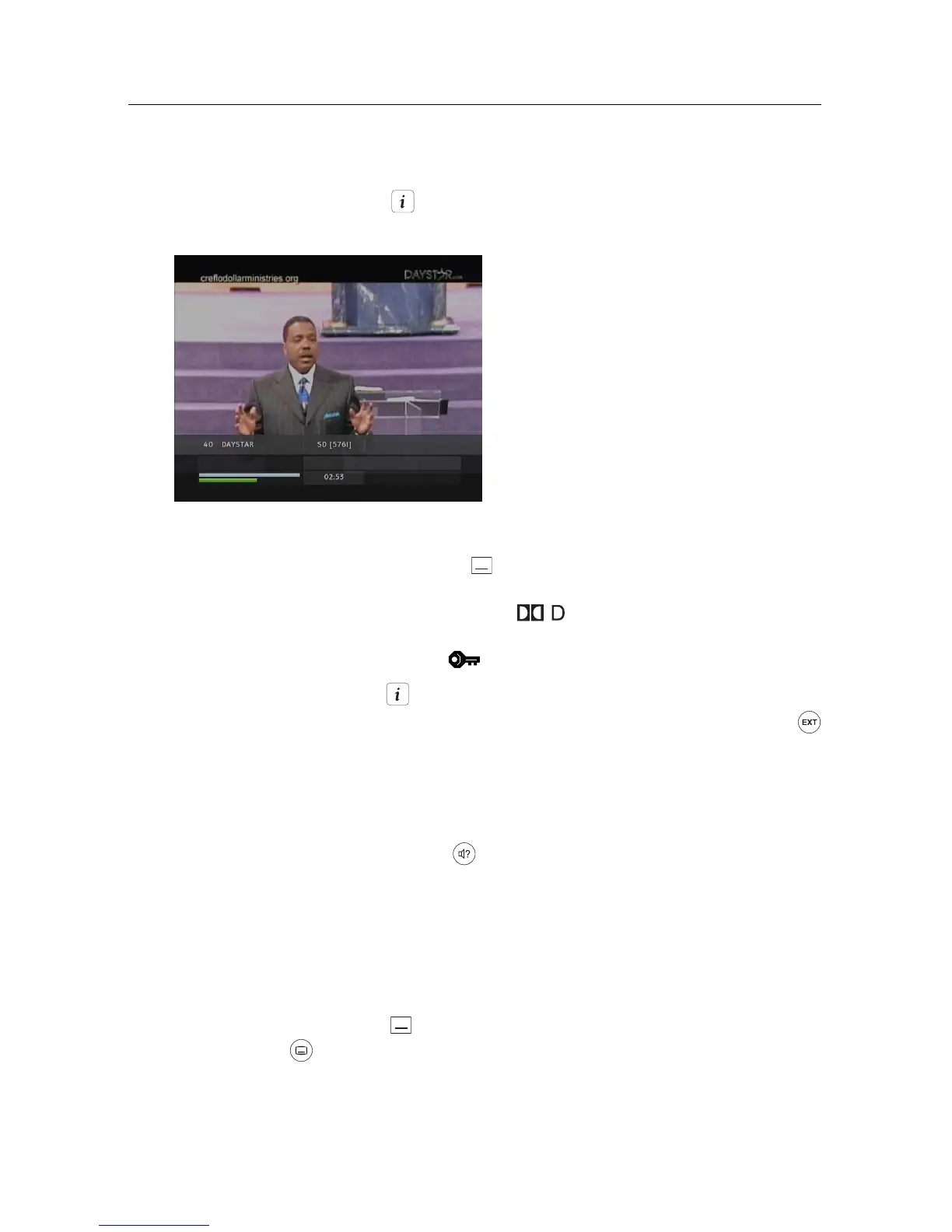
Pressing the button displays the information box, on which you
can see all of the following:
• Service number and name
• Signal level and quality
• Programme name
• Programme classification sign
• Programme summary
• Broadcasting time
• Current time
In addition, you might see the following symbols:
• Subtitle symbol ( ) if subtitle tracks are provided on the cur-
rent programme.
• Dolby Digital symbol ( ) if a Dolby Digital audio track is
provided on the current programme.
• Lock symbol ( ) if the current service is locked.
Pressing the button once more displays detailed information about
the current programme. To hide the information box, press the
button.
5.2.4 Selecting audio tracks
Some programmes are provided with audio tracks in one or more lan-
guages. Pressing the button displays available audio tracks. Once
you select an audio track, that track will be heard. In addition, you can
enjoy audio tracks in four sound modes: Stereo, Mono, Left or Right.
5.2.5 Selecting subtitle tracks
Some programmes are provided with subtitle tracks in one or more
languages. If the current programme provides subtitle tracks, the sub-
title symbol ( ) will be marked on the information box. Pressing the
button displays available subtitle tracks. Once you select a subtitle
track, it will be displayed.




 To Next Page