Home
Topwisdom
Printer
TL-410
Page 31 (3.5 USB Driver Installation)
Topwisdom TL-410 - 3.5 USB Driver Installation
95 pages
Manual
Save Page as PDF
To Next Page
To Next Page
To Previous Page
To Previous Page
Loading...
泰智科技
Shenzhen T
opwisdom T
echnolog
y Co., Lt
d
25
Fig. 3-
13
3.5 USB Dri
v
er Inst
allation
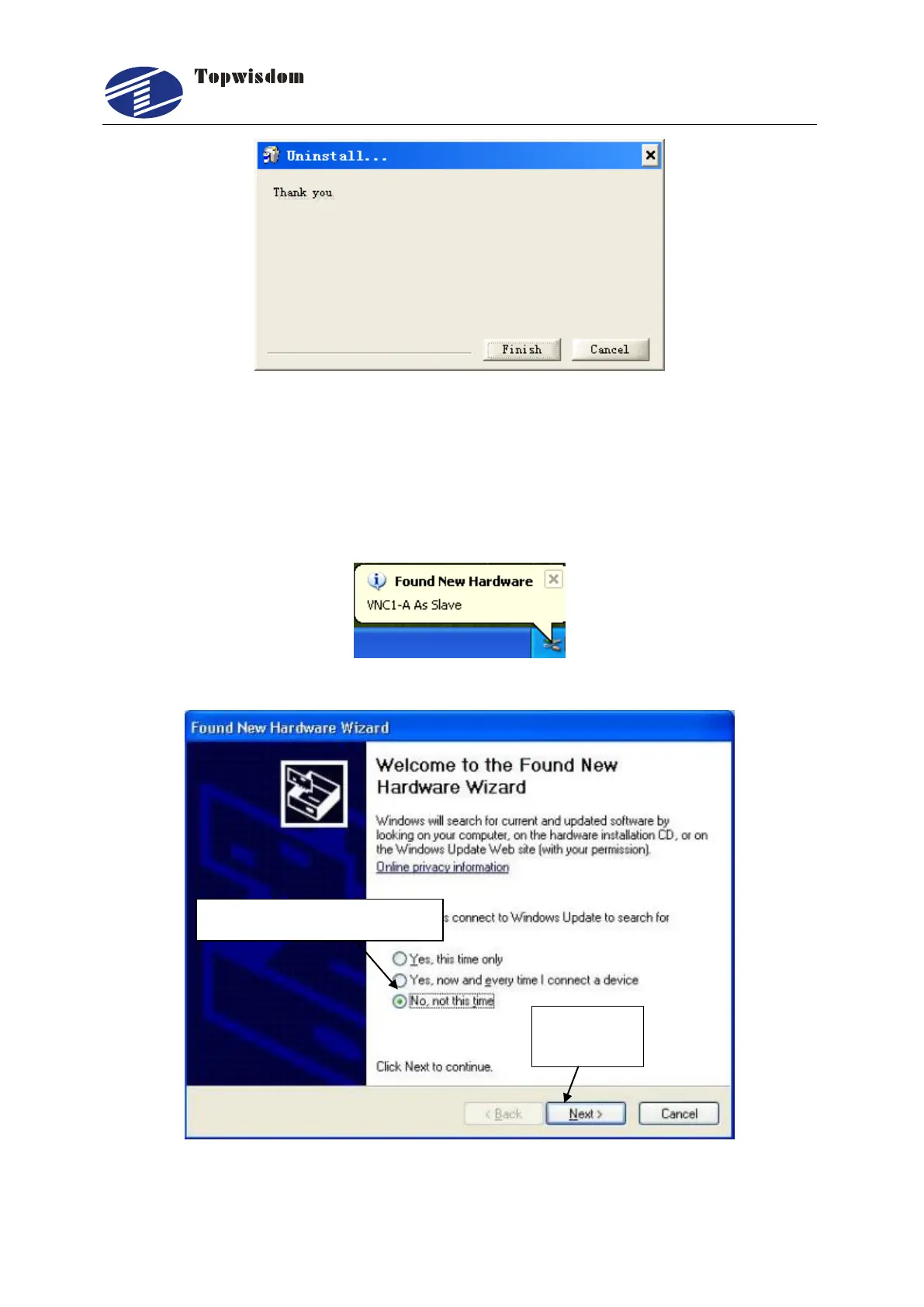
Insert the USB
Cable, the
power
on, Fig. 3-14
will be show
n on th
e Compute,
and then
the Fig. 3-15 will be shown:
Fig. 3-
14
Fig. 3-
15
Select
―
No, not this time
‖
Click the
"Next"
30
32
Table of Contents
Main Page
Table of Contents
3
Part 1 Overview
7
System Overview
7
Notes and Warning
7
Work Environment
8
Power Supply and Grounding
8
Power Supply Requirements
8
Grounding Requirements
8
Accessory List
9
Part 2 Wiring Installation Instruction
11
System Wiring Diagram
11
Installation Dimension
12
Panel
12
Mainboard
13
Wiring Instruction
15
Interface Broad
15
Wiring Diagram
15
Interface Instruction
19
Power Signal
19
U-DISK Port
19
PC Connection Port
19
Output
20
Laser Power Interface
21
Input
22
Input Signal Diagram
24
Part 3 Software Installation
25
Installing Coreldraw Direct Output
25
Manual Install
26
Auto Install
27
Uninstalling Coreldraw Direct Output
28
Installing CAD Direct Output
28
Uninstalling CAD Direct Output
30
USB Driver Installation
31
USB Port Setting
34
View the Assigned COM Port by Computer
34
Change the Assigned COM Port by Computer
37
Part 4 Software Operation Guide
39
Coreldraw Direct Output Software Operation
39
Layer Parameter Setting
40
Coordinate Setting
44
Track Setting
45
Single Axis Operation
46
Output Engrave
47
The Equipment Management
51
Toolbar
52
Parameter Setting
52
Embroidery Import
57
Import Bitmap
58
Curve Precision
59
CAD Direct Output Software Operation
59
CAD Direct Output Software Supplementary Description
60
The Support of Autocad Direct Output Annotation Text
60
Carving Gradient Sketch Map
62
Coordinate System
62
Supplementary Description of Carving
63
Supplementary Description of Software and CAD Direct Output
64
Part 5 the Operation Panel
68
The Panel Operation and Buttons Function Introduction
68
The Panel
68
Buttons Function Introduction
68
The Main Interface Introduction
71
Power Interface
71
Standby Interface
71
Speed Setting Interface
72
Power Light Intensity Interface
73
Range Preview Interface
74
Single Axis Movement Interface
75
File Selection Interface
75
U Disk File Interface
76
The Main Menu Setting
77
File Setting
78
The Integrate Settings
79
Laser Set
79
Equipment Set
80
Axis Set
83
Back Set
85
User Set
87
System Information
89
The Password Setting
91
System Test
92
Part 6 the Frequently Asked Question Help
93
Power-On Reset Question
93
The Laser Light Question
94
The PC Connection Question
94
The Reading and Writing of U Disk Question
95



 To Next Page