6. SYSTEM VALIDATION
ConnecttheUSBcablefromtheATCcontrollertothemill’scontrolcomputer.Startthecontrolsowareusingthe
PCNC1100-ATCicononthedesktop.Whenthesystemcomesup,itshouldndtheATCautomacallyontheUSBports
andcongureitself.YoushouldseeaconrmaonmessageonthemainMachscreenmessagelinethatdisplaysthe
sowareversion:
“ATCStartup–inialized”
AnswerYEStoscreenpromptsrequesngit’s“okaytoresetandreferencez”.WhenusingtheATC,thesepromptsalways
occuratstartup.Ingeneral,youshouldalwaysreferenceZimmediately.Thetoolchangerwillpromptduringexecuonif
youskipitnow.
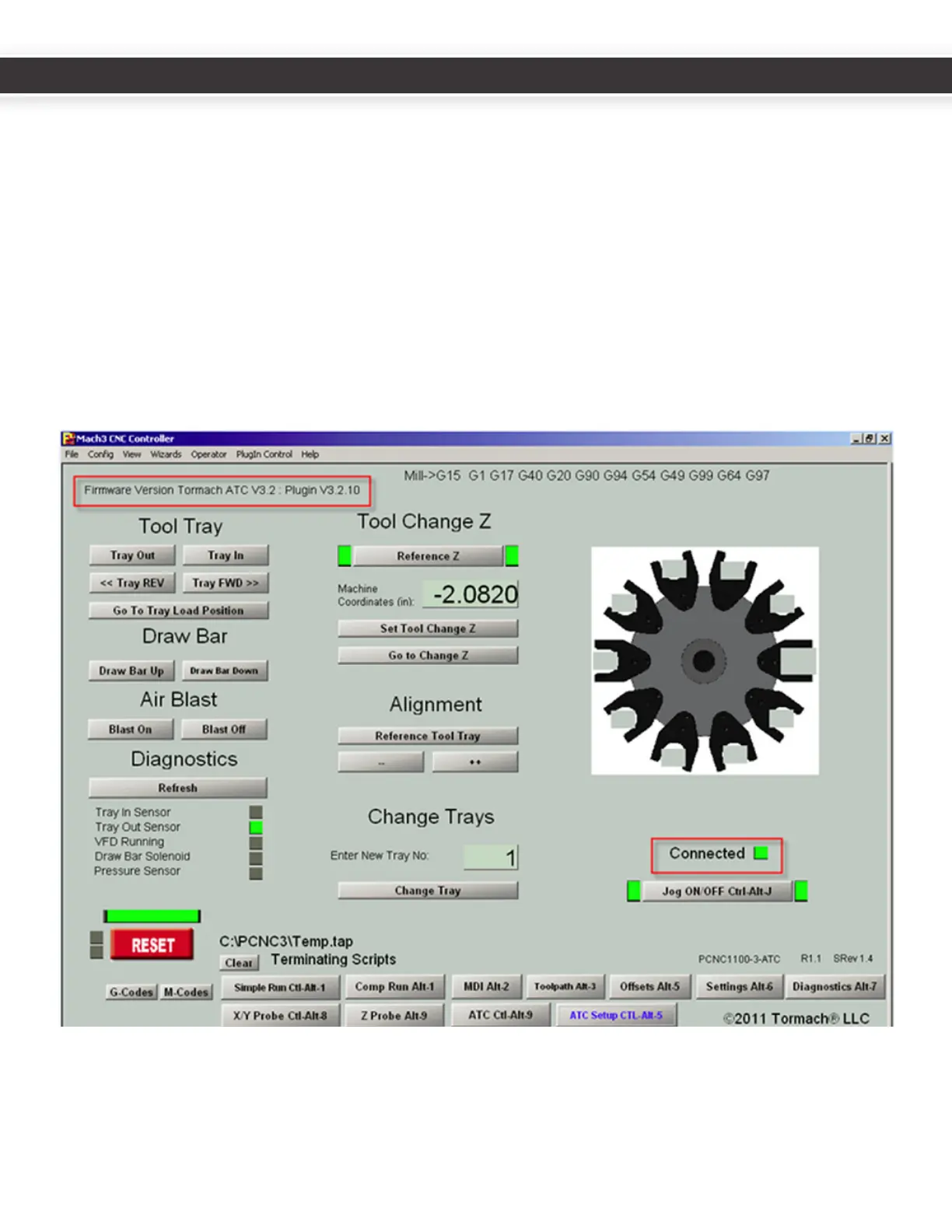
ClickontheATCSetupbuononthelowerporonofthescreen.Notethattheupperlecornerdisplaysthermware
andpluginversions.ThegreenCONNECTEDlightshouldbeglowingtoindicateUSBcommunicaonisestablished.This
veriesthesowareinstallaonandtheUSBconnecon.
14
15
UM10081_TTS_ATC_PCNC1100_1013A UM10081_TTS_ATC_PCNC1100_1013A



 To Next Page