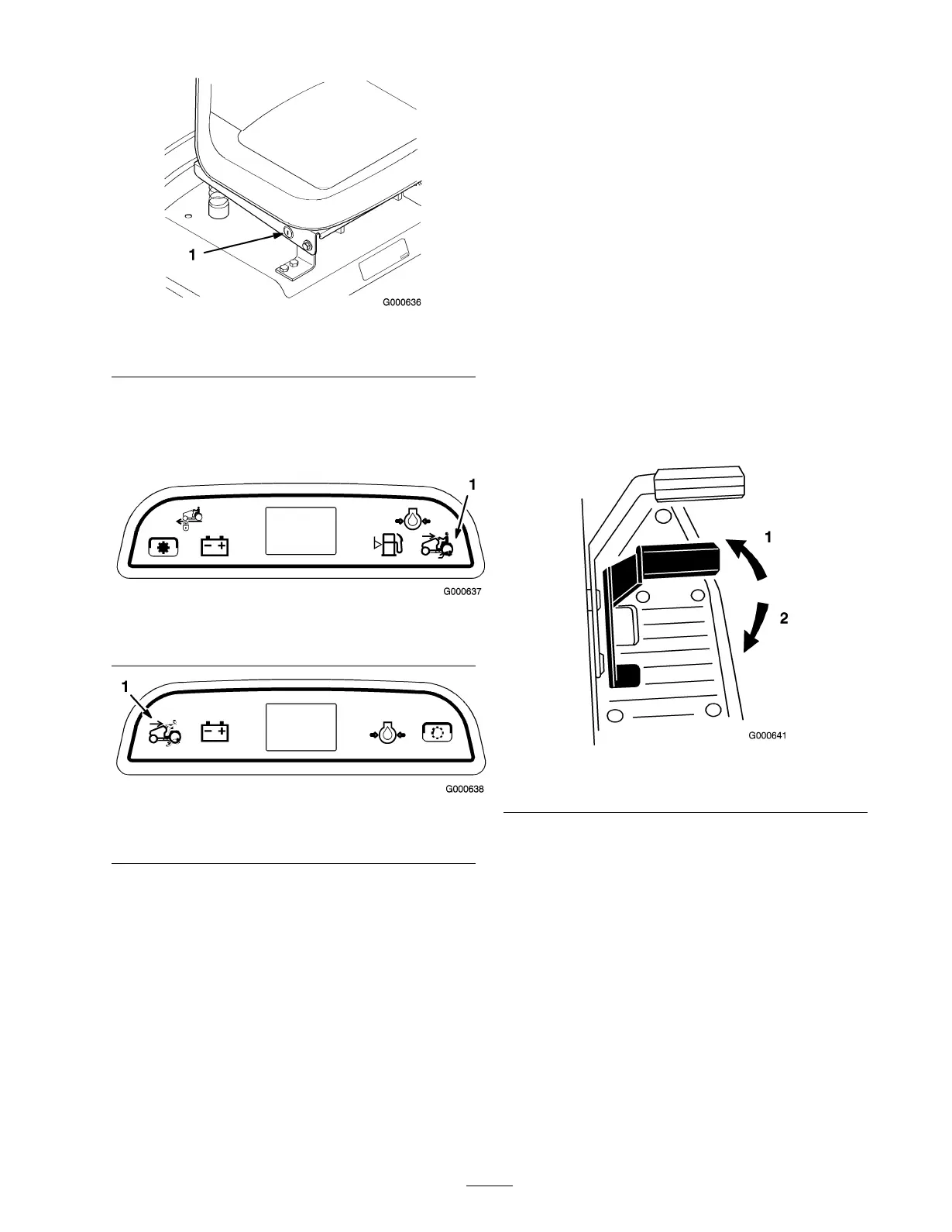
Figure 18
1. KeyChoice® switch
3. T ur n the K eyChoice® k ey .
A red light on the front console ( Figure 19 and
Figure 20 ) tur ns on, indicating that the interloc k
is disabled.
Figure 19
1. Operating-in-reverse light-Model 72202
Figure 20
1. Operating-in-reverse light-Model 72201
4. Shift into rev erse and complete y our task.
5. Stop the PTO , whic h will tur n off the red light on
the console , to acti v ate the interloc k.
6. R emo v e the K eyChoice® k ey and put it in a safe
place out of reac h of c hildren.
Driving Forward or
Backward
T he throttle control regulates the engine speed as
measured in RPM (rev olutions per min ute). Place
the throttle control in the fast position for best
perfor mance .
T o g o forw ard or bac kw ard, release the parking
brak e: refer to R eleasing the P arking Brak e in
Brak e Maintenance , pag e 37 . Place y our foot on the
traction control pedal and slo wly press on the top of
the traction control pedal to mo v e forw ard or on the
bottom of the traction control pedal to mo v e bac kw ard
( Figure 21 ). T he far ther y ou mo v e the traction control
pedal in either direction, the faster the mac hine will
mo v e in that direction.
Note: F or rev erse motion, with the PTO eng ag ed,
the operating-in-rev erse interloc k m ust be deacti v ated
b y the K eyChoice® switc h located on the seat brac k et
on the right hand side just belo w the seat.
T o slo w do wn, release the pressure on the traction
control pedal.
Important: T o a v oid transmission dama ge,
al w ays r elease the par king brak e bef or e mo ving
the traction contr ol pedal.
Figure 21
1. Forward 2. Backward
Stopping the Machine
T o stop the mac hine , release the traction control
pedal, diseng ag e the po w er tak e off (PTO), and tur n
the ignition k ey to off . Also set the parking brak e if
y ou lea v e the mac hine unattended; refer to Setting
the P arking Brak e in Brak e Maintenance , pag e 37 .
R emember to remo v e the k ey from the ignition switc h.
23


 To Next Page