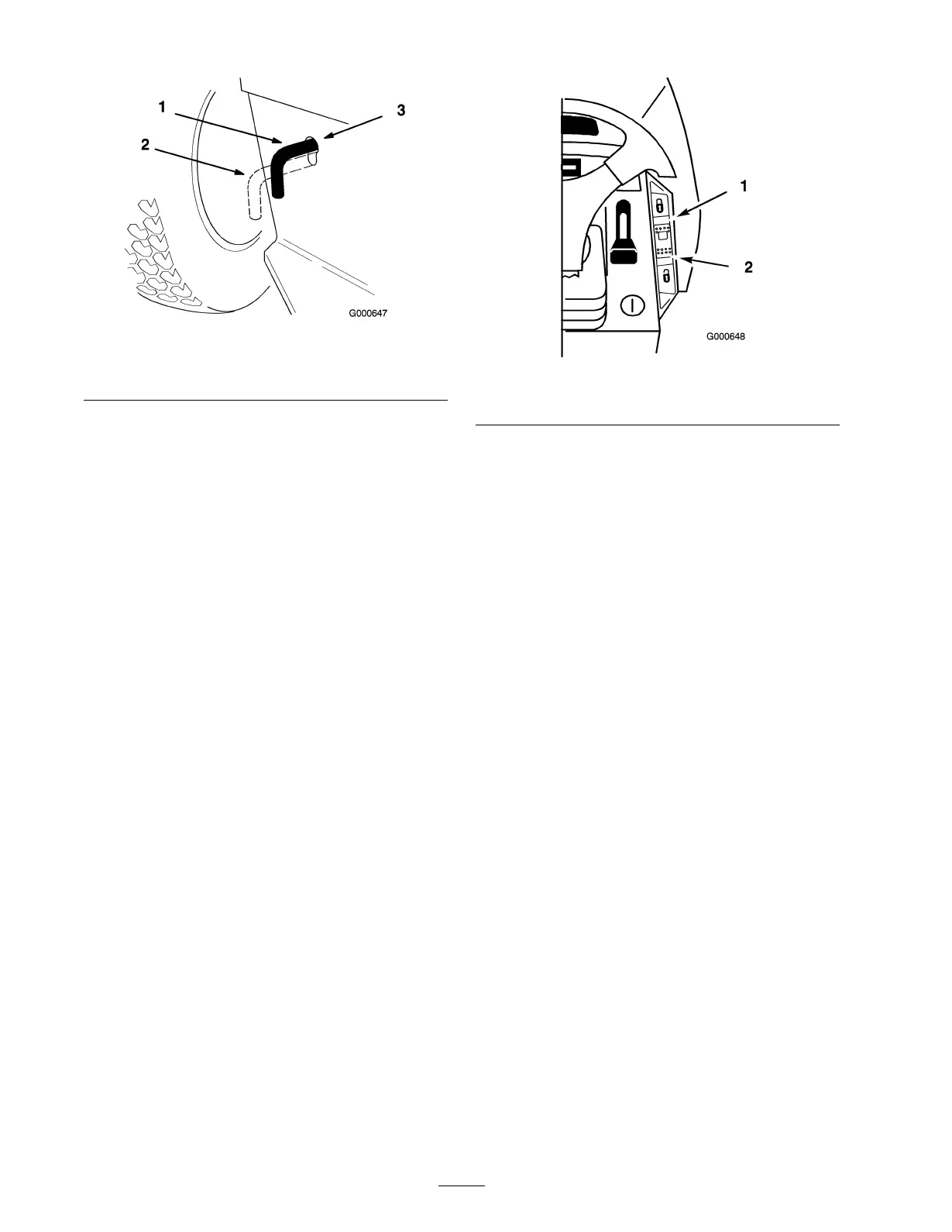
Figure 27
1. Operate position
3. Drive control rod
2. Push position
Using the Cruise Control
A three position switc h, located on the dash
( Figure 28 ), with the functions of: Loc k-Set (spring
loaded), On and Unloc k-Off controls the eng ag ement.
Cr uise control maintains the traction control position
without foot pressure . Cr uise control is intended for
operation in the forw ard direction only . Do not use
cr uise control in rev erse .
Engaging the Cruise Control
1. Begin dri ving tractor : R efer to Dri ving F orw ard or
Bac kw ard in Operation Operation , pag e 19 . W hile
holding y our foot steady on the traction control,
push the cr uise control switc h ( Figure 28 ) to the
loc k-set position.
Figure 28
1. Lock-Set 2. Unlock-Off
2. T his loc ks the traction control in position and y our
foot can then be remo v ed from the traction control.
A constant g round speed will be maintained.
Disengaging the Cruise Control
1. W hile holding y our foot steady on the traction
control, mo v e the cr uise control switc h ( Figure 28 )
to the unloc k-off position.
2. T his unloc ks the traction control and y our foot
then operates the traction control.
3. F or quic k stops , just press on the brak e pedal. T his
automatically diseng ag es the cr uise control and
applies the brak e at the same time .
26


 To Next Page