17
Getting started
Setting the programmes
Note: When Parental Block is activated, the 4-digit
password is needed.
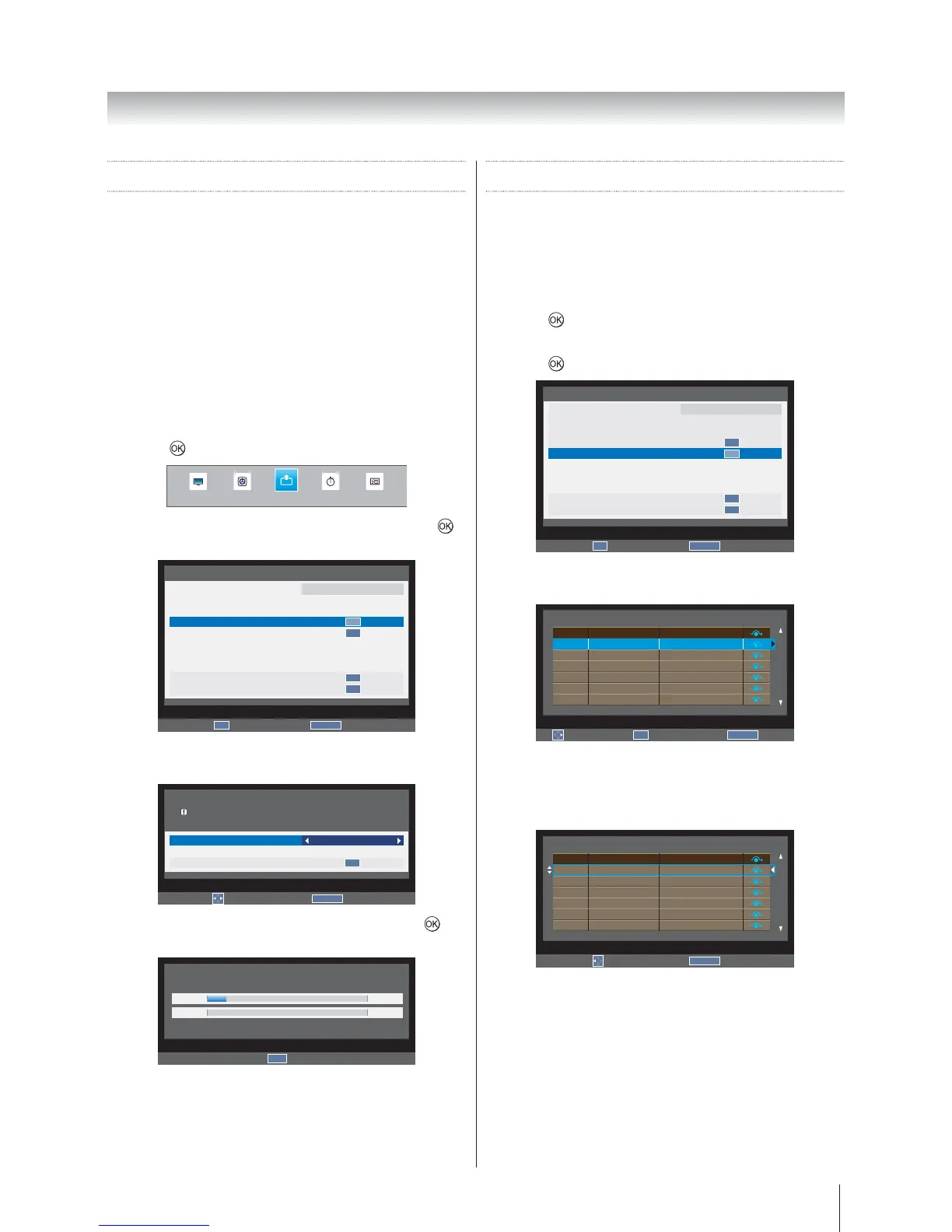
Auto Tuning
The Auto tuning function will completely re-tune the
television and can be used to update the channel list.
Note: It is recommended that Auto tuning is run
periodically to ensure that all new services are added.
Note: All the current channels and settings, for example,
the locked channels, will be lost.
1. Press MENUSETUP and
press
to enter the submenu.
SOUND APPLICATIONS PREFERENCESPICTURE
SETUP
2. Auto tuning, and press
to enter the submenu.
RETURN
Back
SETUP 1/2
Language
Country
Tuner Mode
Auto tuning
ATV Manual Tuning
DTV Manual Tuning
DTV Settings
AV connection
Picture Position
Quick Setup
English
Australia
Antenna
OK
OK
OK
OK
OK
Enter
3.
ATV, DTV or ATV and DTV.
RETURN
Back
Auto tuning
Tuning Mode
Start Scan
DTV
OK
Previous settings will be lost !
Press EXIT for no change.
Edit
4. Start Scan and press to
start Auto Tuning.
Auto tuning (DTV)
6 %
Channel: 33
0
Progress Found
EXIT
Stop
Manual Tuning
ATV Manual Tuning
There are two TV modes: ATV and DTV that can be
tuned-in manually using Manual Tuning.
1. Press MENUSETUP and
press
to enter the submenu.
2. ATV Manual Tuning and
press
to enter the submenu.
RETURN
Back
SETUP 1/2
Language
Country
Tuner Mode
Auto tuning
ATV Manual Tuning
DTV Manual Tuning
DTV Settings
AV connection
Picture Position
Quick Setup
English
Australia
Antenna
OK
OK
OK
OK
OK
Enter
3.
ATV Manual Tuning
Sort
OK
Enter
RETURN
Back
Position
1
2
3
4
5
6
Channel
C69
C69
C69
C69
C69
C69
Station
−−−−−
−−−−−
−−−−−
−−−−−
−−−−−
−−−−−
4.
preferred position. As you do so the other stations
will move to make room.
ATV Manual Tuning
Store
RETURN
Back
Position
1
2
3
4
5
6
Channel
C69
C69
C69
C69
C69
C69
Station
−−−−−
−−−−−
−−−−−
−−−−−
−−−−−
−−−−−








 To Next Page