47
Connecting your TV
Connecting a computer
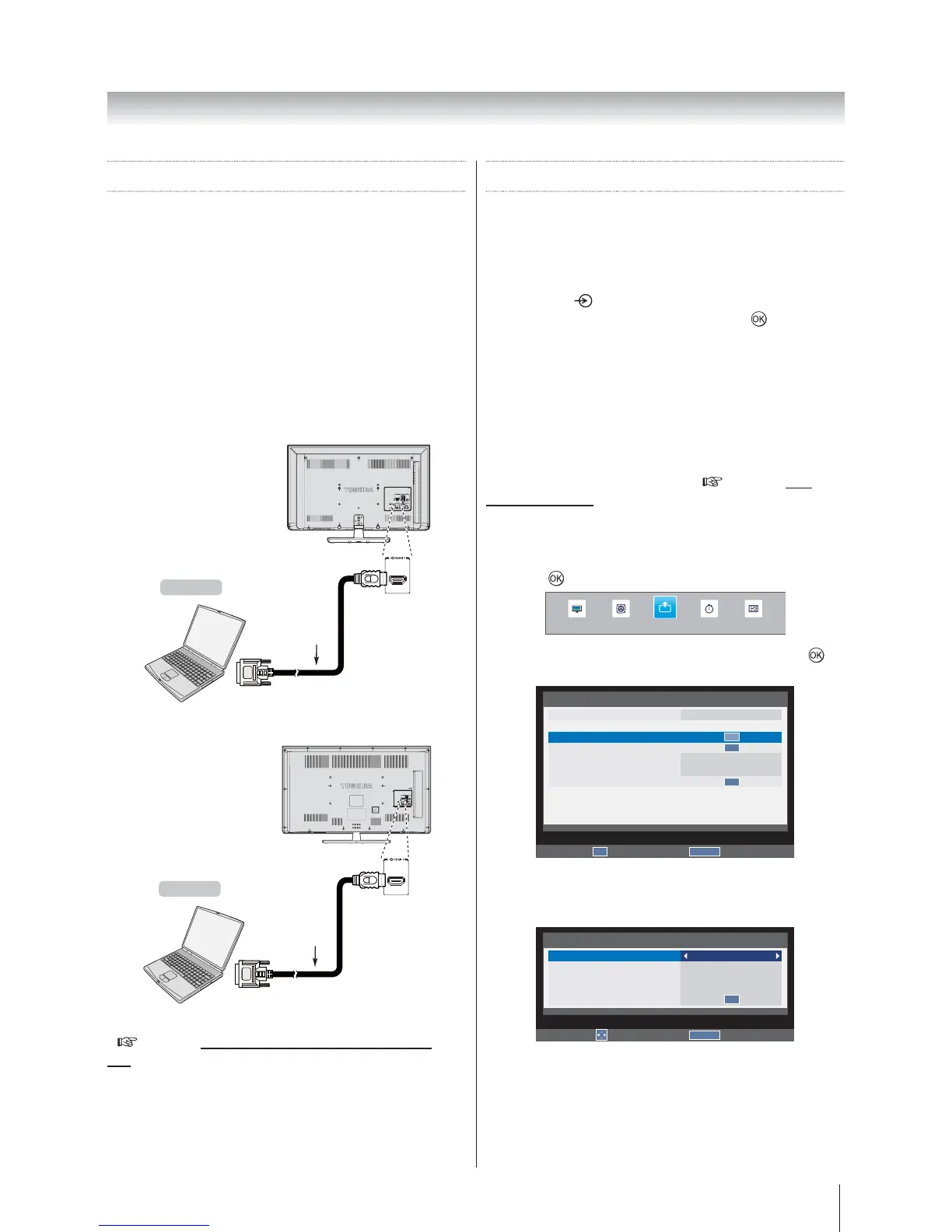
With either an RGB/PC or an HDMI connection, you can
watch your computer’s display on the television.
To connect a PC to the HDMI
terminal
When connecting a PC to the HDMI terminal on the
television, use an HDMI-to-DVI cable.
If connecting a PC with an HDMI terminal, use an HDMI
cable (type A connector). A separate analogue cable is
not necessary.
32W2300A | 39L2300A
the back of your television
HDMI-to-DVI
adapter cable
(not supplied)
2
Computer
50L2300A
the back of your television
HDMI-to-DVI
adapter cable
(not supplied)
2
Computer
For acceptable PC and video signal formats
(
page 49 Accepted PC signals through HDMI termi-
nals)
Note:
The edges of the images may be hidden.
If connecting a certain PC model with a unique PC
signal, the PC signal may not be detected correctly.
Using the PC setting
Most of the picture controls and functions are
available. However features not available will be
greyed out.
In the PC input mode, the Manual Setting is not
displayed.
First press
until the video input mode list appears
in order to
select the PC input mode.
This function may not be available for some signal or
if no signal is received.
The optimum points of the clock phase and sampling
clock adjustments may be incomprehensible
according to the input signals.
Horizontal and Vertical Position
Connect the PC (as shown in the page 47 Con-
necting a computer) and ensure that a picture is showing
on the television screen. The picture position may now
be adjusted to suit personal preference.
1. Press MENUSETUP and
press
to enter the submenu.
SOUND APPLICATIONS PREFERENCESPICTURE
SETUP
2. PC Setting, and press to
enter the submenu.
RETURN
Back
SETUP
Language
Country
PC Setting
Auto Adjust
Automatic Power Down
Location
Software Upgrade
English
Australia
4h
Home
OK
OK
OK
Enter
OK
3. Horizontal position or
Vertical position
settings as required.
RETURN
Back
PC Setting
Horizontal position
Vertical position
Horizontal width
Clock phase
Reset
0
0
0
0
OK
Edit








 To Next Page