46
Connecting your TV
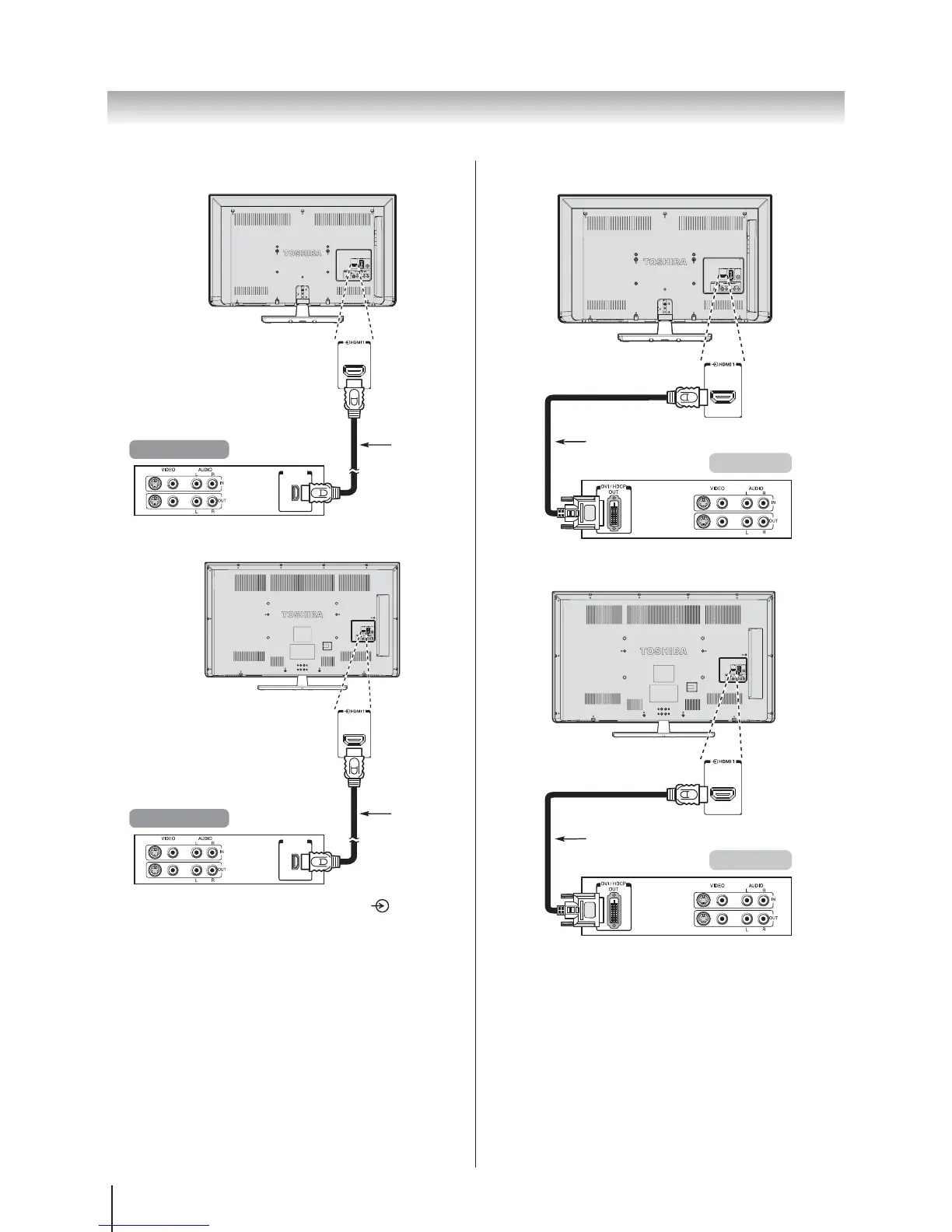
32W2300A | 39L2300A
HDMI
cable
(not supplied)
HDMI device
HDMI out
50L2300A
HDMI out
HDMI
cable
(not supplied)
HDMI device
To view the HDMI device video, press the button to
select HDMI 1 or HDMI 2 mode.
To connect a DVI device
Connect an HDMI-to-DVI adapter cable (HDMI type A
connector) to the HDMI 1.
The maximum recommended HDMT – DVI cable
length is 6.6ft (2m).
An HDMI-to-DVI adapter cable transfers video only.
Separate analogue audio connection are not
supported for audio receivers.
32W2300A | 39L2300A
DVI device
HDMI-to-DVI adapter cable
(not supplied)
50L2300A
DVI device
HDMI-to-DVI adapter cable
(not supplied)
To ensure that the HDMI or DVI device is reset properly,
it is recommended that you follow these procedures:
When turning on your electronic components, turn
on the television first, and then the HDMI or DVI
device.
When turning off your electronic components,
turn off the HDMI or DVI device first, and then the
television.
Note: HDMI, the HDMI Logo, and High-Definition
Multimedia Interface are trademarks or registered
trademarks of HDMI Licensing LLC in the United States
and other countries.








 To Next Page