19
Getting started
Re-number
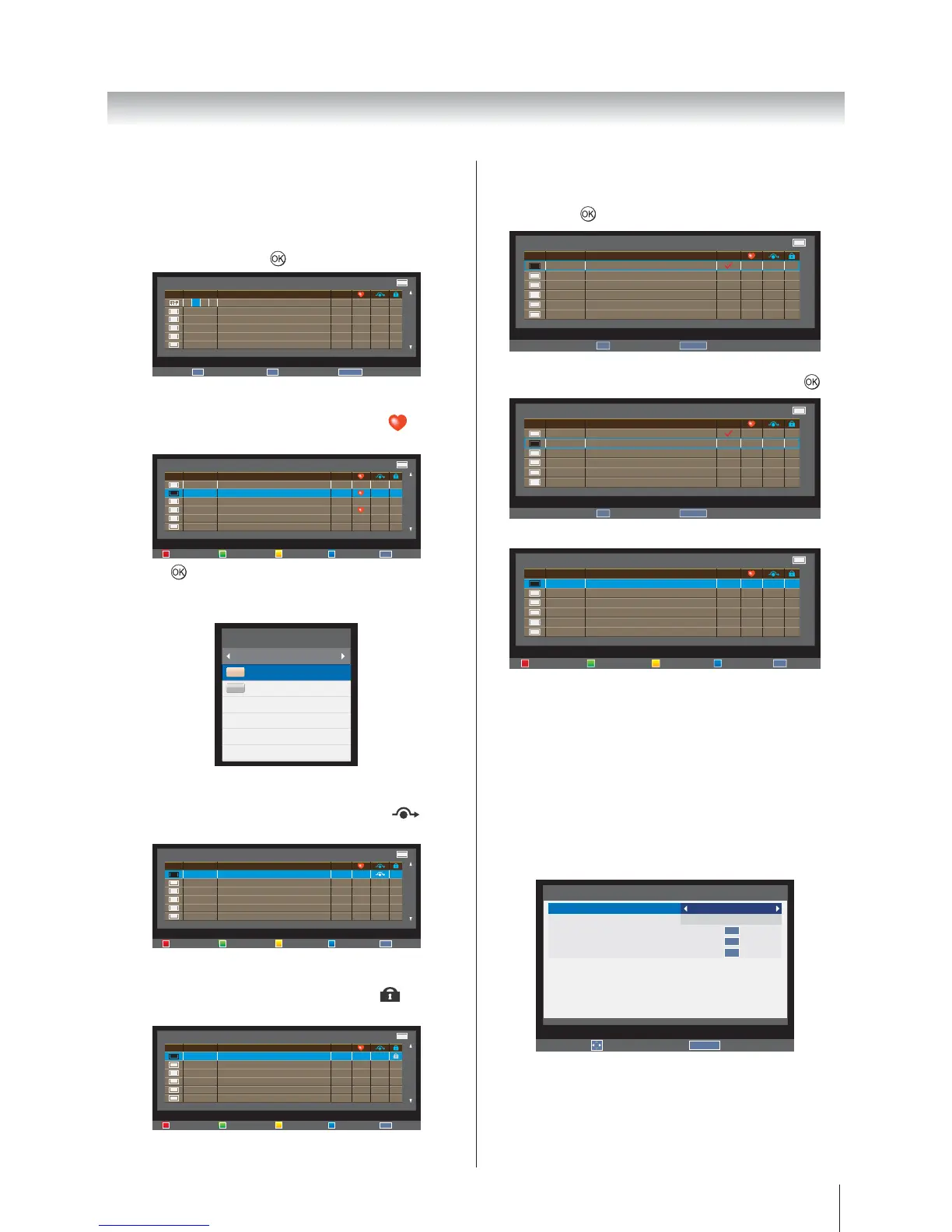
5. Press the red button on the remote to renumber the
highlighted channel.
6. Edit the channel number using the number keys on
the remote and press
.
Channels TV
Position
2
21
22
23
24
Name
ABC Jazz
ABC1
ABC1
ABC2
ABC3
ABC4
OK
Enter
RETURN
Back
0−9
Input
8 − − −
Favorite
7. Press the green button on the remote. A icon
appears.
Channels TV
Position
803
804
805
806
807
273
Name
Rossia 1
Rossia 24
NTV
TRK 5 kamal
Bibigon
Service Information Radio Three
Re−number Favorite Skip Lock
OK
Sort
Press to show the Channel List
Favorite. The desired channel is displayed on
the list.
Channel List
Favorite
804 Rossia 24
806 TRK 5 kamal
DTV
DTV
Skip
8. Press the yellow button on the remote. A icon
appears.
Channels TV
Position
803
804
805
806
807
273
Name
Rossia 1
Rossia 24
NTV
TRK 5 kamal
Bibigon
Service Information Radio Three
Re−number Favorite Skip Lock
OK
Sort
Lock
9. Press the blue button on the remote. A icon
appears.
Channels TV
Position
803
804
805
806
807
273
Name
Rossia 1
Rossia 24
NTV
TRK 5 kamal
Bibigon
Service Information Radio Three
Re−number Favorite Skip Lock
OK
Sort
Sort
10.
then press
. A tick icon appears.
OK
Store
RETURN
Back
Channels TV
Position
803
804
805
806
807
273
Name
Rossia 1
Rossia 24
NTV
TRK 5 kamal
Bibigon
Service Information Radio Three
with the one selected in Step 8 and then press
.
OK
Store
RETURN
Back
Channels TV
Position
803
804
805
806
807
273
Name
Rossia 1
Rossia 24
NTV
TRK 5 kamal
Bibigon
Service Information Radio Three
The names of the two channels are swapped.
Channels TV
Position
804
805
806
807
273
274
Name
Rossia 1
NTV
TRK 5 kamal
Bibigon
Service Information Radio Three
CNN CO/B EIT text
Re−number Favorite Skip Lock
OK
Sort
Automatic Power Down
The TV will automatically turn itself off (standby) within
4 hours, if you do not touch the control buttons on the
remote control or on the TV control panel. It will also
automatically turn off if no input signal is detected after
approximately 15 minutes.
1. In the SETUP
Automatic Power Down.
2. Off, 4h, 6h or 8h.
Edit
RETURN
Back
SETUP 2/2
Automatic Power Down
Location
Software Upgrade
System Information
Reset TV
4h
Home
OK
OK
OK








 To Next Page