3. OPTIONAL KIT EO10-33016A
3.4 Wireless LAN Board: B-SA704-WLAN-QM
3- 6
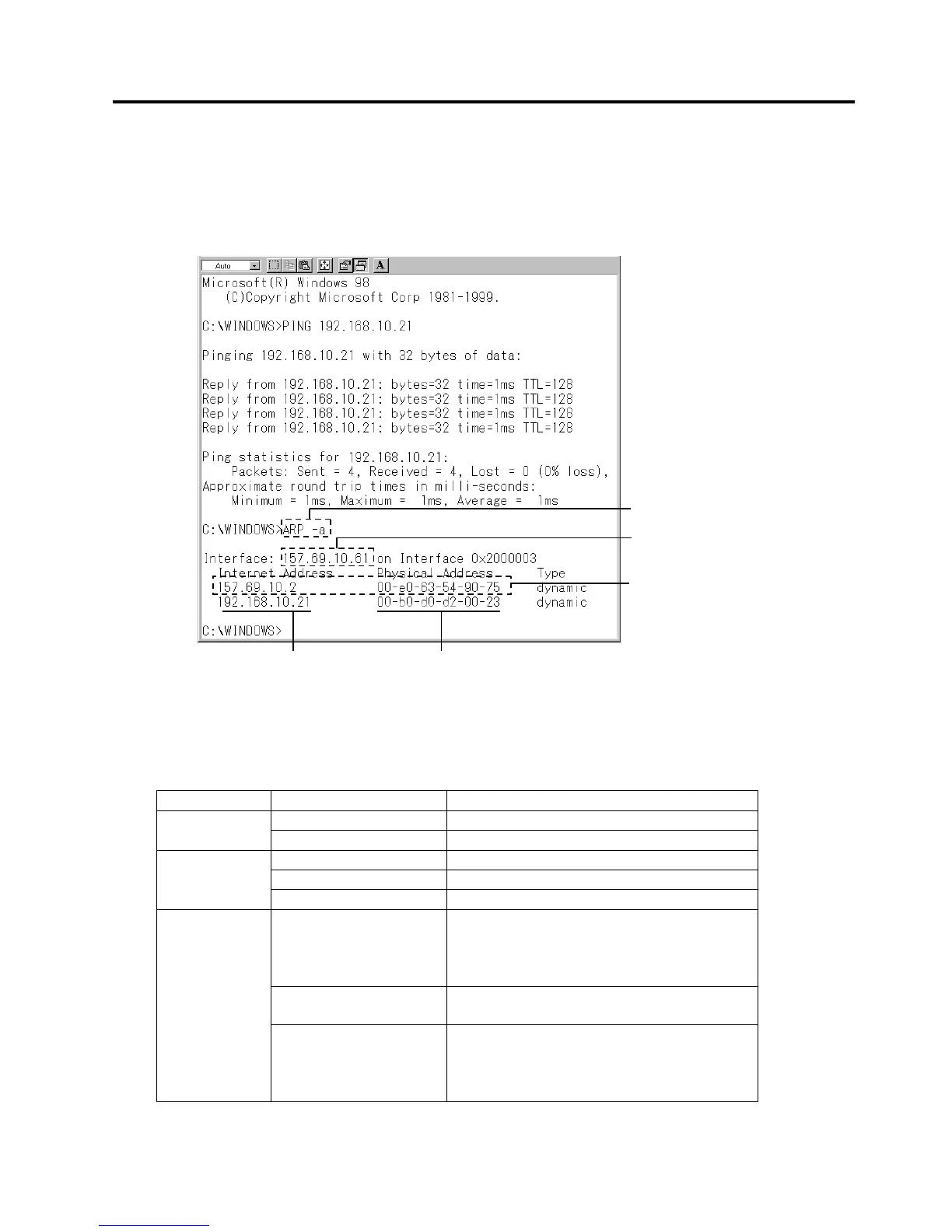
NOTE: MAC address can be checked by using “arp -a” command on MS-DOS Prompt.
<Example>
The following screen shows an example of executing an arp –a command on MS-DOS Prompt.
After wireless LAN board (default IP address: 192.168.10.21) is pinged, IP address and MAC address
are displayed.
NOTE: As obtained IP address and MAC address are stored in the cache of the host for a certain period of
time, other device’s address may be displayed.
LED
<Operation>
LED Status LAN status
ON Communicating LED1 (Red)
Blink Starting
ON Wired LAN is connected.
Blink Communicating with the printer
LED 2
(Orange)
OFF Disconnected from the printer.
ON In case of station mode:
Log in the access point.
In case of access point mode:
User unit is log in.
Blink Communicating with a device connected
via wireless LAN.
LED 3
(Orange)
OFF In case of station mode:
Log out from the access point.
In case of access point mode:
User unit is log out.
ARP –a command



 To Next Page
 Loading...









