6 Installation and Operation Guide
PolyVision
®
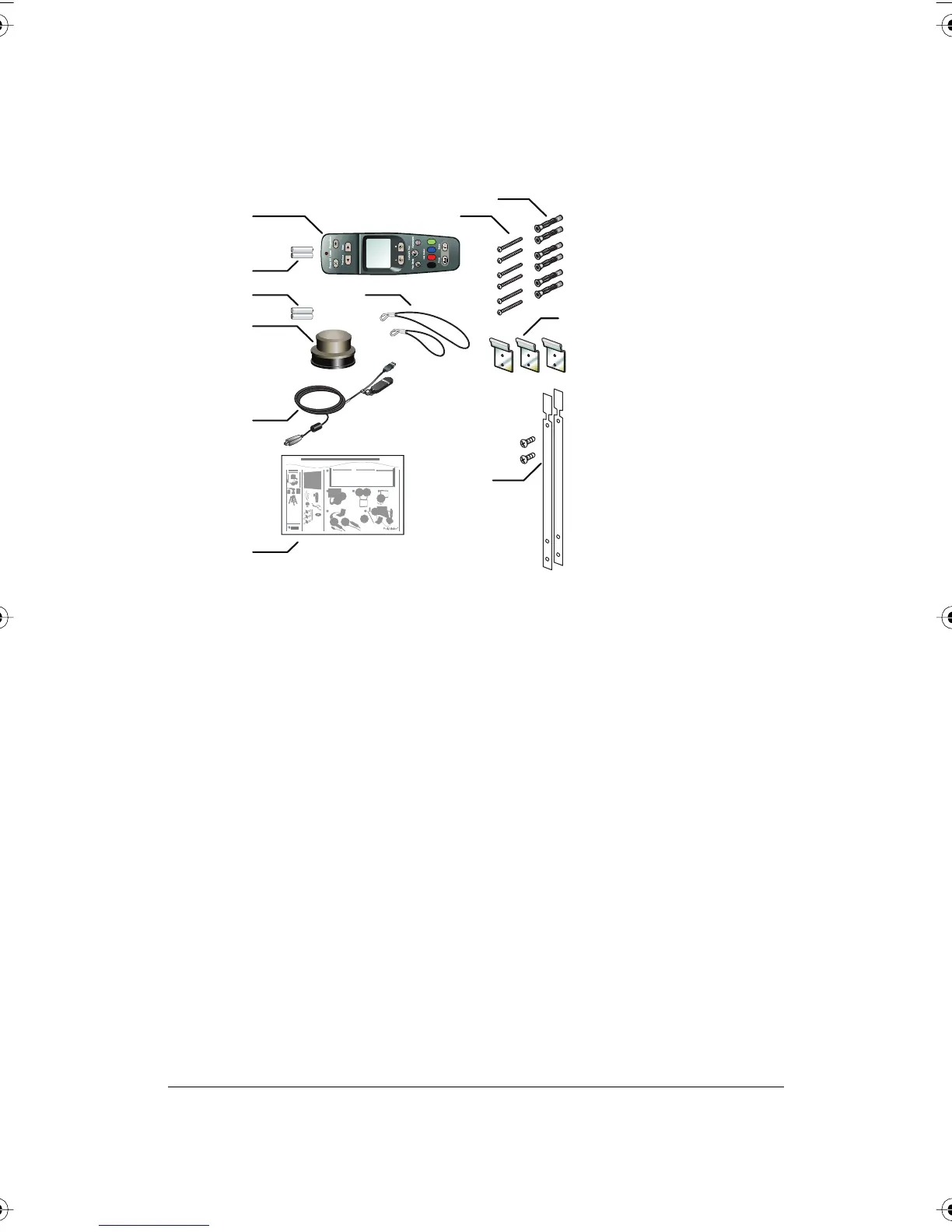
What Comes in the Box
1 remote control
2 remote control batteries (AAA)
3 eraser batteries (AAA)
4 eraser
5 USB cable with PolyKey for driver installation
6 Installation Quick Start
7 two remote control lanyards: one wrist-sized, one neck-sized
8 six (16xx models) or eight (18xx models) screws
9 six (16xx models) or eight (18xx models) sheet rock anchors
10 three (16xx models) or four (18xx models) wall brackets
11 two safety straps and screws
Preparing to Mount the Whiteboard
These instructions guide you through installing your interactive whiteboard
on a sheetrock wall. If your wall material is some other substance, such as
concrete or brick, use these instructions as a guideline but install
appropriate anchors to secure the unit to the wall.
1 8
11
10
9
2
3
7
4
5
6
Quickstart Installation Guide
3/8"
#2
I
n
s
t
a
nt
P
l
u
g
a
nd
P
l
a
y
T
e
chn
o
l
o
g
y
P
o
ly
K
e
y
T
M
18XX
16XX
14XX
1
4 32
5
6
ab
PolyVision I&O.book Page 6 Thursday, October 16, 2008 4:18 PM



 To Next Page