76
1-3. Theft deterrent system
RUSH_OM_General_OMBZ265
Do one of the following to stop the alarm:
● Press the lock or unlock button of the wireless remote control.
● Press the lock/unlock switch on the front door while carrying the
electronic key with you.
● Press the lock button on the back door while carrying the electronic
key with you (when opening the driver’s door).
● Press the back door opener switch on the back door while carrying
the electronic key with you (when closing the driver’s door).
● Get in the car with the electronic key.
● Turn the engine switch to IGNITION ON mode, or start the engine.
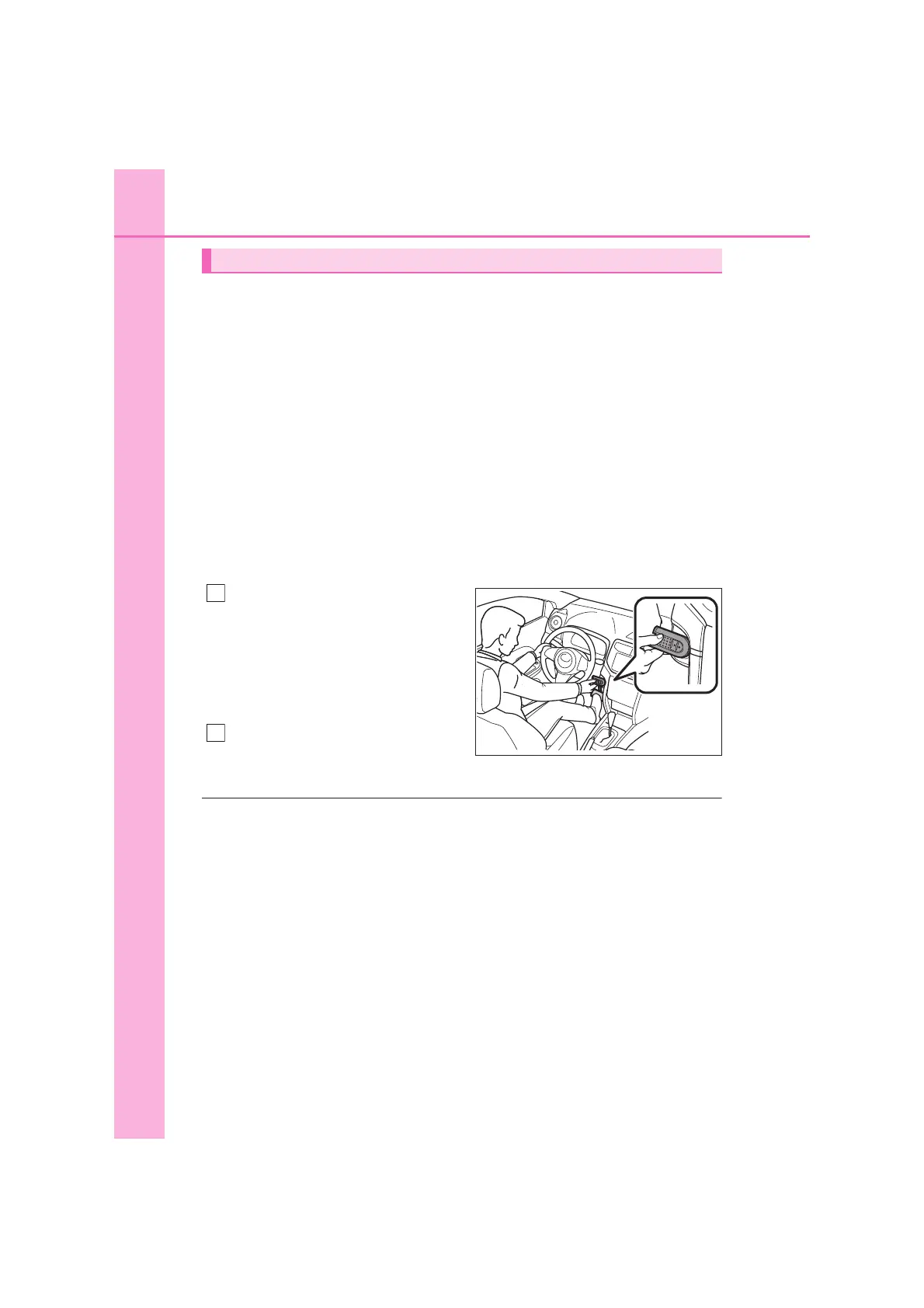
■ If the electronic key does not operate properly
If the electronic key does not work due to battery depletion, etc., per-
form the following operation.
Vehicles with an automatic
transmission:
Depress the brake pedal.
Vehicles with a manual trans-
mission:
Depress the clutch pedal.
Touch the brand logo mark side
of the electronic key to the
engine switch.
■ System maintenance
The vehicle has a maintenance-free type alarm system.
■ Items to check before locking the vehicle
To prevent unexpected triggering of the alarm and vehicle theft, make sure of
the following:
● Nobody is in the vehicle.
● The windows are closed before the alarm is set.
● No valuables or other personal items are left in the vehicle.
Stopping the alarm
KBTE821002E
1
2



 To Next Page