50
Chapter 4
Configure the Router in Wireless Router Mode
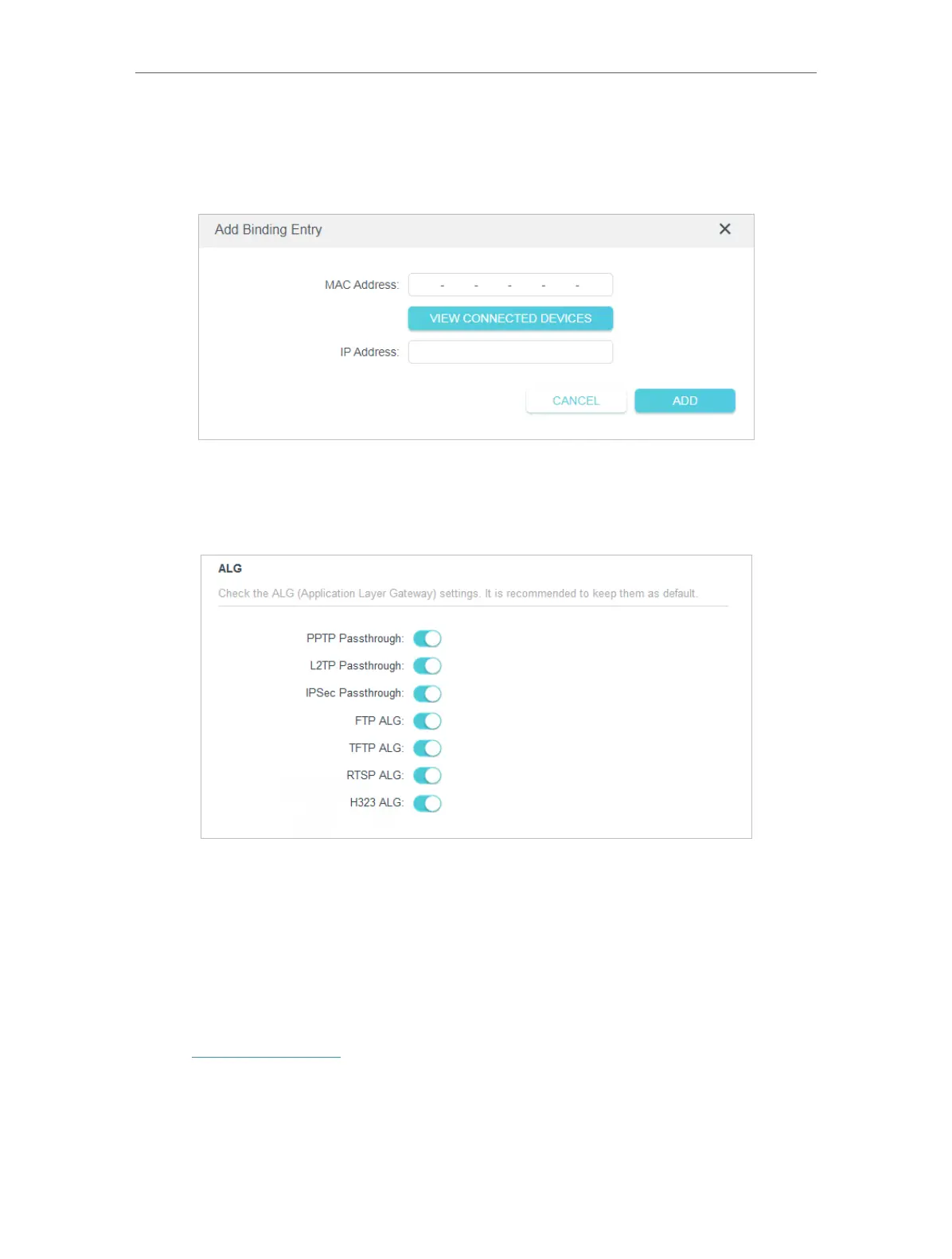
2 ) Click VIEW CONNECTED DEVICES and select the device you want to bind. Or
enter the MAC Address and IP Address that you want to bind.
3 ) Click ADD.
4. 8. ALG (Application Layer Gateway)
View your ALG (Application Layer Gateway) settings in this page. It is recommended to
keep them as default.
4. 9. IPv6
This function allows you to enable IPv6 function and set up the parameters of the
router’s Wide Area Network (WAN) and Local Area Network (LAN).
4. 9. 1. IPv6 Status
1. Visit http://tplinkwifi.net, and log in with the password you set for the router.
2. Go to Advanced > IPv6, and you can view the current IPv6 status information of the
router.
3. Enable IPv6 and select the mode: Router or Pass-Through (Bridge).













 To Next Page