6.0 Using the ProtoTRAK KMX as a DRO
The ProtoTRAK KMX operates in DRO Mode as a sophisticated digital readout with jog
and power feed capability.
6.1 Enter DRO Mode
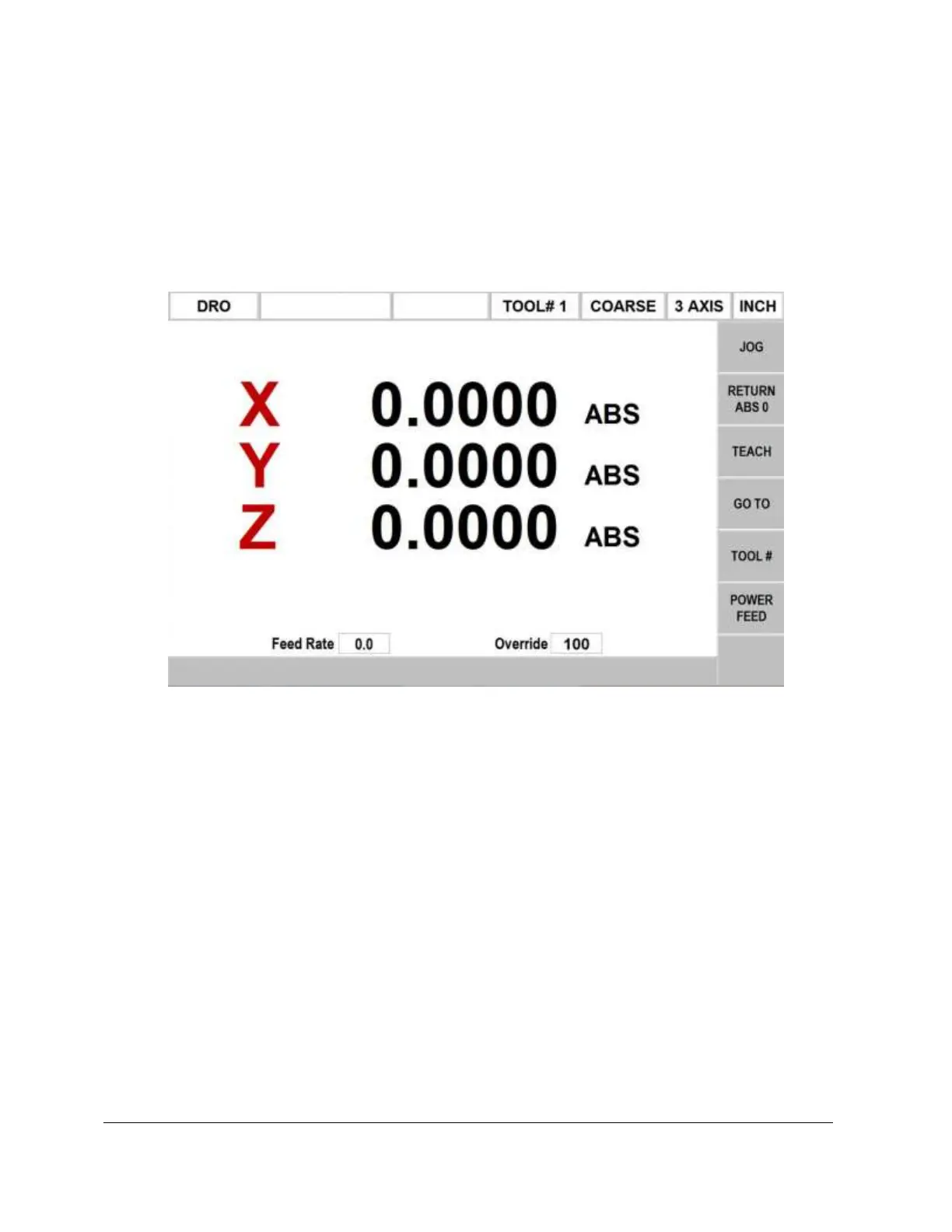
Press MODE, select DRO soft key. The screen will look as follows on the 3 axis model.
Note: the RETURN soft key is lit when in Jog.
6.2 DRO Functions
• Clear Entry: Press RSTR, then re-enter all keys.
• Reset One Axis: Press X or Y or Z, INC SET. This zeros the incremental
position in the selected axis.
• Preset: Press X or Y or Z, numeric data, INC SET to preset selected axis.
• Reset Absolute Reference: Press X or Y or Z, ABS SET to set selected axis
absolute to zero at the current position.
Note: This will also reset the incremental dimension if the absolute position is being
displayed when it is reset.
• Preset Absolute Reference: Press X or Y or Z, numeric data, ABS SET to set the
selected axis absolute to a preset location for the current machine position.
Note: This will also reset the incremental dimension if the absolute position is being
displayed when it is preset.


 To Next Page