TRAK KMX Knee Mill, Bed Mill & ProtoTRAK KMX CNC Retrofit Safety, Programming, Operating & Care Manual
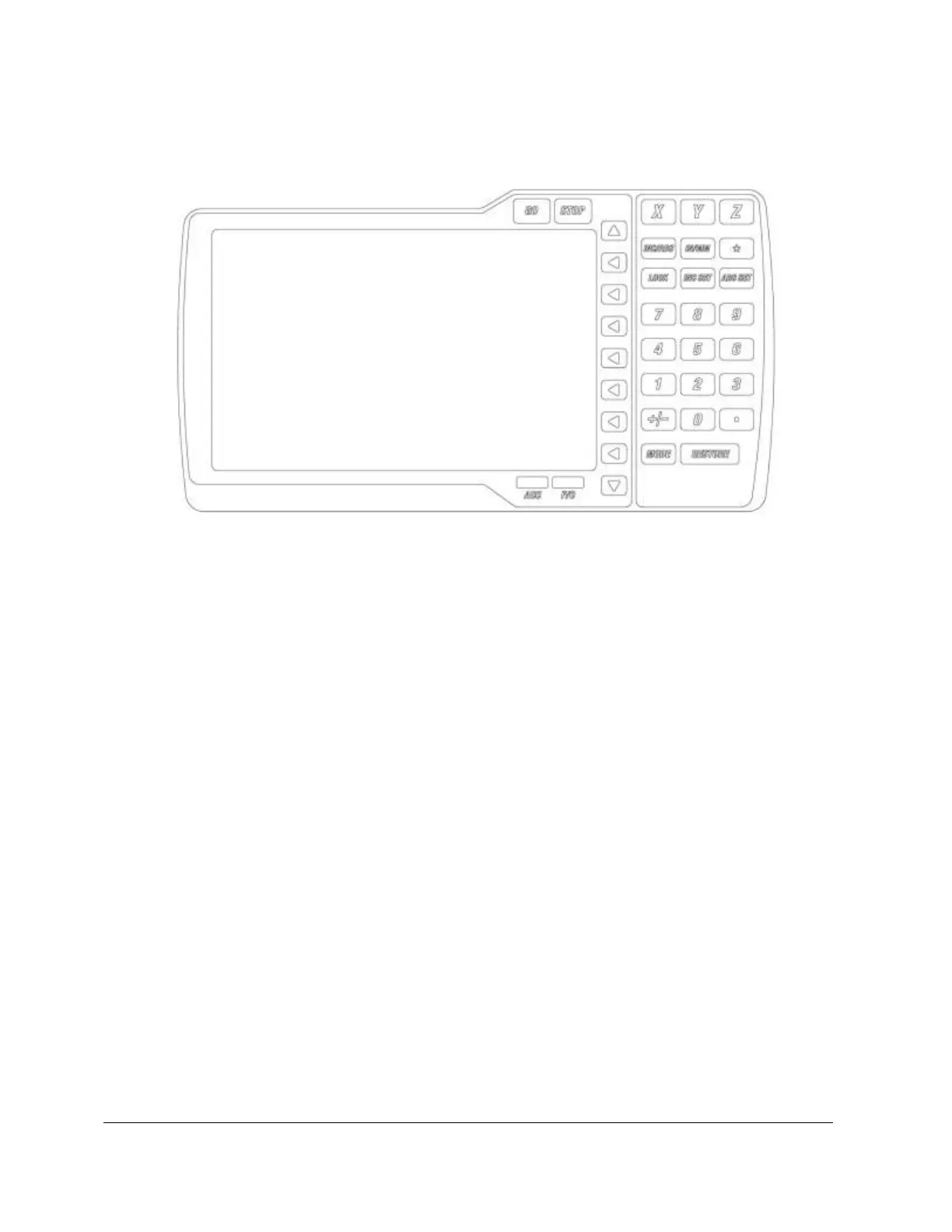
3.2 Display Pendant
3.2.1 Front
Keyboard Hard Keys
GO: initiates motion in Run
STOP: halts motion during Run
LOOK: part graphics in Program and Program I/O modes
INC/ABS: switches all or one axis between incremental and absolute
INC SET: loads incremental dimensions and general data
ABS SET: loads absolute dimensions and general data
X, Y, Z: selects axis for subsequent commands
0-9, +/-, . : inputs numeric data with floating point format. Data is
automatically + unless +/- key is pressed. All input data is automatically rounded
to the system's resolution.
MODE: to change from one mode of operation to another
RESTORE: clears an entry
IN/MM: causes inch to metric or metric to inch conversion of displayed
data
ACC: turns accessory (coolant, spray, etc.) on and off
F/C: selects between fine and coarse resolution on Electronic Handwheels


 To Next Page