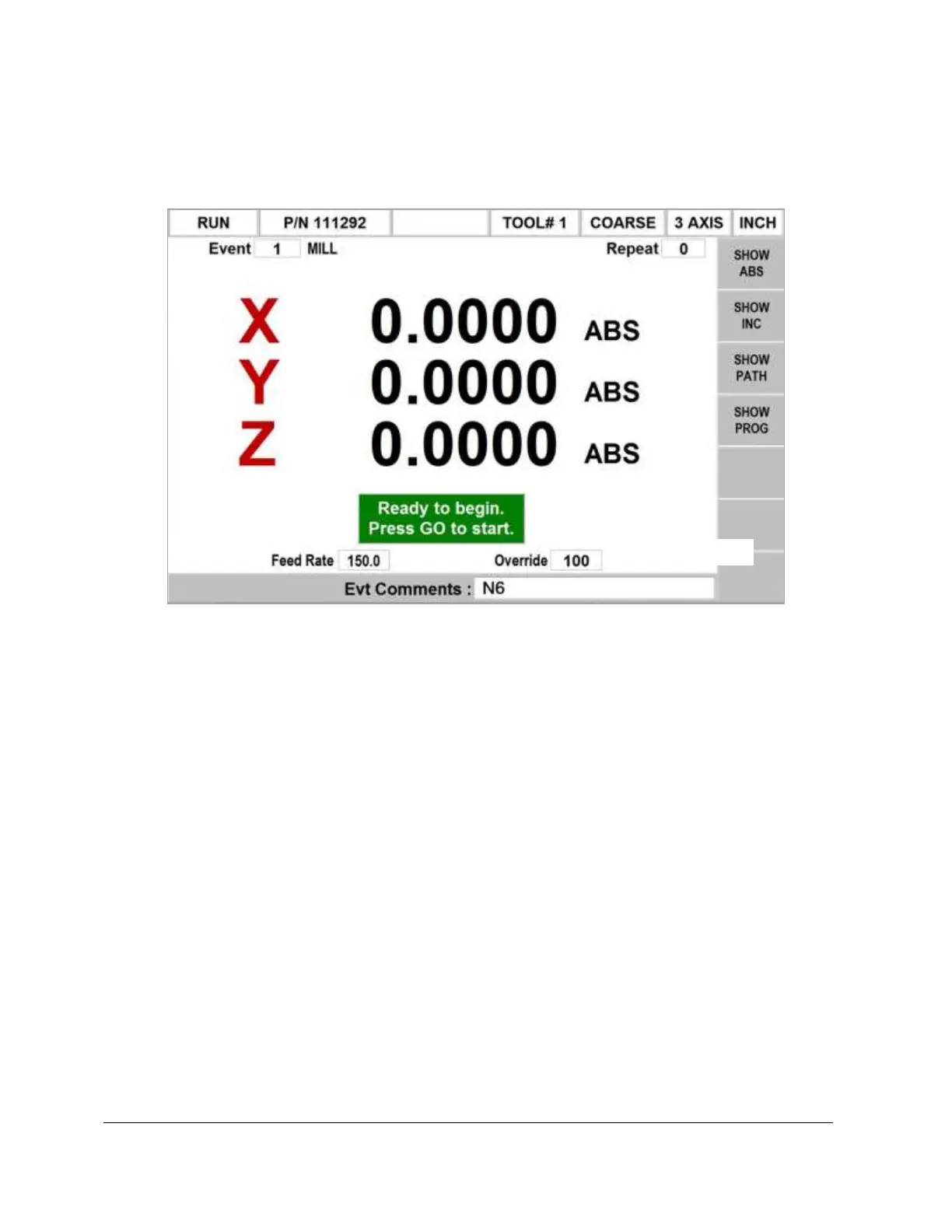
OVERRIDE: the feedrate override, controlled by pressing the up or down arrow keys
above and below the soft keys.
When you have started by any of the means above, the display will show:
Where:
The part number being run is shown in the status line.
• The event number and type (and the repeat number, if applicable) being run is
shown at the top of the screen.
• The current X, Y, Z absolute positions are shown in the information area.
• The SHOW ABS soft key (which is automatically assumed if one of the other 3
show keys are not selected) will show the absolute X, Y, Z positions as the part is
run.
• The SHOW INC soft key will show the incremental (or distance to go within the
event) X, Y, Z positions as the part is run.
• The SHOW PATH soft key will show the tool path graphics as the part is run.
• The SHOW PROG soft key will show the programmed data for the event being
run, and the next event as the part is run.
The run procedure is very simple. Follow the instructions on the conversation line and
proceed by pressing the GO key.
Once the STOP hard key is pressed, additional softkeys will be available:


 To Next Page