24
TK 55711-19-OP-EN
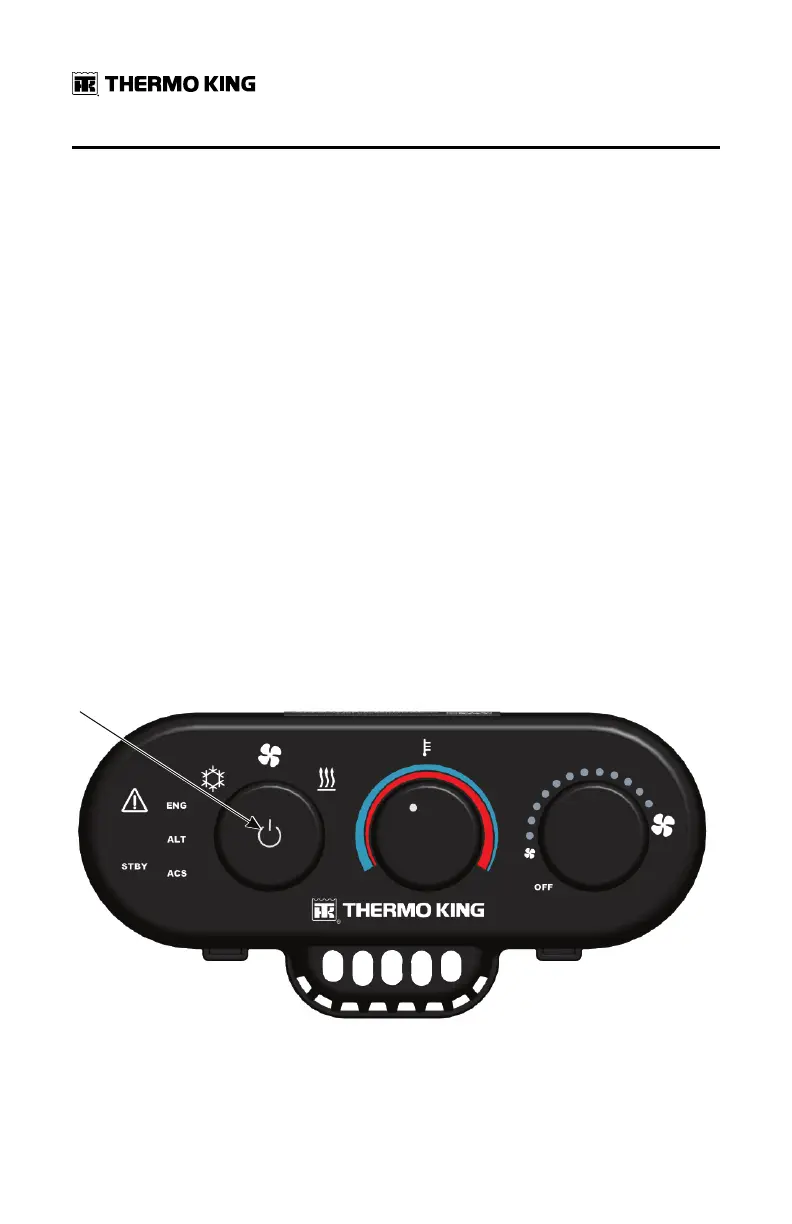
On/Off Button
The On/Off Button is under the Mode Selector knob on the HMI. It provides
several functions depending on how long the button is pressed.
• TTuurrnn ssyysstteemm OOnn:: If the system is off, press the Mode Selector knob for a
minimum of one second to turn the system on. The mode icon will flash
for 10 seconds while the Base Controller completes a boot process. Once
the system has been turned on the system mode, temperature or fan
speed may then be selected. If no selection is made the system will
remain in Monitor Mode. Refer to (“Monitor Mode,” p. 31).
NNoottee:: Pressing the Mode Selector knob for less than one second will not
turn the TriPac system on.
• TTuurrnn ssyysstteemm OOffff:: If system is on, press the Mode Selector knob for a
minimum of two seconds to turn the system off.
NNoottee:: Arctic Option and Battery Voltage Monitoring are disabled when
the APU is turned off.
• DDiissppllaayy SSyysstteemm SSttaattuuss:: If system is on but display has dimmed, tap the
Mode Selector knob for less than one second to restore display to full
brightness. The display will automatically dim again in about 90 seconds.
Pressing the Mode Selector knob for less than one second is referred to
as a “Bump”.
Figure 14. Press Mode Selector Knob to Turn System ON or OFF
OOppeerraattiinngg IInnssttrruuccttiioonnss


 To Next Page