TK 55711-19-OP-EN
25
Mode Selection
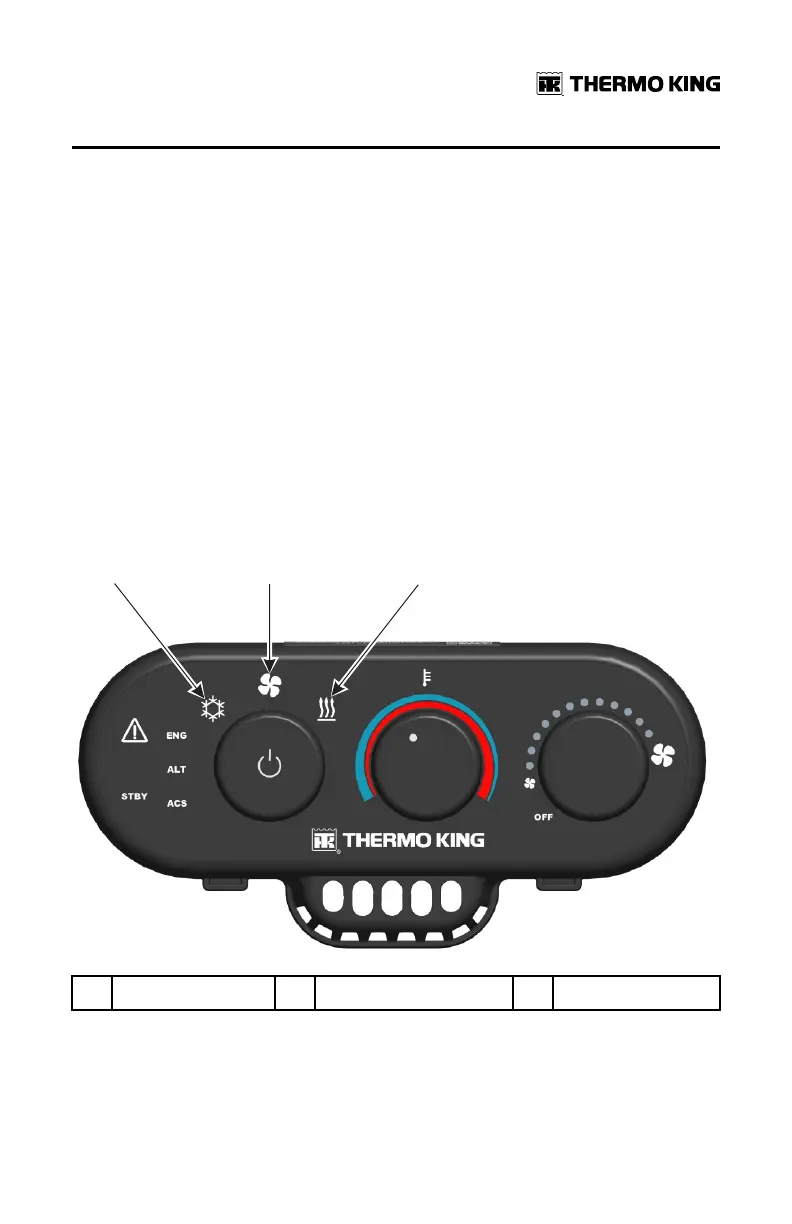
Mode selection is accomplished by rotating the left Mode Selector knob. It
selects between three operating modes. A mode icon will flash then
illuminate indicating the selection. There is a two second delay before the
new mode is activated to prevent momentary or accidental mode changes.
When the system is first turned on there will be a 10 second delay before the
selected mode is activated. The following modes are as follows:
• Cool Mode
• Fan Only Mode
• Heat Mode
NNoottee:: When the system is turned on for the first time after replacing or
disconnecting the Base Controller from power, the mode icon may
flash for approximately 60 seconds. This indicates the Base Controller
is powering up.
Figure 15. Rotate Mode Selector Knob to Desired Operating Mode
1. Cool Mode 2. Fan Only Mode 3. Heat Mode
OOppeerraattiinngg IInnssttrruuccttiioonnss


 To Next Page