© Copyright 2015 TRENDnet. All Rights Reserved.
1. Log into the management page (see “Access the management page” on page 9).
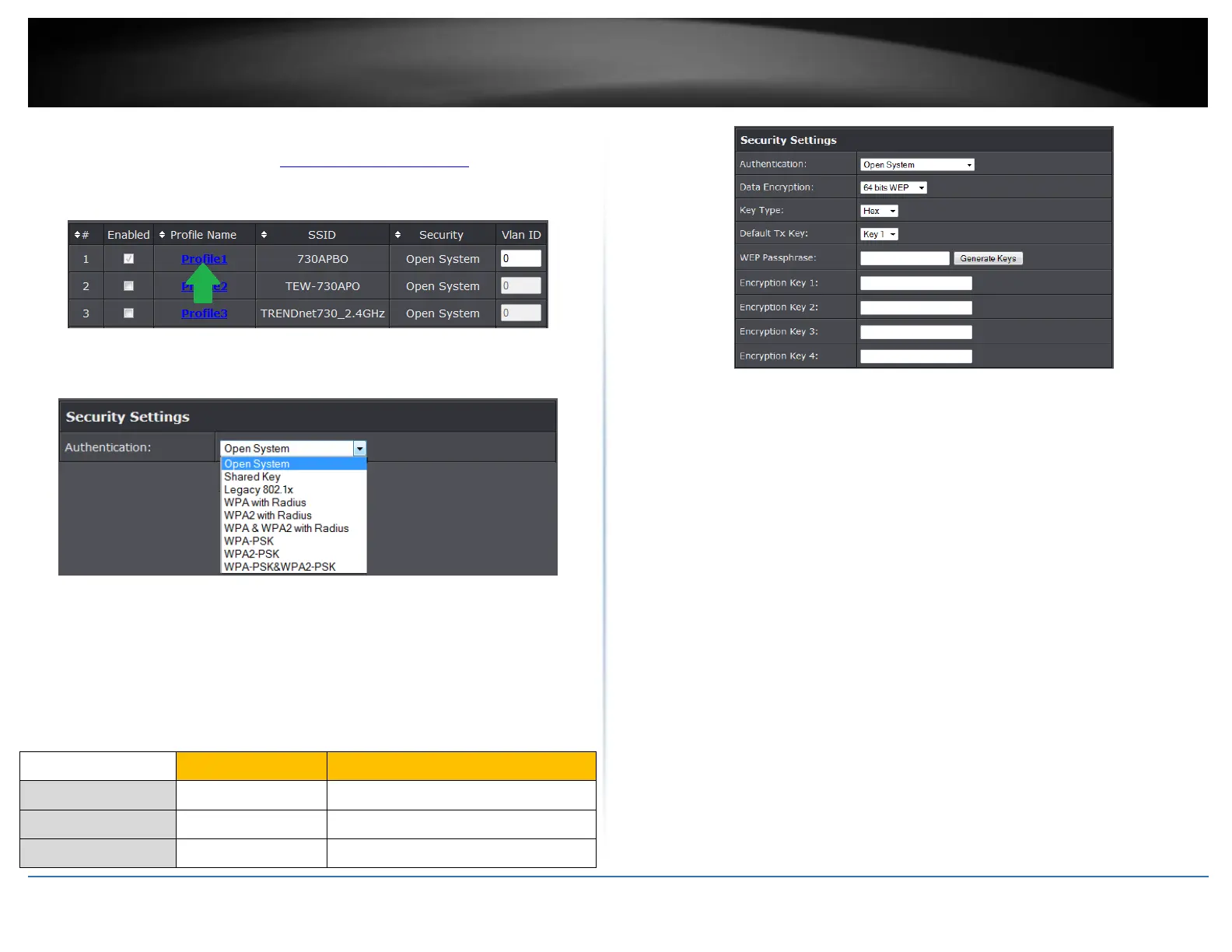
2. Click on Wireless button and click on Profile Settings.
3. Click on the Profile name you would like to apply wireless security.
4. Select the wireless security on your wireless network from the Network
Authentication pull down menu.
Selecting WEP (Open System or Shared Key):
If selecting WEP (Wired Equivalent Privacy), please review the WEP settings to configure
and click Apply to save the changes.
Note: It is recommended to use Open System because it is known to be more secure
than Shared Key.
Data Encryption: Choose the key length 64-bit or 128-bit.
Note: It is recommended to use 128-bit because it is more secure to use a key that
consists of more characters.
Key type: Choose HEX or ASCII.
Note: It is recommended to use ASCII because of the much larger character set that
can be used to create the key.
Key 1-4
o This is where you enter the password or key needed for a computer to
connect to the router wirelessly
o You can define up to 4 passwords or 4 keys. Only one key can be active at a
given time. Most users simply define one key.
o Choose a key index 1, 2, 3, or 4 and enter the key.
o When connecting to the router, the client must match both the password
and the Key number. (e.g. if you have activated Key 2 with a password of
12345, then the client must select: Key 2 (entering Key 1, 3, or 4 will block
the ability to connect) and enter password 12345)
WEP Passphrase: Enter a passphrase and click Generate key to have the access
point generate your encryption key.
Selecting WPA-PSK, WPA2-PSK, or WPA-PSK & WPA2-PSK (WPA2-PSK recommended):
Alphanumeric (a,b,C,?,*, /,1,2, etc.)















 To Next Page