© Copyright 2015 TRENDnet. All Rights Reserved.
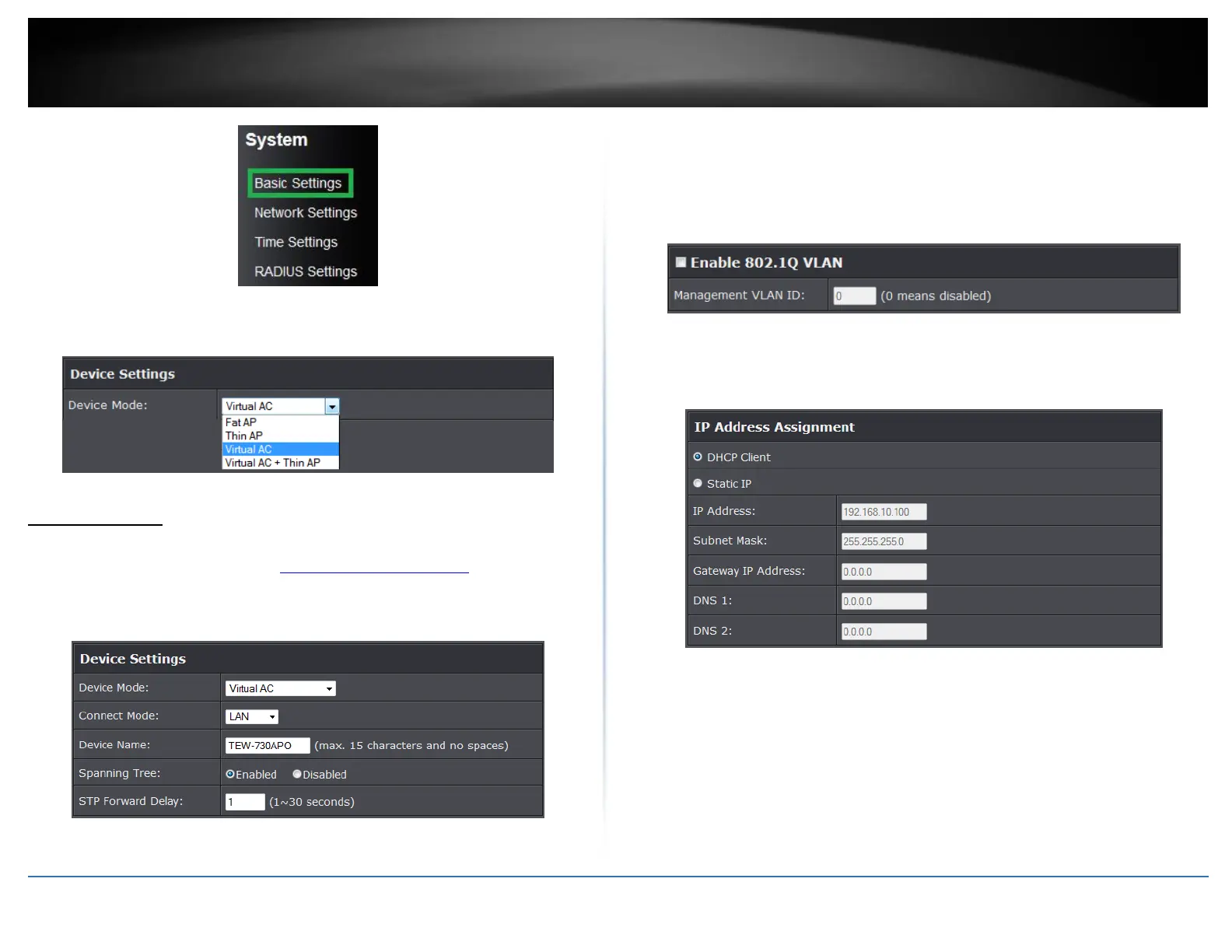
5. Select Virtual AC in the Device Mode drop down menu and Select your
Country/Region.
System Setting
This page displays thin access points connected in the network.
1. Log into the management page (see “Access the management page” on page 9).
2. Click on Management and System Settings.
Device Settings
Device Mode: Select the mode you would want the access point to operate on.
Connect Mode: Select the mode the access controller will be connected
Device Name: Enter the name of the device
Spanning Tree: Select to enable Spanning Tree feature
STP Forward Delay: Enter the delay time duration
Enable VLAN
Enable 802.1Q VLAN: Select to enable VLAN feature
VLAN ID: Enter the assigned VLAN ID of the access controller
IP Address
DHCP Client: Select to have access controller to receive IP address from your
DHCP server
Static: Select this option to manually configure the access point’s IP address.
o IP Address: Enter the IP address to assign
o Subnet Mask: Enter the subnet mask of the access point
o Gateway IP Address: Enter the gateway IP address
o DNS1-2: Enter the DNS IP address to assign on the access point.
DHCP Server















 To Next Page