© Copyright 2015 TRENDnet. All Rights Reserved.
View your log
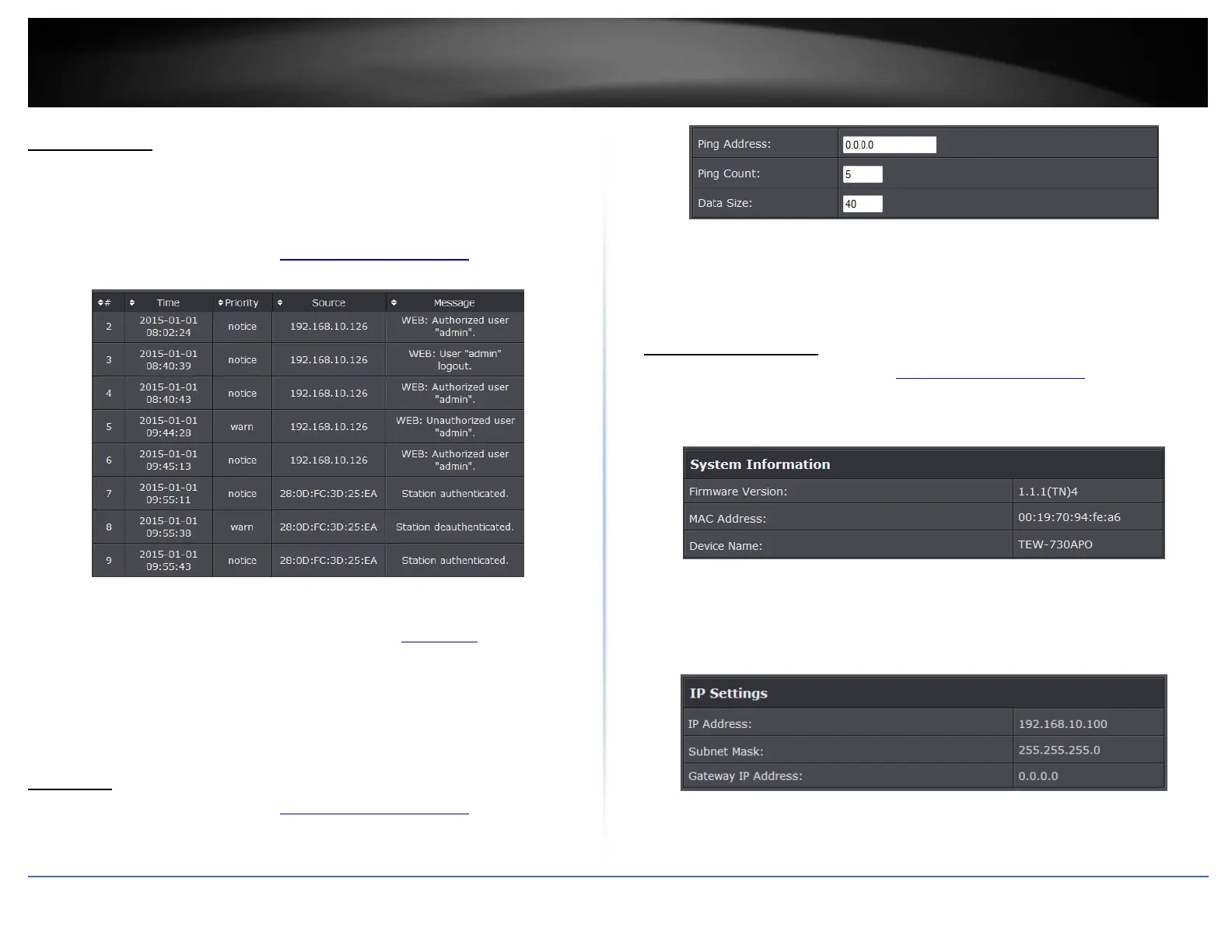
You may want send your router log to your e-mail address or to an external log server
(also known as Syslog server) so you can check it periodically while away from home.
You may also want to only see specific categories of logging.
1. Log into the management page (see “Access the management page” on page 9).
2. Click on Management, and click on System Log. Click Apply to save settings.
Time: Displays the date and time of the log entry. If the time is inaccurate, make
sure to set the router date and time correctly. (See “Setting time” on page 51)
Source: Source of the log entry
Message: Displays the log message.
Refresh: Click to refresh the displayed log entries
Clear: Click to clear all current log entries
Ping Tool
1. Log into the management page (see “Access the management page” on page 9).
2. Click on Tools, and click on Ping. Click Apply to save settings.
Ping Address: Enter the IP address to ping
Ping Count: Enter the ping count to conduct
Data Size: Enter the data size to ping
Device Information
1. Log into the management page (see “Access the management page” on page 9).
2. Click on Status, and click on Information.
System Information
Firmware Version: Current firmware version of the access point.
MAC Address: MAC address of the access controller
Device Name: Assigned name of the device
IP Settings
IP Address: Assigned IP address of the access controller
Subnet Mask: Assigned subnet mask of the access controller















 To Next Page