Home
TRENDnet
Wireless Router
TEW-828DRU
Page 53
TRENDnet TEW-828DRU - Page 53
72 pages
Manual
Save Page as PDF
To Next Page
To Next Page
To Previous Page
To Previous Page
Loading...
© Copyright 2015 TREN
Dnet. All Rights Reser
ved.
TRENDnet User’s Gu
ide
TEW-828DRU
50
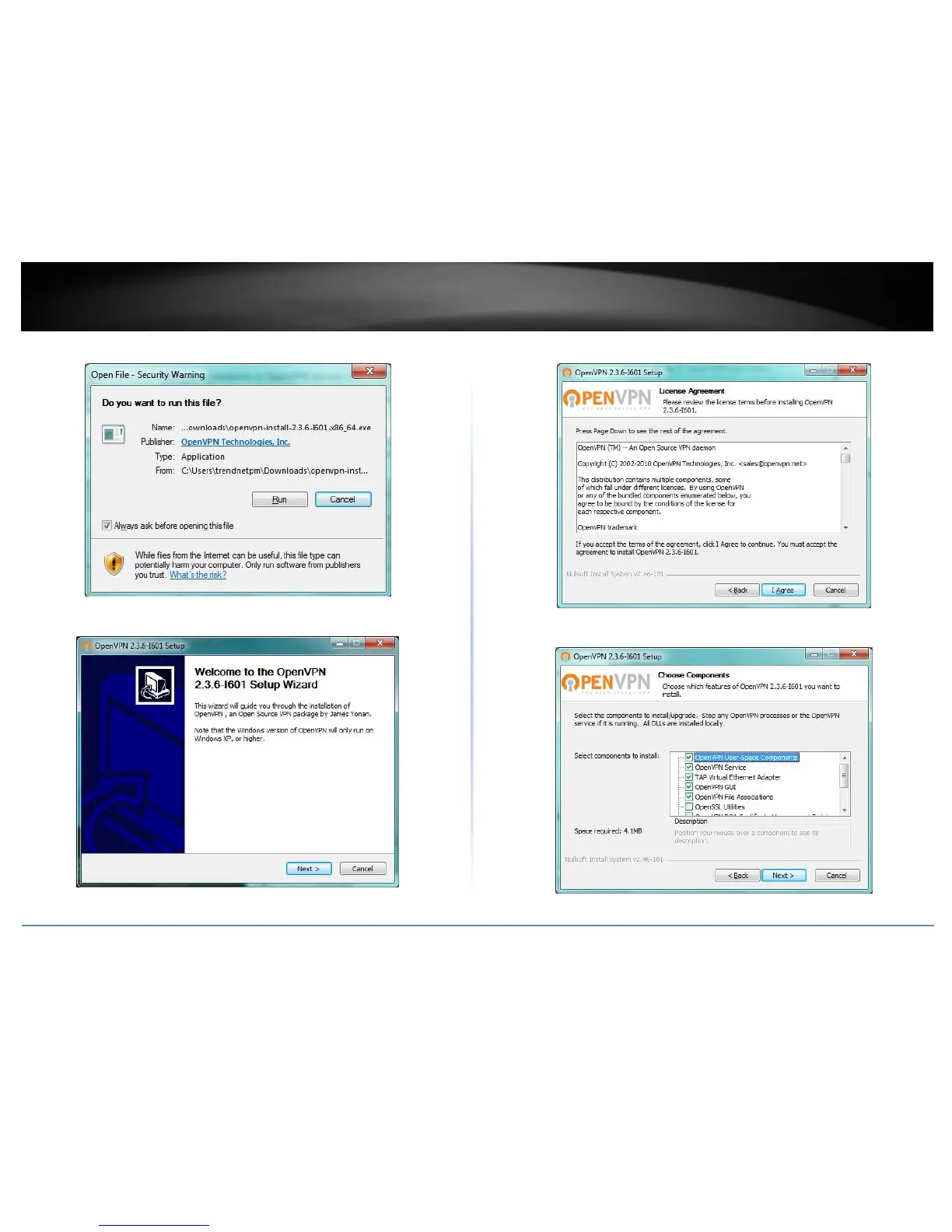
4. If prompted to run th
e file, click
Run
.
5. At the installation window,
click
Next
.
6. At the license agreement w
indow, review the license agree
ment and click
I Agree
.
7. At the choose components
window, click
N
ext
.
52
54
Table of Contents
Main Page
Default Chapter
2
Table of Contents
2
Product Overview
4
Package Contents
4
Features
4
Product Hardware Features
5
Application Diagram
6
Router Setup
7
Creating a Home Network
7
Router Installation
8
Connect Additional Wired Devices to Your Network
11
Basic Router Settings
12
Access Your Router Management Page
12
Network Status
12
Wireless Settings
13
Guest Network
16
Parental Control
18
Website Filter
18
IP Address Filter
19
MAC Address Filter
20
Wireless Networking and Security
21
How to Choose the Type of Security for Your Wireless Network
21
Secure Your Wireless Network
22
Connect Wireless Devices to Your Router
24
Connect Wireless Devices Using WPS
24
Advanced Wireless Settings
26
Multiple SSID
26
Wireless Bridging Using WDS (Wireless Distribution System)
27
Advanced Settings
29
Steps to Improve Wireless Connectivity
30
Advanced Router Settings
31
Change Your Router Login Password
31
Manually Configure Your Internet Connection
31
Change Your Device Name
32
Change Your Device URL
32
Ipv6 Settings
32
Clone a MAC Address
33
Change Your Router IP Address
33
Set up the DHCP Server on Your Router
34
Set up DHCP Reservation
35
Enable/Disable Upnp on Your Router
36
Enable/Disable Application Layer Gateways (ALG)
36
Identify Your Network on the Internet
37
Set Your Router Date and Time
38
Create Schedules
39
Access Control (IP Protocol Filter)
40
Protocol/Ip Filter
40
Quality of Service
41
Open a Device on Your Network to the Internet
42
Dmz
42
Virtual Server
42
Special Applications
44
Gaming
45
Allow Remote Access to Your Router Management Page
46
Add Static Routes
46
VLAN Configuration
47
Using External USB Storage
48
Samba Server
48
DLNA Server
49
FTP (File Transfer Protocol) Server
50
Virtual Private Networking (VPN)
51
Creating a Virtual Private Network
51
Router Maintenance & Monitoring
56
Reset Your Router to Factory Defaults
56
Router Default Settings
56
Backup and Restore Your Router Configuration Settings
57
Reboot Your Router
57
Upgrade Your Router Firmware
58
Allow/Deny Ping Requests to Your Router from the Internet
59
Client List
59
Check the Router System Information
60
View Your Router Log
62
Router Management Page Structure
63
Technical Specifications
64
Troubleshooting
66
Appendix
67
Other manuals for TRENDnet TEW-828DRU
Quick Installation Guide
9 pages
Related product manuals
TRENDnet TEW-824DRU
72 pages
TRENDnet TEW-823DRU
52 pages
TRENDnet TEW-831DR
88 pages
TRENDnet TEW-812DRU
91 pages
TRENDnet TEW-817DTR
78 pages
TRENDnet TEW-818DRU
68 pages
TRENDnet TEW-830MDR
65 pages
TRENDnet TEW-811DRU
97 pages
TRENDnet TEW-830MDR3K
11 pages
TRENDnet TEW-830MDR2K-CA
65 pages
TRENDnet TEW-651BR
80 pages
TRENDnet TEW-432BRP
67 pages















 To Next Page