ACCESSORY,
OPTION
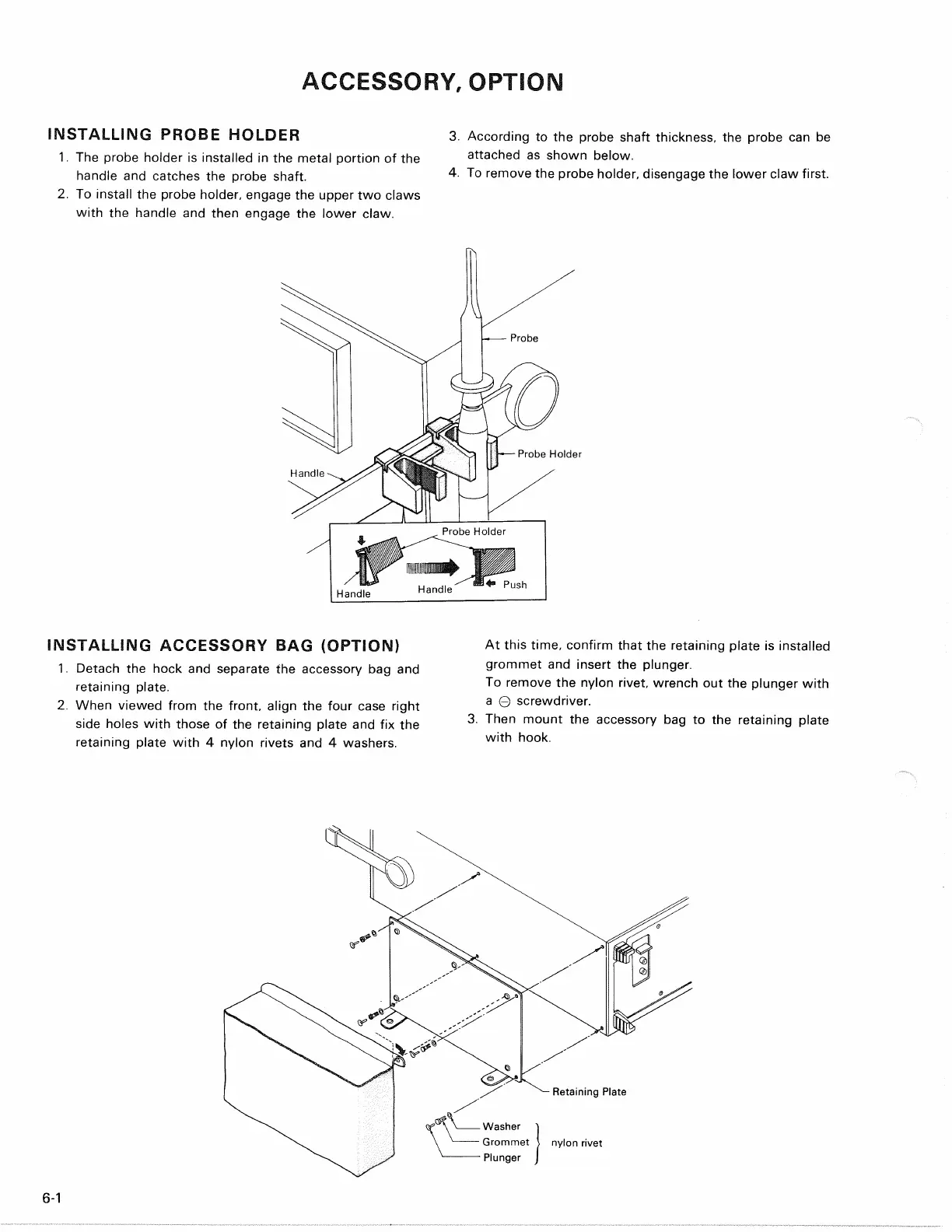
INSTALLING PROBE HOLDER
1.
The probe holder is installed in the metal portion of the
handle and catches the probe shaft.
2.
To install the probe holder, engage the upper two claws
with the handle and then engage the lower claw.
3. According to the probe shaft thickness, the probe can be
attached as shown below.
4.
To remove the probe holder, disengage the lower claw first.
INSTALLING ACCESSORY BAG (OPTION)
1.
Detach the hock and separate the accessory bag and
retaining plate.
2.
When viewed from the front, align the four case right
side holes with those of the retaining plate and fix the
retaining plate with 4 nylon rivets and 4 washers.
At this time, confirm that the retaining plate is installed
grommet and insert the plunger.
To remove the nylon rivet, wrench out the plunger with
a 0 screwdriver.
3. Then mount the accessory bag to the retaining plate
with hook.
6-1
Probe
• Probe Holder
Handle
Probe Holder
Handle
Handle
Push
Retaining Plate
-Washer
• Grommet
• Plunger
nylon rivet


 To Next Page