T100e thermostatic care & care plus
15
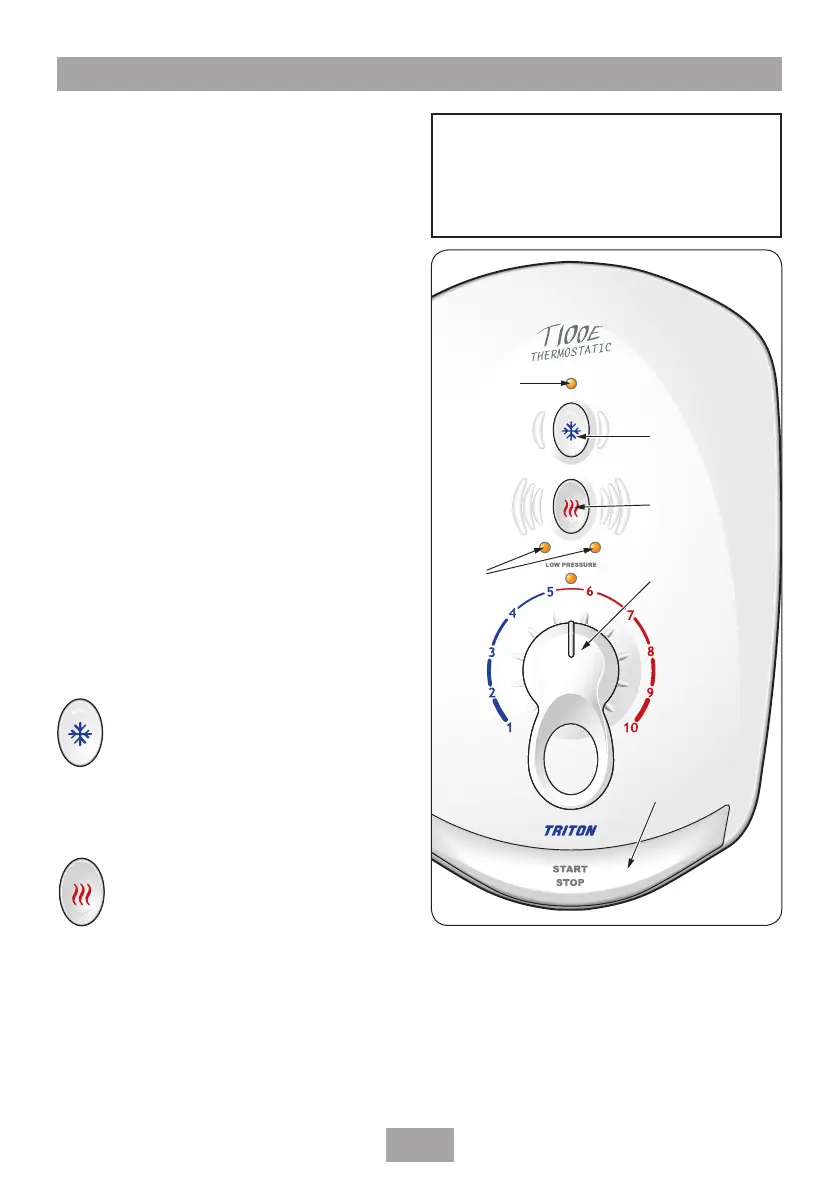
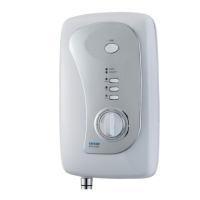
The shower controls are shown in fig.21.
Make sure the water supply is turned fully on.
Switch the electric supply back on at the
isolating switch.
Immediately the start up routine commences
and the four LED’s flash simultaneously three
times (the Care Plus will also emit a single
‘bleep’).
Starting the shower
Press the START/STOP button and water will
begin to flow (the Care Plus will emit a single
‘bleep’). The two power indicators light, to show
the shower is running at full power.
Stopping the shower
Press the START/STOP button (the Care Plus will
emit a single ‘bleep’) and the phased shutdown
will begin. Water continues to flow for a few
seconds, flushing out any remaining hot water.
This guarantees that the next immediate user
does not receive a slug of hot water if standing
under the showerhead when starting the shower.
Using the control buttons
The shower has two control buttons — POWER
and COLD, as shown.
This symbol is for COLD water only.
When pressed, the LED above the button
lights up (the Care Plus will ‘bleep’
once). It will remain in this state until the
power button is pressed.
Note: Adjustment of the temperature control at
this setting has no effect on the force of water
from the showerhead.
This symbol is the POWER button, which
is a toggle switch between full power
and economy power.
Note: The shower automatically starts up on the
full power setting.
Economy is for using less power when the
ambient mains temperature is high during hot
months.
If the shower is on full power and the POWER
button is pressed, one of the LED’s below the
button goes out (the Care Plus will also emit a
Cold button
Power button
Temperature
control lever
Start/Stop
button
Cold setting
indicator
Power
indicators
Fig.21
W-001-A
WARNING!
Before normal operation of the
shower, it is essential the following
commissioning procedure is completed
correctly.
Operating the shower


 To Next Page