INSTRUMENTS
38
To access the set menu:
▼ Push and release the SCROLL/
SELECT button until the set menu is
displayed.
Clock
WARNING
Do not attempt to set the clock while
the motorcycle is in motion.
Stop the motorcycle to set the clock.
Failure to follow the advice above
may lead to loss of motorcycle control
which could result in serious injury or
death.
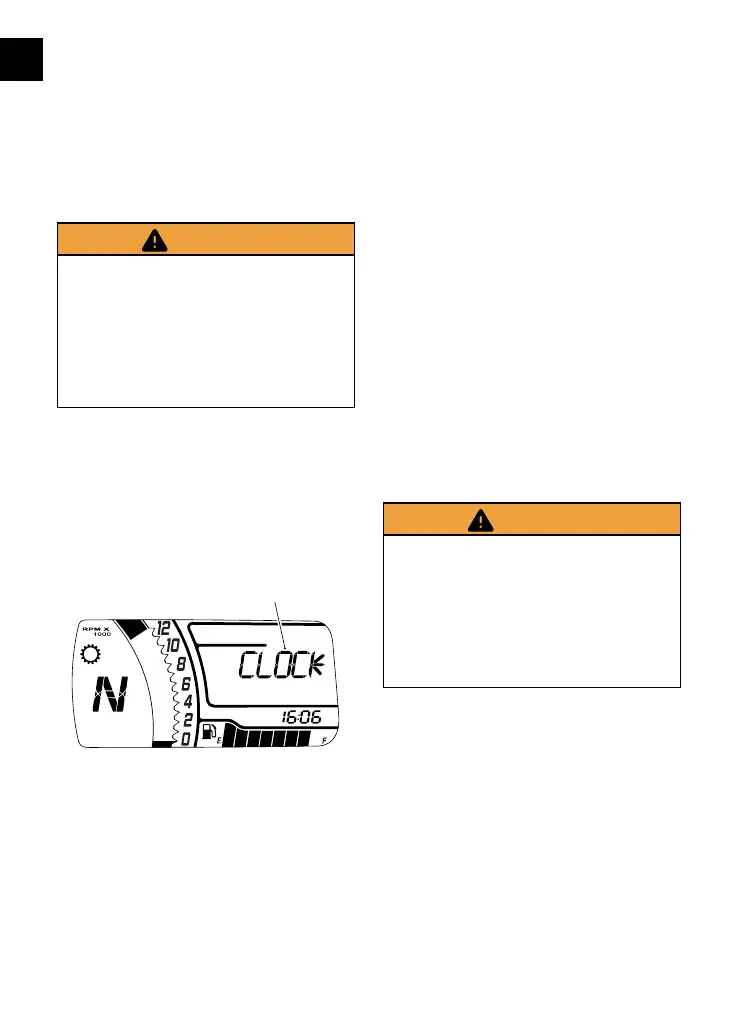
The clock menu allows the adjustment
of the clock to be set to the local time.
To set the clock:
▼ From the set menu, push and hold
the SCROLL/SELECT button for one
second to select CLOCK.
1
1. Clock menu
▼ From CLOCK, push and hold the
SCROLL/SELECT button for one
second and the clock’s hour display
will start to flash. Release the
SCROLL/SELECT button.
To set the hour display:
▼ Make sure the hour display is still
flashing then push and release the
SCROLL/SELECT button to change
the setting. Each individual push of
the button will change the setting
by one digit.
▼ When the correct hour display is
shown, push and hold the SCROLL/
SELECT button for one second. The
hours display is set and the minutes
display will begin to flash. The
minutes display is adjusted in the
same way as the hour display.
▼ Once both hours and minutes
are correctly set, the menu will
automatically revert back to the
previous screen after four seconds.
Units
WARNING
Do not attempt to set the units while
the motorcycle is in motion.
Stop the motorcycle to set the units.
Failure to follow the advice above
may lead to loss of motorcycle control
which could result in serious injury or
death.
The units menu allows the selection of a
preferred unit of measurement.
To set the units:
▼ From the set menu, push and hold
the SCROLL/SELECT button for one
second to select CLOCK.





 To Next Page