12
ASSEMBLY STEPS
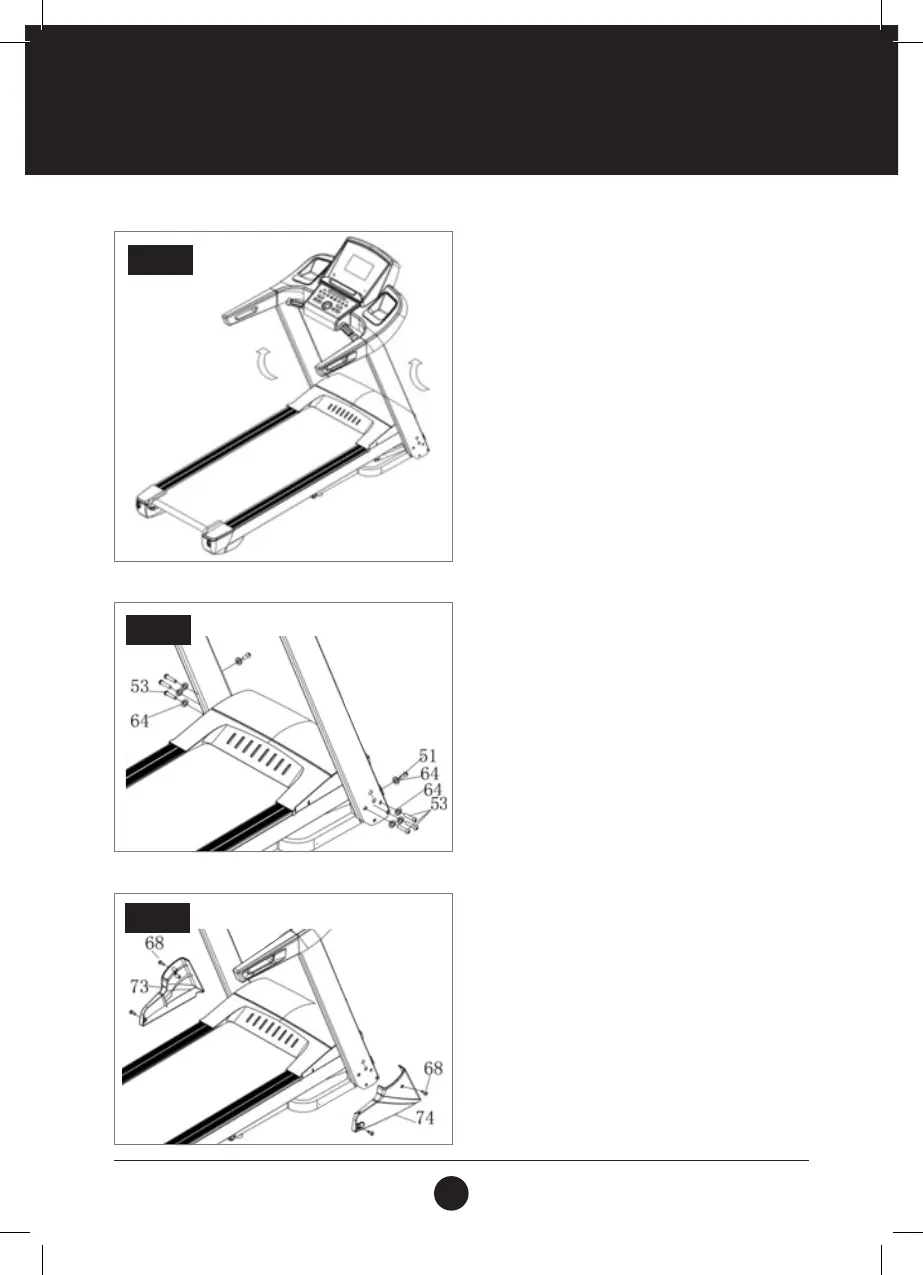
STEP 3:
Push up the Computer and Left and Right Uprights as
per arrow in the illustration.
Note: Do not squash the wires inside the tube. Ensure
that wires are connected. Please hold the uprights, to
avoid them falling down.
STEP 4:
Use the 5 Allen Key (12), to lock the Bolt (53) and
Lock Washer (64). Then secure the Right Upright to
the Main Frame. Use the 5# Allen Key (12), to secure
Bolt (51) and Lock Washer (64) to the Base Frame (2)
through the Base and Right Upright Tube. (Please refer
to the corresponding image for illustration.)
Please duplicate the left and the right assembly as
the method is identical.
Note: Support the upright with your hand to avoid
falling down and possible injury.
STEP 3
STEP 4
STEP 5:
Use Wrench W/Screw Driver (61) to afx the Right
Base Cover (74) and Bolt (68) to the Base Frame.
Please duplicate the left assembly and the right as the
method is identical.
Note: Support the upright with hand to avoid falling
down and possible injury.
STEP 5



 To Next Page