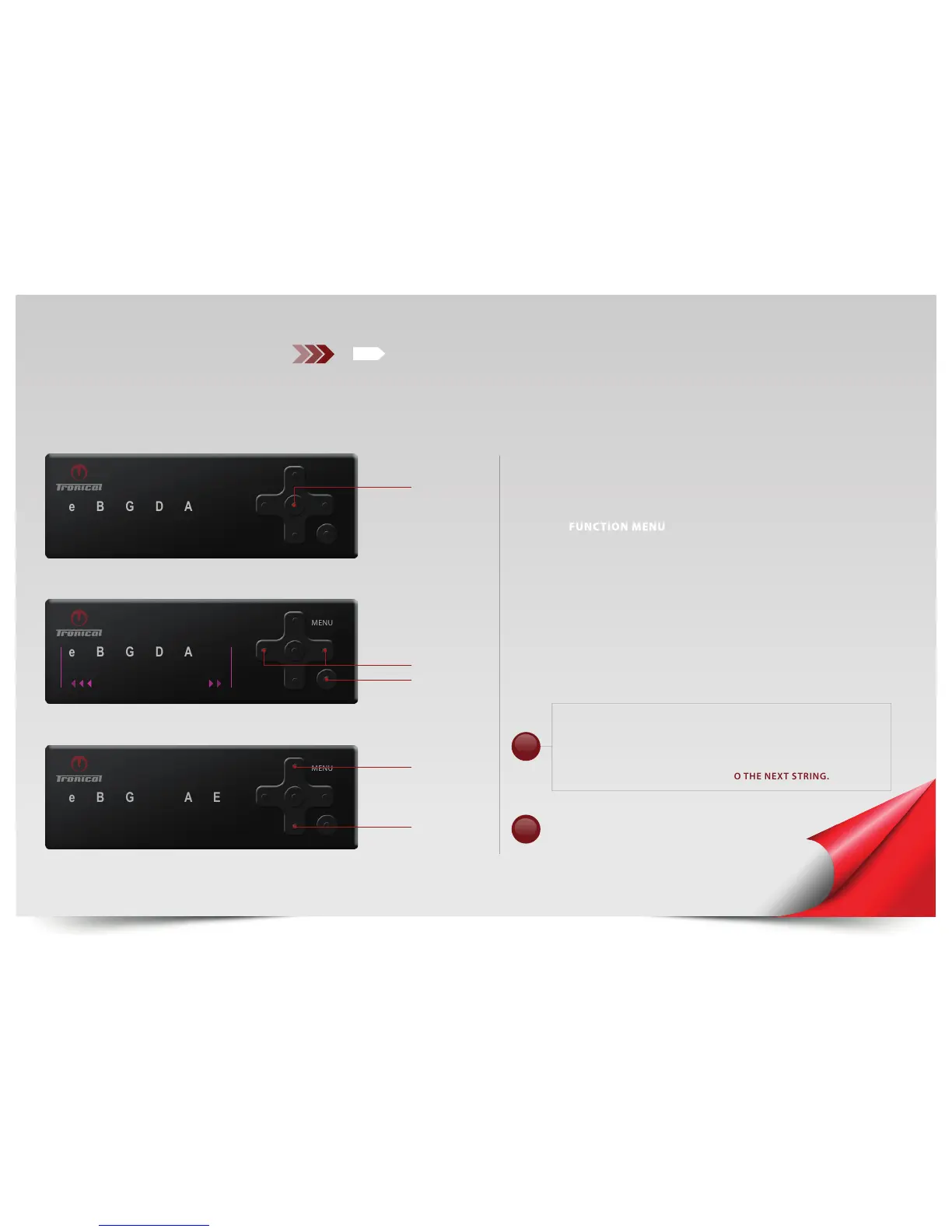
SELECT WHITE “E“ LED. PUSH “ENTER“ to confirm.
The MENU LED switches OFF, The “E“ lights up RED.
PRESS “DOWN“ to unwind the low “E“ string or PRESS “UP“ to wind up the
low “E“ string.
PRESS “LEFT“ or “RIGHT“ button to choose any other string to wind up or
down in the same manner.
PRESS “BACK“ for FUNCTION MENU.
DURING “STRING UP AND DOWN MODE” THE “SINGLESTRING
TUNING MODE” IS ACTIVE. IT IS RECOMMENDED TO WIND THE
STRING ROUGHLY + 300 CENT TO STANDARD PITCH, THEN
RELEASE THE UP/DOWN BUTTON AND PLUCK THE STRING. THE
SYSTEM TAKES OVER AND WILL TUNE THE STRING TO STANDARD
PITCH AND AUTOMATICALY MOVE TO THE NEXT STRING.
E
E
D
LEFT / RIGHT
ENTER
E
SWITCH BETWEEN STRINGS
BACK
DOWN
UP
FUNCTION MENU
PUSH “ON“ button. The system activates with the last completed tuning in
MULTISTRING MODE.
PUSH “BACK“ button to enter TUNING SELECTION MODE. MENU LED is OFF.
TO ENTER
PRESS AND HOLD THE “UP“ button until MENU LED lights up WHITE.
SEE ADDITIONAL
FUNCTIONS
PG. 19
!
IMPORTANT!
REFER to Page 36 to SELECT GUITAR TYPE
(ACOUSTIC or ELECTRIC INSTALLATION)
!



 To Next Page