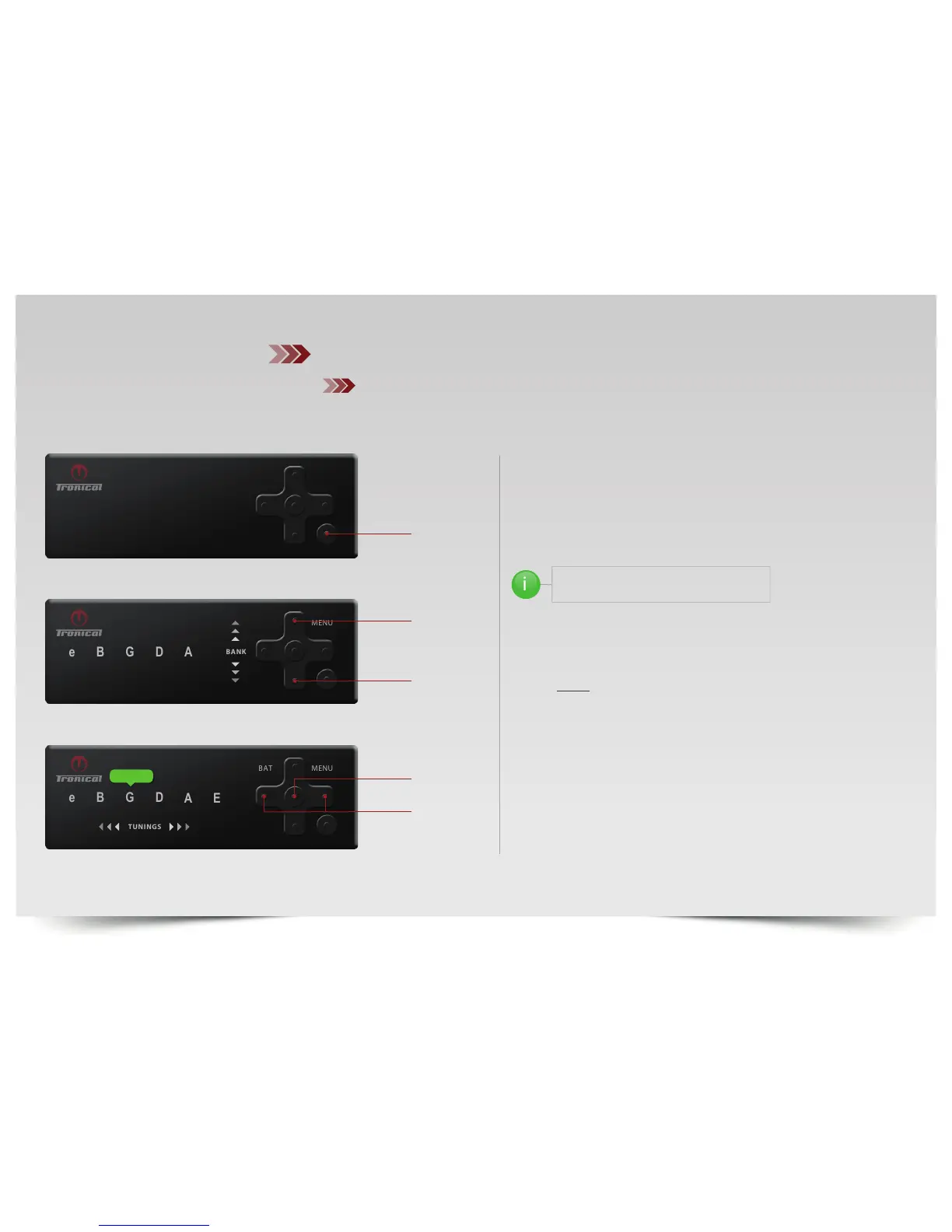
PUSH “ON“ button, the system will come up with the last complete
tuning.
PUSH “BACK“ to enter TUNING SELECTION MODE. The MENU LED
switches OFF.
PUSH ”UP“ or ”DOWN“ to navigate to the GREEN (Major) Bank.
THE RESPECTIVE COLOR IS INDICATED
BY THE COLOR OF THE STRING LEDS
PUSH “LEFT/RIGHT“ until GLED is shining GREEN.
SINGLECLICK ”ENTER” for MULTISTRING MODE or
PUSH & HOLD ”ENTER” for SINGLESTRING MODE
Once the tuning is activated the RoboHeads start immediately in order to
change the pitch. Keep your hands away from RoboHeads and strings during
this automatic move phase (0.5 to 2 seconds).
AFTER ALL ROBOHEADS HAVE STOPPED:
MUTE ALL STRINGS & PICK THE INDICATED OUT OF TUNE STRING RED
or STRUM ALL OUT OF TUNE STRINGS MULTI STRING MODE to start fine
tune phase.
MUTING THE IN TUNE STRINGS (GREEN) while tuning is also recommended
for improved accuracy. When all strings are in tune the system switches off
automatically.
DOWN



 To Next Page