CHAPTER 4: PROGRAMMING & OPERATION
Truetness.com / 800.426.6570 / 636.272.7100
23
CONSOLE NAVIGATION:
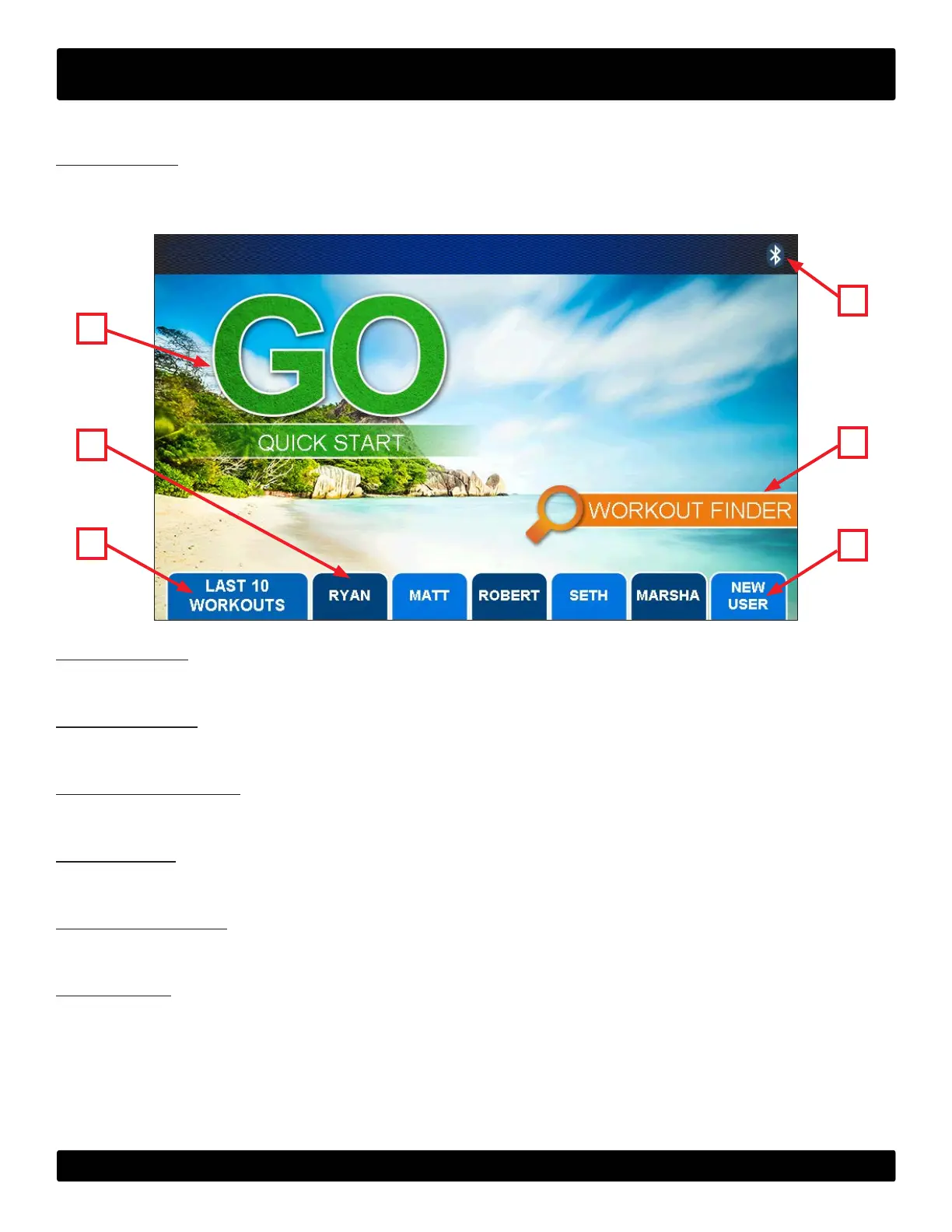
Home Screen:
e Home Screen is displayed on the console when there is no workout in progress. From this screen the user is able to
select from various options to begin a workout.
A) Quick Start:
Starts a Quick Start workout in which the user controls all settings until the workout is ended by the user.
B) User Proles:
Custom proles used to store a user’s age, weight and saved workouts.
C) Last 10 Workouts:
Displays the last 10 workouts that were completed on the treadmill and allows users to easily replay a recent workout.
D) New User:
Creates a new User Prole.
E) Workout Finder:
Displays a list of the pre programmed workouts that are available on this treadmill.
F) Bluetooth:
Allows users to pair their blutooth devices prior to beginning a workout.
A
D
F
E
B
C


 To Next Page