CHAPTER 4: PROGRAMMING & OPERATION
Truetness.com / 800.426.6570 / 636.272.7100
29
BLUETOOTH FUNCTIONS CONTINUED:
Mobile Fitness App Pairing:
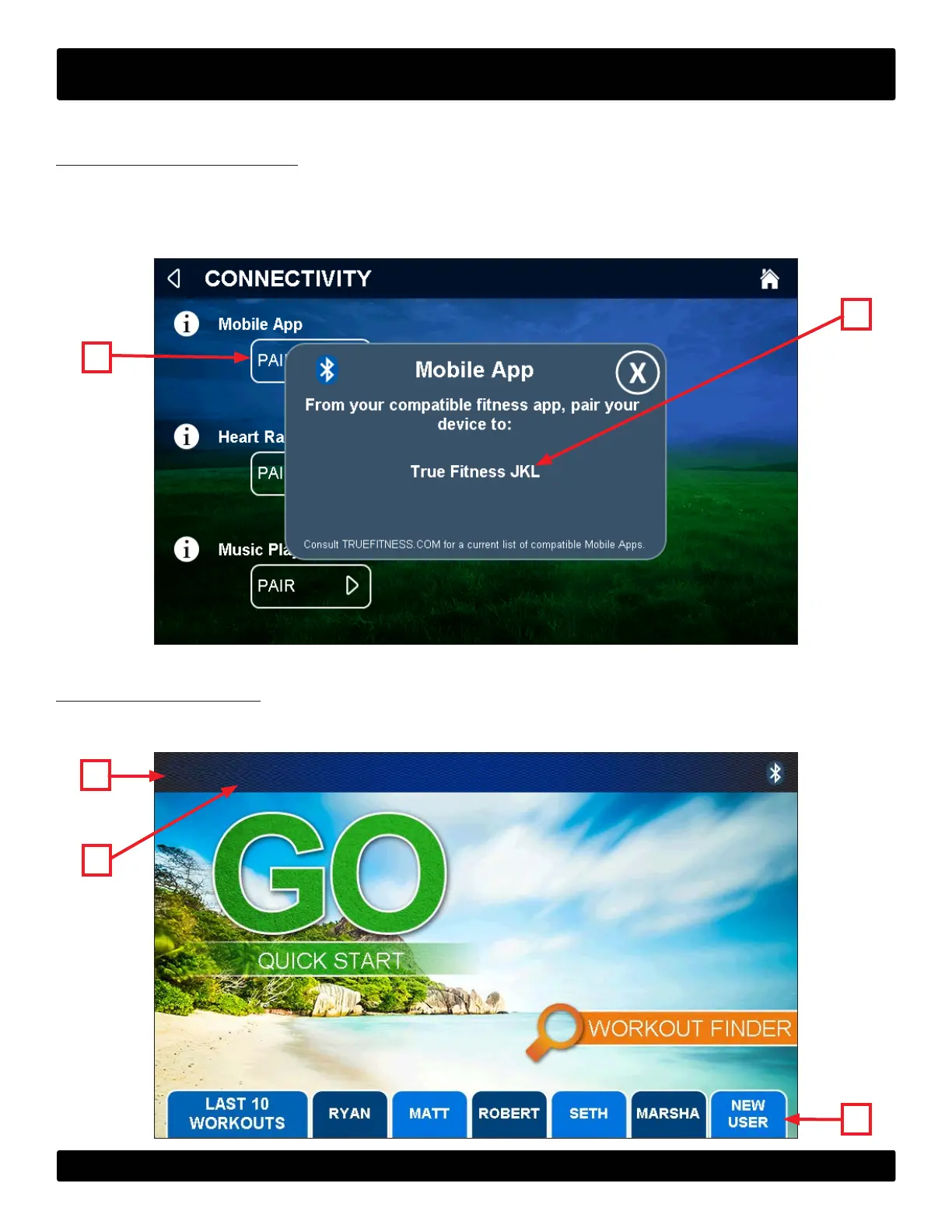
is console is compatible with Wahoo tness tracking apps. To pair a compatible app, tap the Bluetooth button on the
homepage or in a user prole to display the connectivity screen. Touch the mobile app pair button (A) to display the
mobile app pairing screen. From the tness app, pair to the device (B)shown on the console.
NOTE: For additional informaion on compatible mobile apps, please visit www.wahootness.com.
B
A
ADVANCED CONSOLE FUNCTIONS:
Entering Service Mode:
Press and hold the TRUE logo (A) in the upper le corner of the home screen. When the word “TRUE” (B) begins to ash,
release the logo and press and hold the lower right corner of the screen(C).
C
A
B


 To Next Page