CHAPTER 4: PROGRAMMING & OPERATION
Truetness.com / 800.426.6570 / 636.272.7100
25
CONSOLE NAVIGATION CONTINUED:
Workout Data Screens:
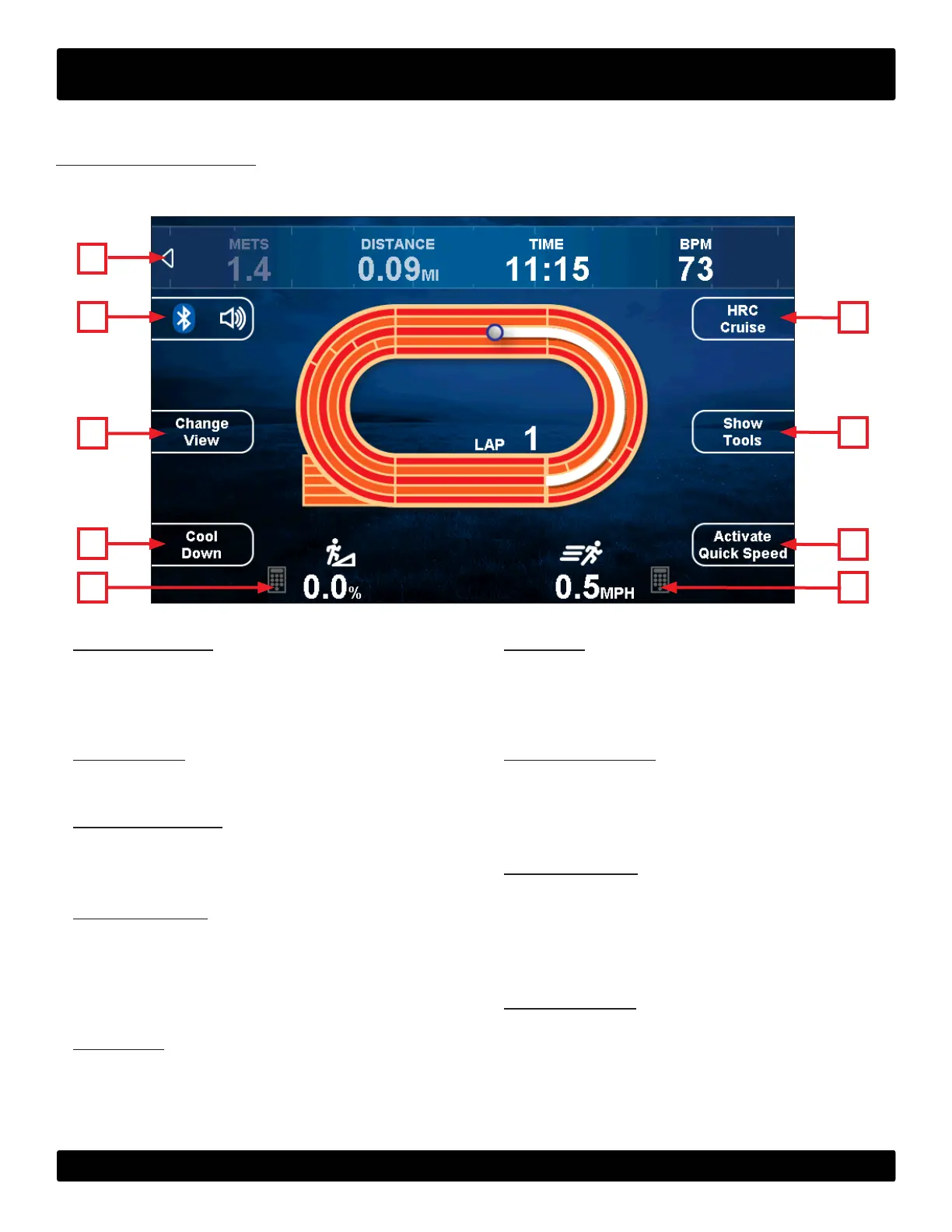
During any workout a Workout Data Screen will be displayed to give the user a comprehensive visual overview of their
current workout data.
I
B
G
H
A
F
A)Statistics Bar:
Displays data such as Calories, METS, Distance, Time
and Heart Rate during a workout. is may be hidden by
touching the arrow on the left side of the bar.
B
)Bluetooth:
Enables or disables the Bluetooth audio function.
C) Change View:
Switches between the available Workout Data
Screens
D) Cool Down:
Allows the user to end their current workout with a two
minute low intensity cool down period. When Cool
Down is activated the unit is in manual mode and the
user directly controls all settings.
E) Incline:
Displays the current level of incline. e incline level can
be changed by pressing the keypad icon and entering a
numeric value.
C
D
E
F) Speed:
Displays the current treadmill speed. e speed can be
changed by pressing the keypad icon and entering a
numeric value.
G) Quick Touch:
Displays various preset speeds and incline levels to
allow the user to quickly and conveniently
customize their workout.
H) Show Tools:
Gives the user the following options:
- Customize the data shown in the Statistics Bar.
- Change units between English and Metric.
- Pair a Bluetooth heart rate strap.
I) HRC Cruise:
Engages Heart Rate Control to allow the equipment to
maintain the user’s current heart rate through automatic
speed and incline adjustments (when the user is utilizing
heart rate monitoring).


 To Next Page