5. CONFIGURATION AND CALIBRATION MENUS
· In order to enter P1
-
General, P2
-
Parameters, P3
-
Configuration and P4
-
Calibration
menus, calibration jumper must be closed.
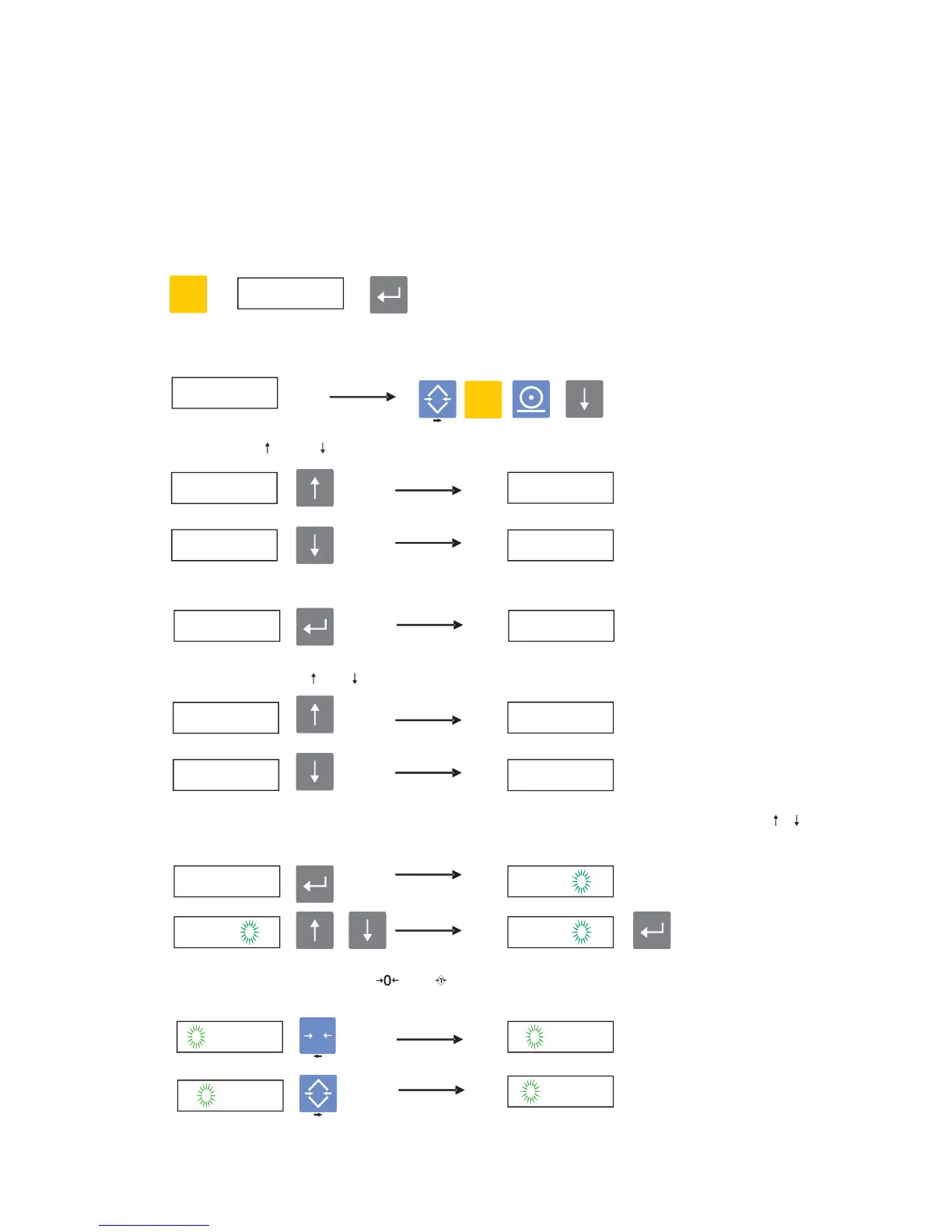
· Press F button to enter configuration and calibration
menu
s, when FUNC
?
message
is appeared, press Enter button,
· After PASS ? message is displayed,
(1) (3) (2) (5) (Order of keys starting from zero)
write password and press Enter ,
· You can use and
buttons in order to stroll between main menus
up or down
,
· Use Enter button in order to enter sub menus of any of the main menus,
· Again you can use and buttons in order to stroll between sub menus,
· Press Enter button in order to start changing a parameter. Change it by using
/
buttons and save it by pressing Enter button,
· During data entry menus, and buttons are used to move cursor one step right
or
left
.
P1.0
P1.1
FUNC ?
PASS
P1.1


 To Next Page