20
SYMBOL NAME ALTERNATIVES DEF. EXPLANATION
P3.0
P3.3
Capacity 1
Capacity 2
0000000
0000000
.
P3.1
P3.4
Division
Division
Interval 1
Interval 2
(Verification
(Verification
Scale
Scale
Interval)
Interval)
1
1
1
1
2
2
2
2
3
3
5
5
4
4
10
10
5
5
20
20
6
6
50
50
7
7
100
100
8
8
200
200
9
9
500
500
1
1
Scale's division interval ( verification scale
interval.) for weighing range 1. If P1.0
(purpose of use) is selected as approved,
number of divisions can not exceed 3000.
For non-approved applications you can
select up to 50,000 divisions.
Scales division interval ( verification scale
interval.) For weighing range 2. If P1.0
(purpose of use) is selected as approved,
number of divisions can not exceed 3000.
For non-approved applications you can
select up to 50,000 divisions.
P3.2
P3.5
Decimal
Decimal
Point
Point
Place 1
Place 2
0
0
No point
No point
1
1
xxxxx.x
xxxxx.x
2
2
xxxx.xx
xxxx.xx
3
3
xxx.xxx xxx.xxx
xxx.xxx
4
4
0
0
This option is to select place of decimal point
for weighing range 1.
This option is to select place of decimal point
for weighing range 2.
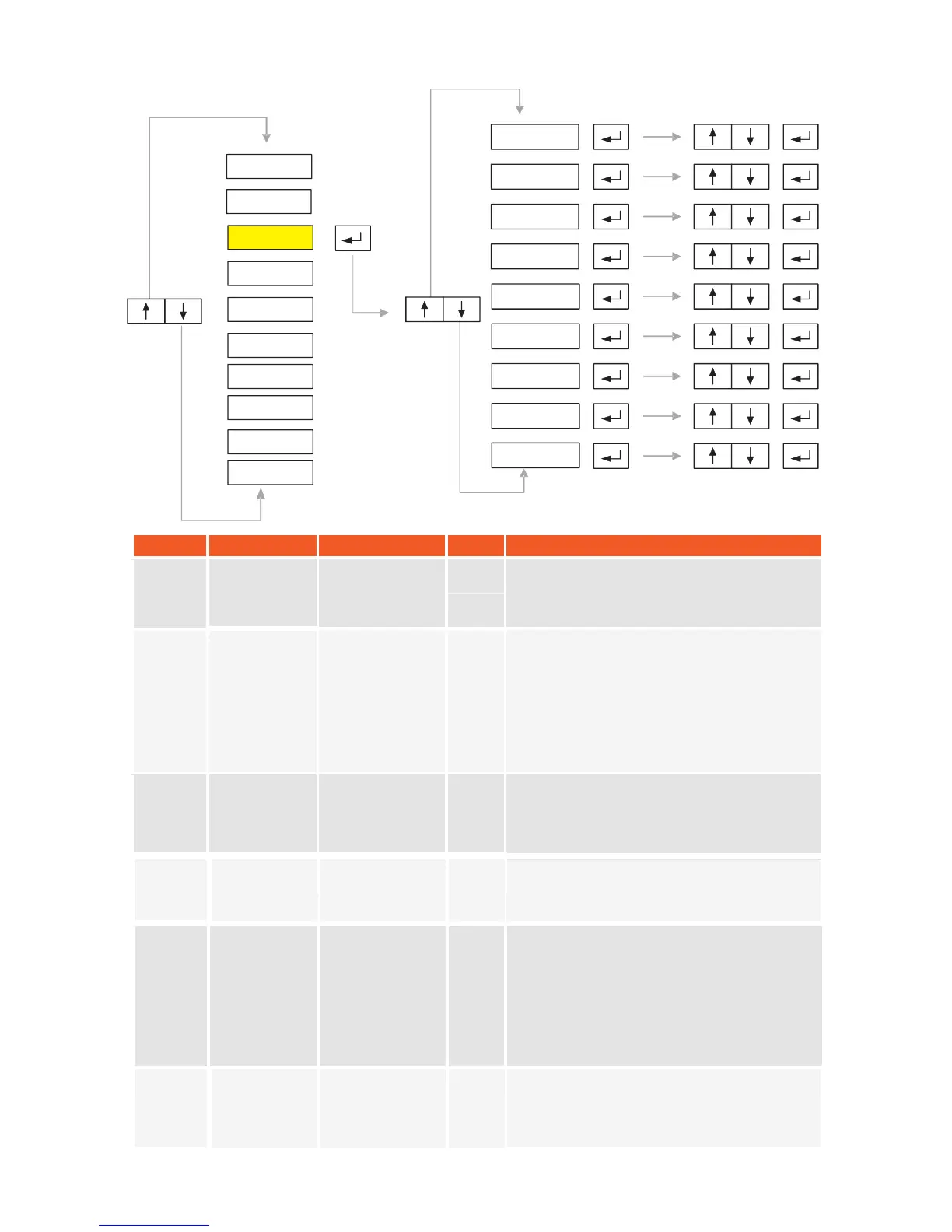
5.3. P3-Configuration:
P3.4
P3.3
P3.6
P3.7
P3.8
P3.5
P3.2
P3.1
P3.0
P2-PAR
P1-GEN
P3-CON
P4-CAL
P5-POR
P6-INO
P7-PRP
P8
P9
-
-
DIS
ANA
-END-
Enter maximum capacity of the second
weighing range
Enter maximum capacity of the first weighing
range (If single interval is selected at menu
P4.1,this will be the Maximum Capacity of the
scale)
KM.LL2E.002
xx.xxxx
xx.xxxx


 To Next Page