998-2300 Rev. H Page 43
Appendix L: How to set up Hyperterminal for Digital (ASCII) Data Capture
1. Ensure C-Soft program is not running in the background. On an MS Windows
computer, open the HyperTerminal program (Start→All
Programs→Accessories→Communications→ HyperTerminal)
2. The Connection Description screen will appear. Name the connection
description. This file will save the communication parameters for the C3
Submersible Fluorometer and can be used in the future to establish
communication with the instrument quickly.
3. The Connect To screen will appear. Choose the appropriate communications port
in the Connect Using window. Click OK.
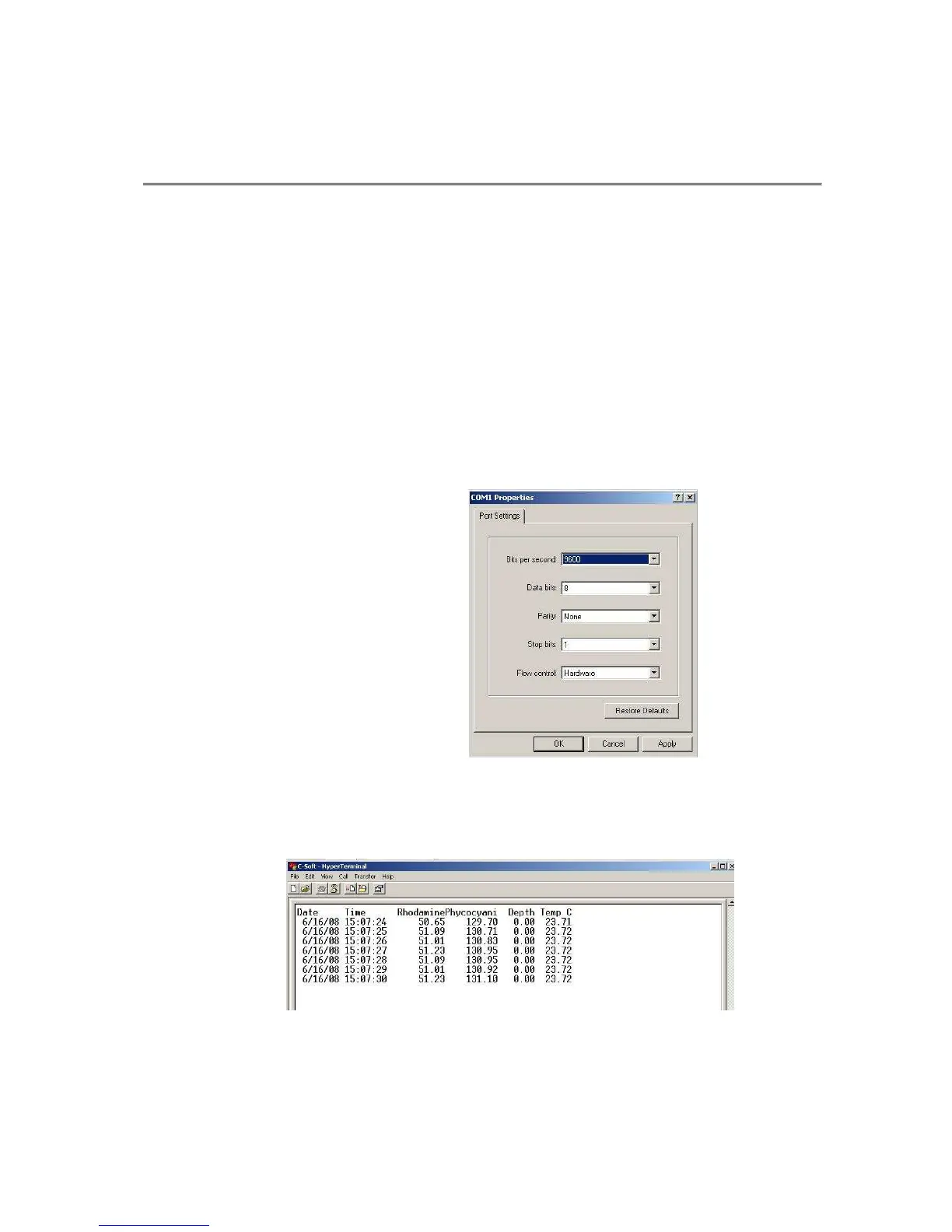
4. The Port Settings screen will appear. Choose the following port settings:
Bits per second: 9600
Data bits: 8
Parity: None
Stop bits: 1
Flow control: Hardware
Click Apply and OK
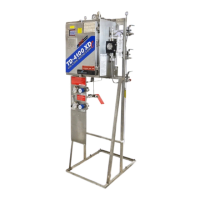
5. Next, the HyperTerminal window will appear. You are now ready to connect the
C3 Submersible Fluorometer to a power source. Data will be displayed at set
intervals in the HyperTerminal window after 100 seconds or at the specified log
start time.



 To Next Page