EasyManua.ls Logo

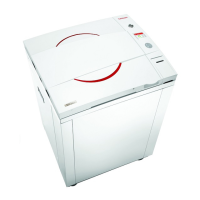
Tuttnauer 5075 - Service Manual

Tuttnauer 5075
85 pages
Print Icon
To Next Page IconTo Next Page
Loading...
OPERATION
&
MAINTENANCE
MANUAL
Laboratory Vertical Steam Sterilizers
models 5050, 5075
ELV-D
Standard Autoclave
ELVC-D
Including Fast Cooling System
Cat. No. MAN205-0451001EN Rev B
Tuttnauer Europe b.v., Paardeweide 36, 4824 EH, Breda, P.O. Box 7191, 4800 GD Breda, Netherlands. +31/76-5423510,
Fax: +31/76-5423540
Tuttnauer U.S.A. Co, Ltd. 25 Power Drive Hauppauge, NY, 11788, USA. Tel (631) 737 4850, (800) 624 5836,
Fax: (631) 737 0720

Table of Contents

Other manuals for Tuttnauer 5075

Questions and Answers

  • D
    Diane WilsonSep 13, 2025
    What does it mean if my Tuttnauer Steriliser shows 'High Pressure'?
    • S
      Sonya Villegas PhDSep 13, 2025
      If the Tuttnauer Steriliser displays 'High Pressure', it means the Chamber Pressure rose 4.2 psi-29 kPa above sterilization pressure (134°C = 304 kPa, 121°C = 205 kPa) for 2 seconds during the sterilization stage. Perform a new cycle.
  • M
    Martin OwensSep 9, 2025
    Why is my Tuttnauer Laboratory Equipment printer printing blank pages?
    • K
      Kristin DixonSep 9, 2025
      If your Tuttnauer Laboratory Equipment's printer is printing but nothing appears on the paper, ensure the paper roll is installed correctly, as only one side of the paper is printable. If the issue persists, the printer may be faulty and require replacement.
  • S
    smitchellSep 7, 2025
    What to do if Tuttnauer Laboratory Equipment displays 'No Water'?
    • S
      spencercalderonSep 7, 2025
      If your Tuttnauer Laboratory Equipment displays 'No Water', check and fix the mineral free water supply, check and clean the water inlet filter, and clean the water level electrode. Here is a summary of the suggested solutions: 1. Check and fix the mineral free water supply. 2. Check and clean the water inlet filter. 3. Clean the water level electrode.
  • D
    davidhayesAug 28, 2025
    What to do if my Tuttnauer 5075 says 'Door is open (During the cycle)'?
    • J
      Julie PriceAug 28, 2025
      If your Tuttnauer Laboratory Equipment displays a 'Door is open (During the cycle)' message, it means the door is open during the cycle. Close the door to perform a new cycle.
  • W
    watsonryanAug 28, 2025
    What does 'Canceled By User' mean on my Tuttnauer Laboratory Equipment and how do I proceed?
    • M
      mlopezAug 28, 2025
      If your Tuttnauer Laboratory Equipment displays a 'Canceled By User' message, it means the START/STOP key was pressed and the cycle was aborted. Wait until "cycle failed – canceled by user" or "cycle end – canceled by user" is displayed, then perform a new cycle.
  • Y
    yjensenAug 28, 2025
    What does 'Cycle Failed' mean on my Tuttnauer 5075 and what should I do?
    • L
      Lisa JohnsonAug 29, 2025
      If your Tuttnauer Laboratory Equipment displays a 'Cycle Failed' message and symbol, it indicates that an error occurred before the sterilization cycle was completed. To resolve this, perform a new cycle.
  • K
    kathryn11Aug 29, 2025
    What does 'Power Down' mean on my Tuttnauer 5075 Laboratory Equipment and how do I recover?
    • K
      Kyle PadillaAug 29, 2025
      If your Tuttnauer Laboratory Equipment displays a 'Power Down' message, it means a power outage occurred during the cycle. Turn on the autoclave, wait until it is ready (reaches a safe condition), and then perform a new cycle.
  • D
    danieldelgadoSep 16, 2025
    What does 'Compressed air supply error (ELVCPVG- D only)' mean on my Tuttnauer Steriliser?
    • J
      jamie38Sep 16, 2025
      If the Tuttnauer Steriliser displays 'Compressed air supply error (ELVCPVG- D only)', it indicates a malfunction in the compressed air supply. Check and fix the compressed air supply.
  • K
    Kendra KerrSep 22, 2025
    What to do if the printer of Tuttnauer 5075 Laboratory Equipment does not print?
    • P
      payneashleySep 22, 2025
      If the printer on your Tuttnauer Laboratory Equipment isn't printing: 1. Make sure the paper roll is inserted in the printer. 2. If there's no obvious reason, switch the machine off and then back on to restart it.
  • E
    Emily KeySep 9, 2025
    How to stop a Tuttnauer Laboratory Equipment machine from leaking at the door?
    • S
      Shannon WilliamsSep 9, 2025
      If your Tuttnauer Laboratory Equipment is leaking at the door, it could be due to a dirty or damaged door gasket. Try cleaning the door gasket first. If the leaking persists, the door gasket may be damaged and need replacement.

Summary

OPERATION & MAINTENANCE MANUAL

Laboratory Vertical Steam Sterilizers 5050, 5075

Details the 5050 and 5075 vertical steam sterilizers.

1. GENERAL

Incoming Inspection and Warranty

Covers initial inspection of the unit and warranty terms.

2. SAFETY INSTRUCTIONS

General Safety Guidelines

Crucial safety precautions for autoclave operation, maintenance, and usage.

3. TECHNICAL DATA

Introduction and Overview

Introduces models and their purpose.

Operating Conditions and Standards

Specifies environmental, operational limits, and compliance standards.

Specifications and Electrical Data

Details technical specifications, dimensions, and electrical requirements.

Utilities and Loading Capacities

Lists required utilities and maximum loading capacities for the unit.

FRONT VIEW

Component Identification

Labels and identifies components shown in the front view diagram.

REAR VIEW

Component Identification

Labels and identifies components shown in the rear view diagram.

OVERALL DIMENSIONS

Dimensional Drawings

Provides visual representations and dimensions of the sterilizer models.

Water Quality Requirements

Built-in Safety Features

Description of Operation Stages

4. CONTROL PANEL

Control Panel Layout

Illustrates the layout of the control panel.

Display Screen Functions

Details the information displayed on the LCD screen during operation.

Keypad Operation Guide

Explains the functions and usage of the control panel keys.

Error Messages and Symbols

Lists and explains error messages and symbols for troubleshooting.

Operational Messages

Describes operational messages and their required user actions.

5. STERILIZATION PROGRAMS

Program Overview and Parameters

Summarizes available sterilization programs and their settings.

Program 1: Unwrapped Instruments

Details parameters and sequence for unwrapped instrument sterilization.

Program 2: Wrapped Instruments

Details parameters and sequence for wrapped instrument sterilization.

Program 3: Unwrapped Pouches

Details parameters and sequence for unwrapped pouch sterilization.

Program 4: Wrapped Pouches

Details parameters and sequence for wrapped pouch sterilization.

Program 5: Unwrapped Delicate Instruments

Details parameters and sequence for unwrapped delicate instrument sterilization.

Program 6: Wrapped Delicate Instruments

Details parameters and sequence for wrapped delicate instrument sterilization.

Program 7: Custom 1

Allows user configuration of parameters for custom sterilization cycles.

Program 8: Custom 2

Allows user configuration of parameters for custom sterilization cycles.

Program 9: Liquid A

Specifies parameters for sterilizing liquids in unsealed bottles.

Program 10: Liquid B

Specifies parameters for sterilizing liquids in sealed bottles.

6. PARAMETERS AND DATA MANAGEMENT

System Navigation Overview

Outlines the system's menu structure for accessing settings and data.

Table of Default Cycle Parameters

Provides a table of default parameters for custom programs.

Accessing the Main Menu

Guides users on how to navigate to the main system menu.

Custom Cycle Parameter Settings

Details how to configure parameters for Custom 1 and Custom 2 programs.

System Parameters Adjustment

Explains how to adjust system-wide settings.

Cycle History Management

Covers viewing and exporting historical cycle data.

12. SERVICE AND MAINTENANCE

Preventive Maintenance Schedule

Details scheduled tasks for maintaining the autoclave's condition.

Daily, Weekly, and Periodic Maintenance

Covers daily, weekly, and periodic cleaning and checks.

Safety Valve Checking Procedure

Procedure for testing the safety valve's functionality.

13. TROUBLESHOOTING GUIDE

Common Malfunctions and Solutions

Provides solutions for common malfunctions and error messages.

14. SPARE PARTS LIST

Available Spare Parts

Lists available spare parts with their catalog numbers.

15. ACCESSORIES

Optional Accessories

Lists optional accessories with their catalog numbers.

Tuttnauer 5075 Specifications

General IconGeneral
TypeAutoclave
Chamber Volume75 liters
Power Supply230V, 50/60Hz
Sterilization Temperature Range121°C to 134°C
Number of Trays3
Chamber MaterialStainless Steel
Weight120 kg
Power3.0 kW
Power Consumption3, 000 watts
Temperature Range105°C to 137°C
Sterilization Time Range5 to 60 minutes
Exterior MaterialSteel
Safety FeaturesOver-temperature protection, pressure relief valve
Cycle TimeVaries depending on load size and sterilization parameters

Related product manuals