32
OSD Adjustments
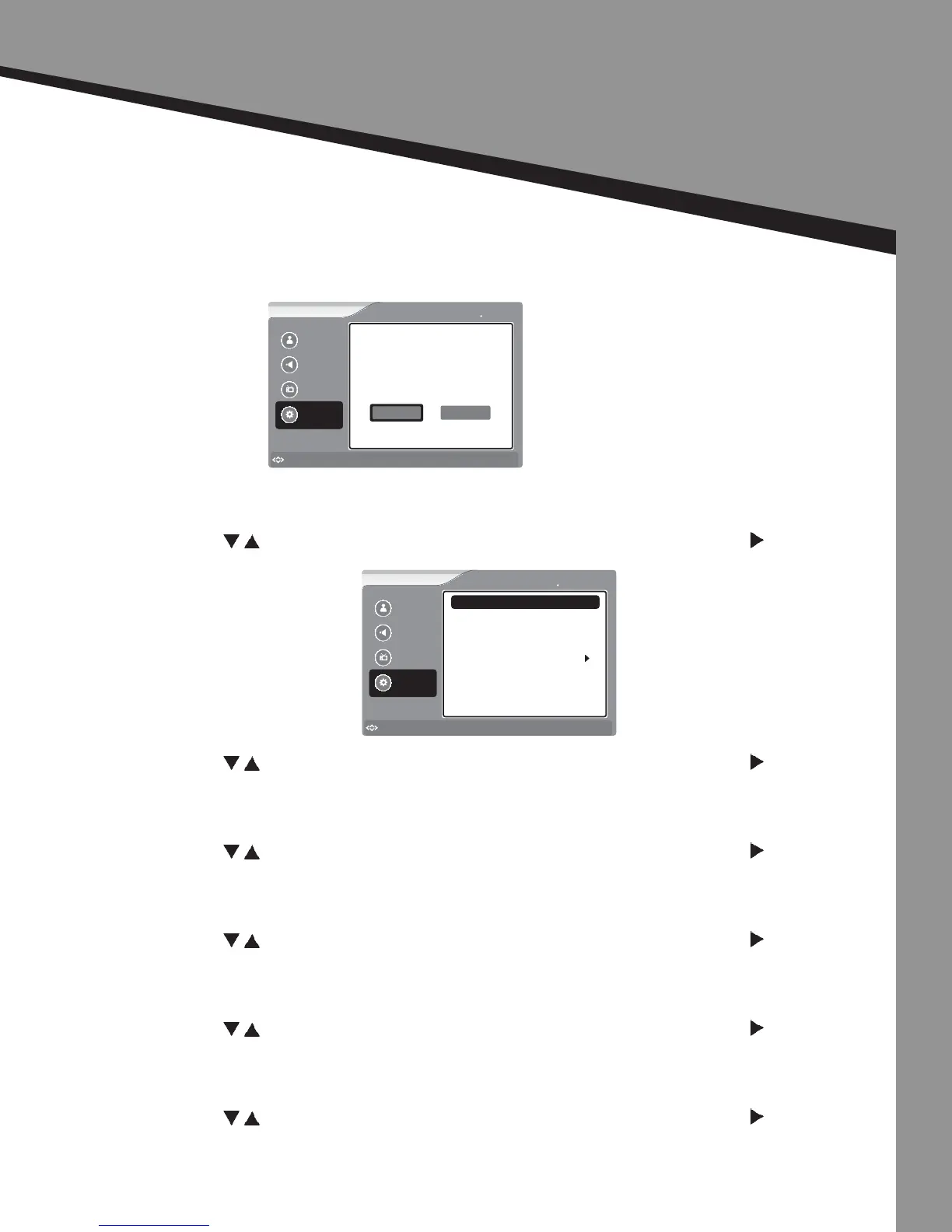
Seng Opons
Reset |
To reset all items to their default value select “Yes”.
PC Seng |
Only used for PC Source
• Press to select the item you would like to adjust, then press ENTER or to select
that item.
Horizontal Posion -
• Press to select the item you would like to adjust, then press ENTER or to select
that item.
Vercal Posion -
• Press to select the item you would like to adjust, then press ENTER or to select
that item.
Phase -
• Press to select the item you would like to adjust, then press ENTER or to select
that item.
Clock -
• Press to select the item you would like to adjust, then press ENTER or to select
that item.
Auto Adjustment -
• Press to select the item you would like to adjust, then press ENTER or to select
that item.
Picture
Sound
Channel
Settings
to Move
to Select
Enter
Menu
to Exit
Settings Reset
This will reset Picture
Settings to factory mode.
Do you want to continue?
Yes No
Picture
Sound
Channel
Settings
to Move
to Select
Enter
Menu
to Exit
Settings PC Setting
Vertical Position
Phase
Clock
Auto Adjustment
Horizontal Position 50
50
50
50


 To Next Page