Page 52 of 102
TVL 351
ISSUE 15
9.2. ETSD Card Software Upgrade (only applies if ETSD card fitted)
The ETSD bootloader searches for a binary file named “E2_ETSD_Brd_YYYYMMDD_VERS.bin”. Ensure only one
ETSD binary file is stored on the SD Card’s root directory before flashing.
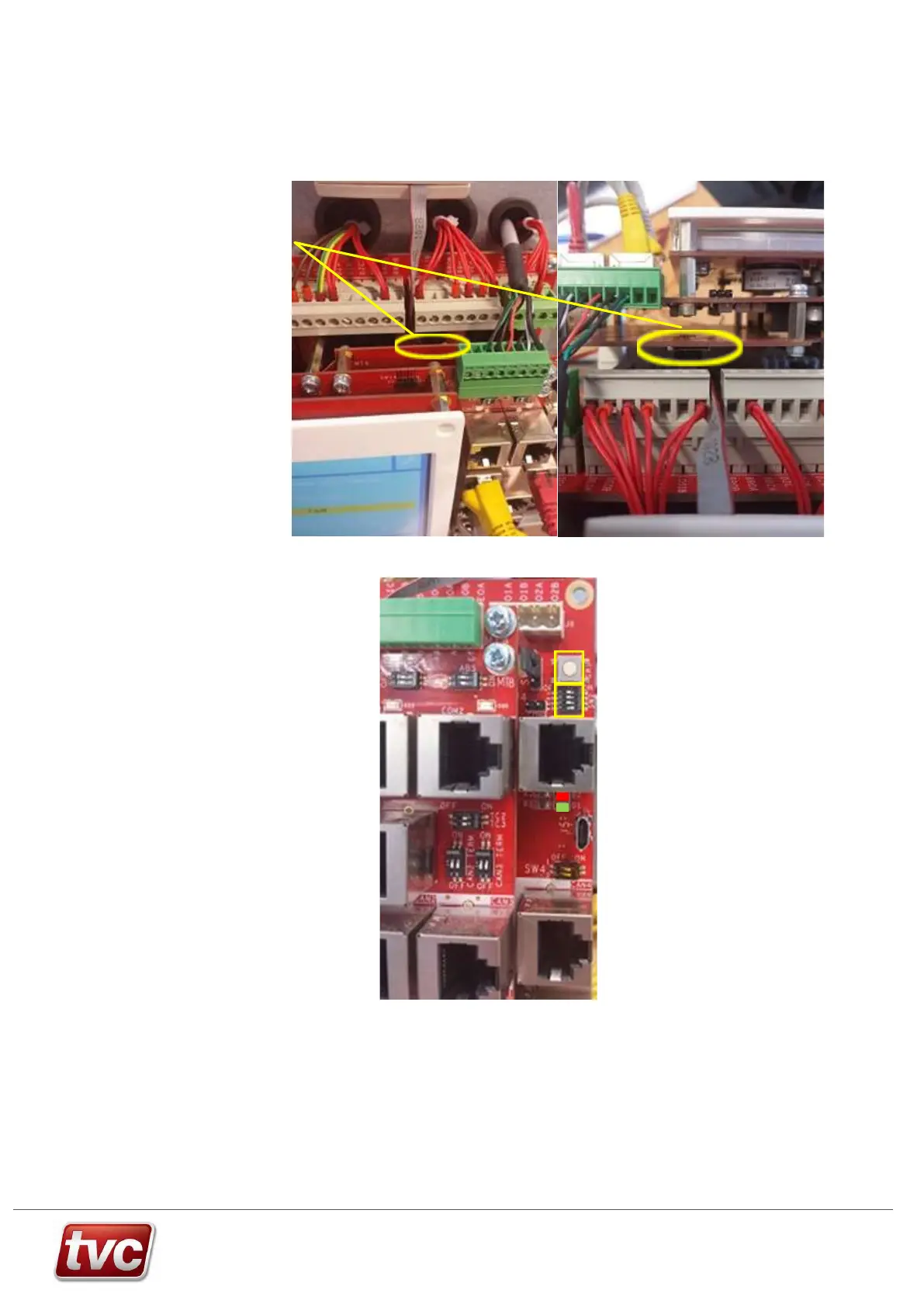
Insert the SD Card into SD
card reader J2 on the
underside of the ETSD card.
Insert the SD card with the
contacts uppermost.
The location of the ETSD SD
card reader J2 is circled.
Move SW2 DIP4 right to the
ON position. Press the ETSD
reset button SW1.
ETSD SW1, SW2, D1 and D2
locations are given to the
right.
SW1 Reset button
SW2 DIP 4 is the lowest DIP switch
Right = ON software
upgrade Left = OFF normal
operation
D2 Red
D1 Green
Whilst the software is being programmed into memory the green LED D1 remains illuminated. Once programmed
the ETSD Card performs a reset and reboots into normal operation as indicated by a brief pulse on red LED D2
followed by periodic flashing of green LED D1. Once the ETSD card has rebooted into normal operation slide SW2
DIP4 left to the OFF position and return the SD card to the Lift processer card reader SD1.



 To Next Page