Page 90 of 102
TVL 351
ISSUE 15
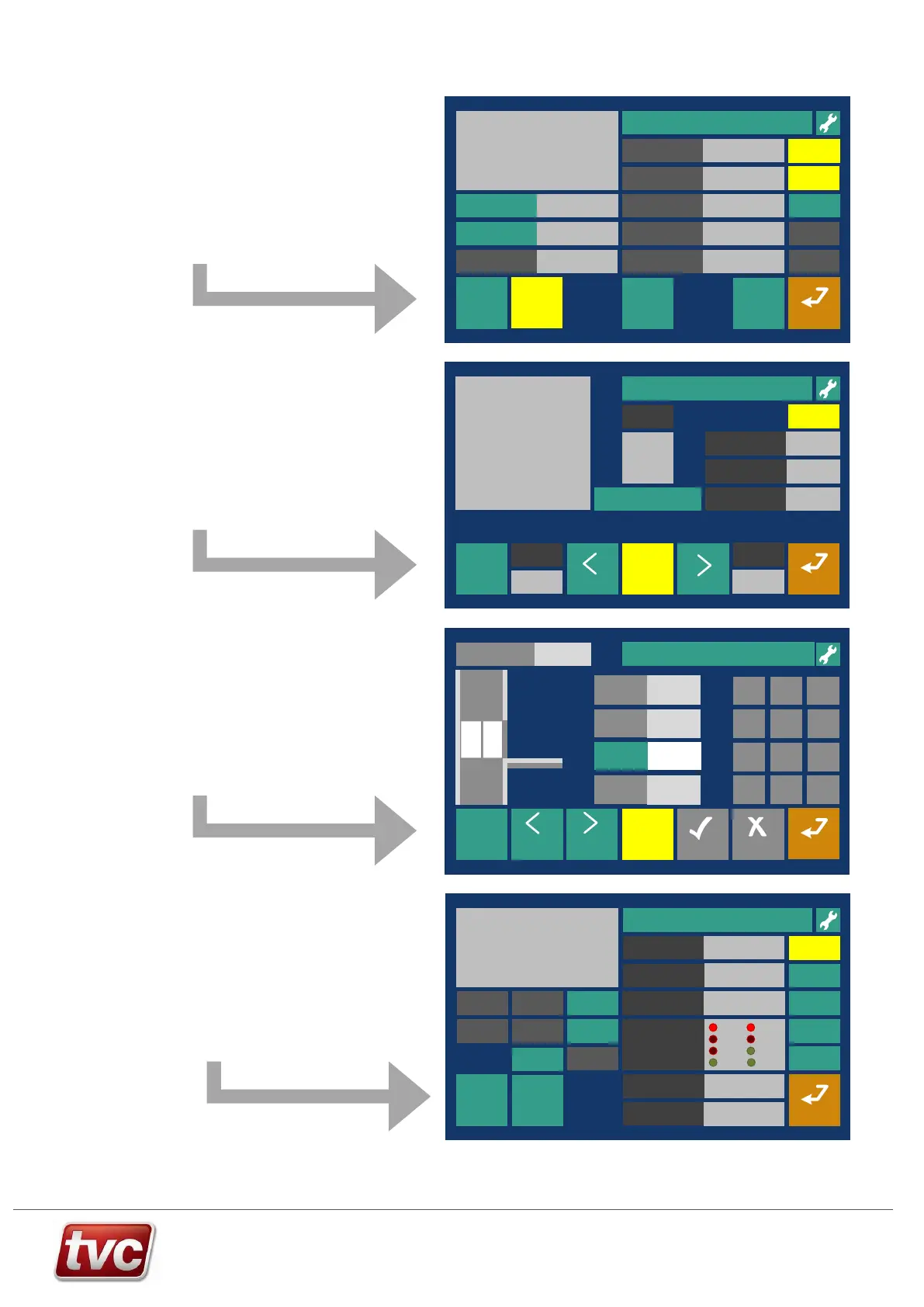
Limax3CP Setup Screens - Overview
View Events
Move car using emergency electrical operation to each floor and teach the floor levels.
Back
?
Help
Next
Floor
Bottom Reference
Position
75678 mm
9500 mm
Current Floor
2
13000mm
Instructions:
To teach floors - Switch to Panel Test or
Inspection and Door Disable, activate
Teach Mode. Start with the car at the
bottom floor. Select floor to teach with
car pushes or arrows below. Move car
to floor level and then press teach
“FRONT, REAR or both” teach button or
press DOP for 3 sec.. Move up a floor
and repeat until all floors are taught.
Previous
Floor
Enable
Doors
End
Teach
Mode
Top Reference
Position
Limax Position 14000 mm
Next FloorPrev Floor
Teach - FRONT
10000 mm
32567 mm
Out of Service
Checklist >Floor Teach Fri 03/09/21 15:47:00=Level 1
View Events
Floor Level
Error
0 mm
Back
CancelOk
Enable DDS and PPT, then Settings Mode. - Enter floor level error (+ve = car stopped high)
Current Position
32557mm
Help
?
Move to
Next Floor
Move to
Prev Floor
Floor Level
32546 mm
Use on screen buttons to move the car to each floor and adjust floor level if needed.
Floor Level
Input
Range
-50mm to
50mm
End
Settings
Mode
Floor 6
1 2 3
4 5 6
7 8 9
+/-
0 .
Out of Service
Checklist > Floor Adjust
Fri 03/09/21 15:47:00=Level 1
View Events
Follow on screen prompts to test the Limax3CP safety shaft system.
Back
?
Help
Mode State Limax Norm Mode
Active Error/Fault No Faults
Fault Description
None
Instructions:
1) To Test ETSL – Switch Panel to Normal Enable
Test Mode, ETSL Up or Down. Call to terminal
floor.
2) To Test Overspeed – Switch to Normal, Call
to terminal floor.
3) Use buttons to test outputs
I/O States
Enable
Doors
Enable
Test
Mode
Limax Position 14000 mm
Top Car
Call
Bottom Car
Call
OC Output
Test
ETSL
Test Up
ETSL
Test Down
Open SR1
Test eSGC
0xADB12EFC
Configuration CRC
Limax Fault
Reset
Trip Speed
Test
Pre Trig
Test
System
Reset
OC
SR1
SGC
DZR
EN21
DZF
Out of ServiceChecklist > Limax Status/Test Fri 03/09/21 15:47:00=Level 1
To setup the Limax3CP safe system follow the steps below:
Make sure the Limax is configured correctly in the Factory Config
screen.
Check the CRC of the unit matches the one set in the Ethos 2.
Step 1) - Checklist > Limax Safe Setup
Teach the reference positions, the top and bottom extreme limits of
the shaft.
View Events
Out of Service
Checklist >Limax Safe Setup
Follow on screen prompts to setup the shaft reference points for Limax3CP shaft encoder and safety device.
Back
Fri 03/09/21 15:47:00
?
Help
Teach Bottom
Reference Position
34567 mm
9780 mm
Instructions:
1) To Commission - Switch to Panel Test, then
activate Teach Mode and then Teach Top and
Bottom Reference Positions.
Limit offsets can be modified whilst on Prepare
to Test and Doors Disabled.
Enable
Doors
End
Teach
Mode
Teach Top
Reference Position
Limax Position 10051 mm
500 mm
Top Final Limit
Offset
500 mm
Bottom Final Limit
Offset
200 mm
Top Inspection
Limit Offset
200 mm
Bottom Inspection
Limit Offset
Enable
Settings
Mode
System
Reset
4.000 m/sTrip Test Speed
Prepare to
Test
=Level 1
Step 2) - Checklist > Floor Teach
Teach all the floor levels, move the car to each level in sequence. Once
complete the car will run in normal operation.
Perform a DZ stop learn after this step.
Step 3) - Checklist > Floor Adjust
Check each floor level for accuracy.
Switch to floor adjust mode and move levels as necessary.
Step 4) - Checklist > Limax Status/Test
Follow the prompts to test, as needed.
Diagnose any problems from this screen.
INUP
INDN
SR1 UCM
Test
Factory
Config.
Door Zone
Length
Door Zone
Length RL



 To Next Page