http://www.tyan.com
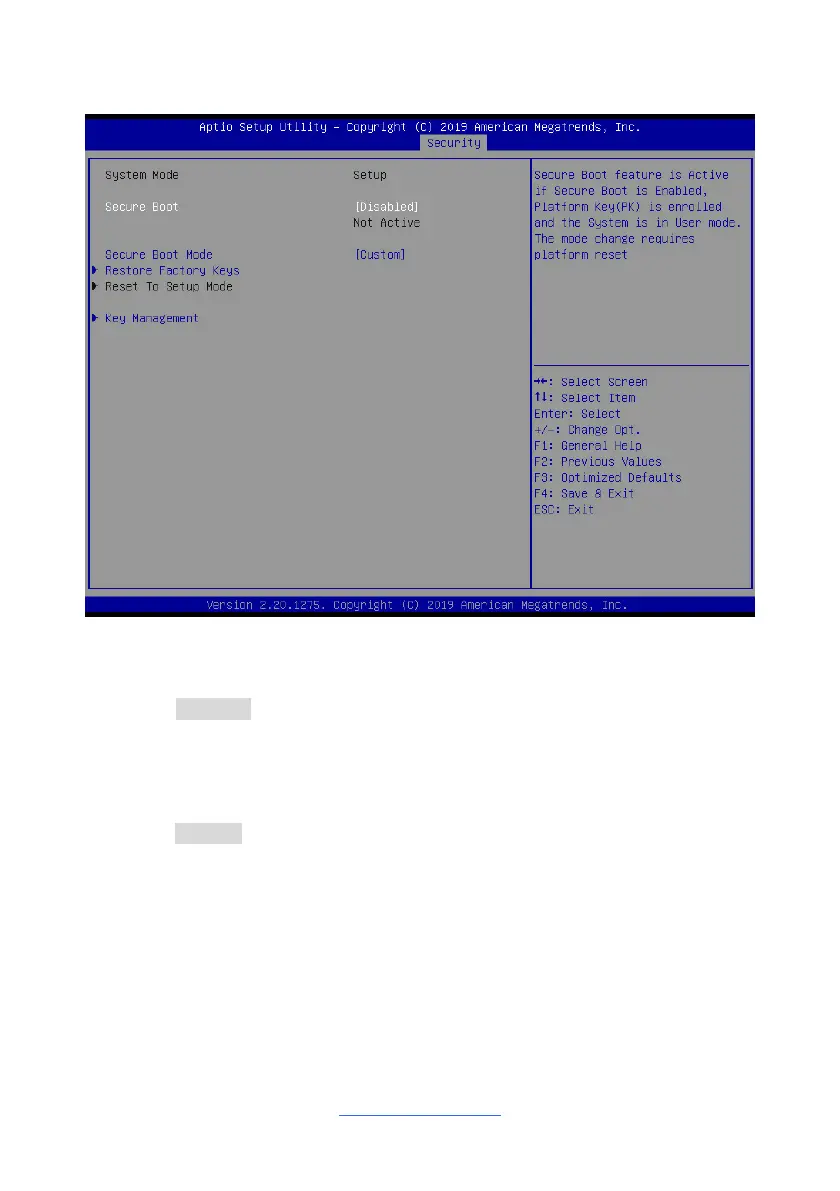
6.6.1 Secure Boot Menu Configuration
Secure Boot
Secure Boot feature is Active if Secure Boot is Enabled, Platform Key(PK) is enrolled,
and the system is in User mode. The mode change requires platform reset
Disabled / Enabled
Secure Boot Mode
Secure Boot mode options: Standard or Custom.
In Custom mode Secure Boot Policy variables can be configured by a physically
present user without full authentication
Custom / Standard
Restore Factory Keys
Force System to User Mode. Install factory default Secure Boot Key databases.
Reset To Setup Mode
Delete all Secure Boot Key database from NVRAM
Key Management
Enables expert users to modify Secure Boot Policy variables without full
authentication


 To Next Page