Tyro Go EFTPOS reader user guide 18
Return to table of contents
9. Other things you should know
9.1 Devices supported
Please refer to the Apple App Store or Google Play for supported devices and supported OS software versions.
9.2 Accessories
Use only the approved charging cable.
9.3 Updating your Tyro Go App software
Depending on the settings on your smart device, software updates will be applied automatically or manually.
We encourage you to keep your app up-to-date for the best experience.
9.4 Updating your Tyro Go firmware
When your Tyro Go requires an update to its firmware, you will be notified in the app.
Firmware updates are mandatory and cannot be paused.
The Tyro Go App will download the latest reader firmware and then apply the update to the reader. When the
update has finished, the reader will restart automatically.
In all situations, please follow the instructions on the Tyro Go App.
To see what firmware version is currently running on your Tyro Go, from the home screen:
• Select “more” on the bottom right
• Select “Reader settings”
Your “Reader version” will be listed.
9.5 Status LEDs
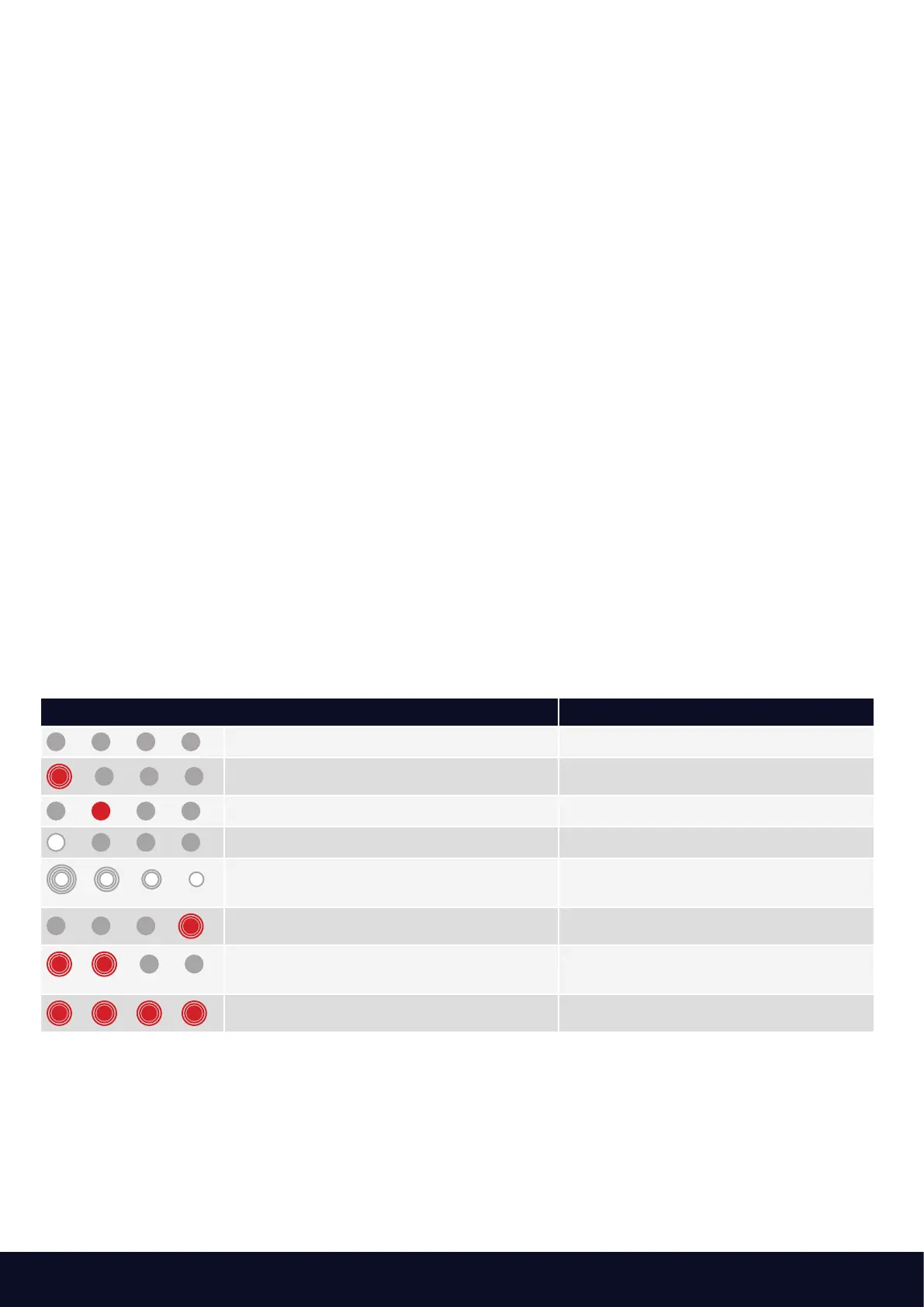
The LEDs on your Tyro Go will illuminate from time to time. Some of the patterns are standard operating patterns,
while others may indicate an error.
Please see below:
LED Indication Description
No LEDs illuminated The device is off
The first LED is flashing red The device has been turned on
The second LED is solid red The device battery is charging
The first LED is solid white The device is in normal operating mode
All four LEDs are flashing white in
sequence
The device is waiting for Bluetooth
pairing
The fourth LED is flashing red Bluetooth is connected
The first and second LEDs are flashing red The device may have been tampered
with*
All four LEDs are flashing red Device error
tes a tampered state or device error, please call Customer Support 24/7 at 1300 108 976.
10. Warranty
Your Tyro Go comes with 12 months warranty.
Contact our Customer Support for any concerns at 1300 00 TYRO.
Thank you for transacting with Tyro



 To Next Page