Tyro Go EFTPOS reader user guide 7
Return to table of contents
After confirming the payment amount, the contactless icon and contactless
payments indicator will illuminate on your Tyro Go, indicating that it is ready to
accept a card or device payment.
Follow the instructions to insert or tap the card.
2.9 Typical tasks on Tyro Go
2.9.1 Accepting card payments
Taking payment is straightforward. Note that your Tyro Go must be paired to your smart device, and
your smart device must have an internet connection to begin the process of taking a payment.
As soon as you open the Tyro Go App, it will automatically pair to your Tyro Go if paired previously.
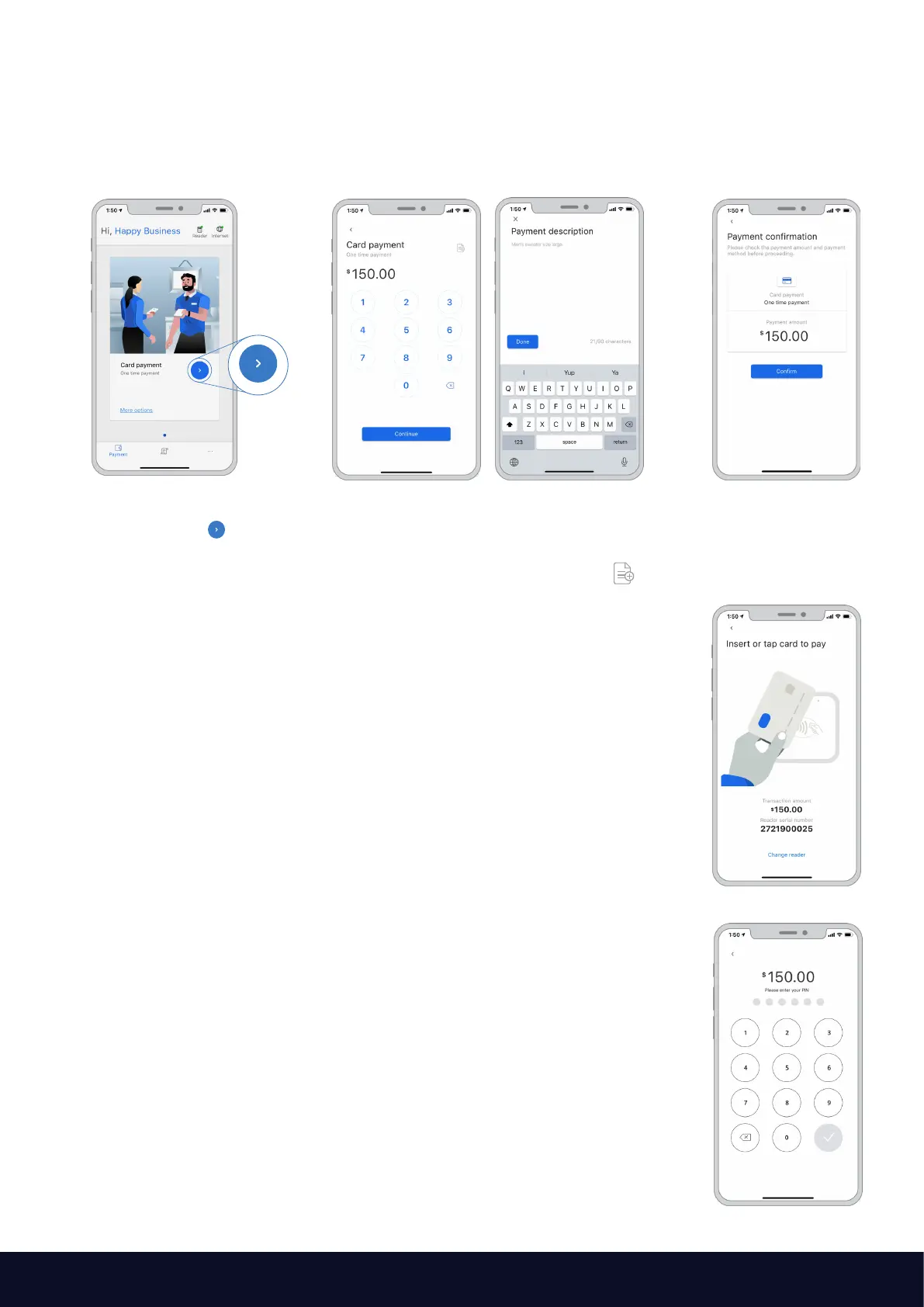
At the payment page,
select the Payment icon
Enter the sales amount.
Note that a decimal is not required.
Optional: Enter the sale description if you
prefer by selecting the “add note” icon
on the top right.
Confirm the
payment amount
Allow the customer to tap their contactless card or mobile device on the
Tyro Go. Alternatively, the customer can insert their card into the chip slot.
Note: Tyro Go only supports contactless and chip-based payments.
Magnetic stripe (card swipe) is not supported.
The customer may be required to enter a PIN if:
• the contactless transaction exceeds AU$200; or
• a chip payment is made
Important: As the business operator, you should provide adequate privacy for
the cardholder to enter their PIN. In addition, you should remind the cardholder
to cover the screen when entering their PIN to protect their confidentiality.
Once the card has been tapped and the PIN successfully entered (if required),
the Tyro Go will release a beep sound, and the LED indicator will light up.
The Tyro Go App will display the logo for the card used for the transaction,
e.g. Visa, and then attempt to authorise the transaction.



 To Next Page