10
Ulead COOL 3D Production Studio
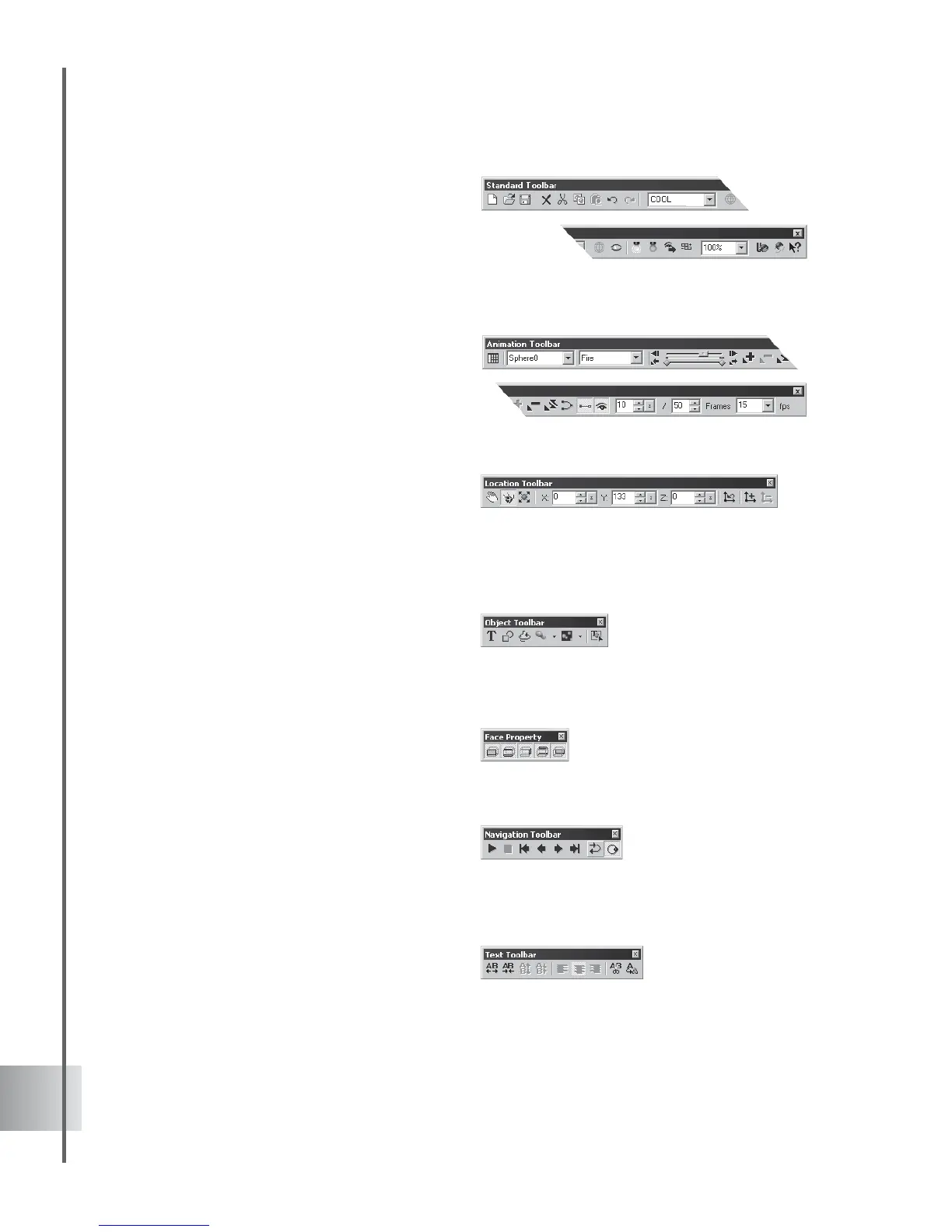
• Standard Toolbar Contains all of the
most commonly used functions and
commands. In addition to the typical file
commands, it also has the Object List,
as well as Wireframe Rendering, Show/
Hide objects, and ambience control
buttons.
• Animation Toolbar Displays all the
controls you need to manipulate an
animated project, including extensive
key frame and timeline controls,
animation looping modes, frame
numbers, and frame rate. See page 43.
• Location Toolbar Shows the position,
size, rotation, light, and texture
coordinates of the selected 3D object.
Allows you to enter values yourself, or
displays the changing values of the
object as you drag it in the Edit
Window.
• Object Toolbar Allows you to place
and edit text, graphics, lathe objects,
basic 3D geometric shapes, and particle
effects objects in your project. This is
where you really begin your project.
• Face Property Toolbar Allows you to
choose which side of the object to edit.
A handy tool to have around for
accurate modeling of intricate shapes.
• Navigation Toolbar Allows user to
view and manipulate the object's
animation through Play, Rewind,
Previous, Next, Last, Loop Mode and
Ping Mode.
• Text Toolbar Allows you to adjust the
alignment of the text within a text
object, as well as the spacing between
lines and characters.



 To Next Page