Compressor Unit Instruction Manual
ULVAC CRYOGENICS INCORPORATED 3-7
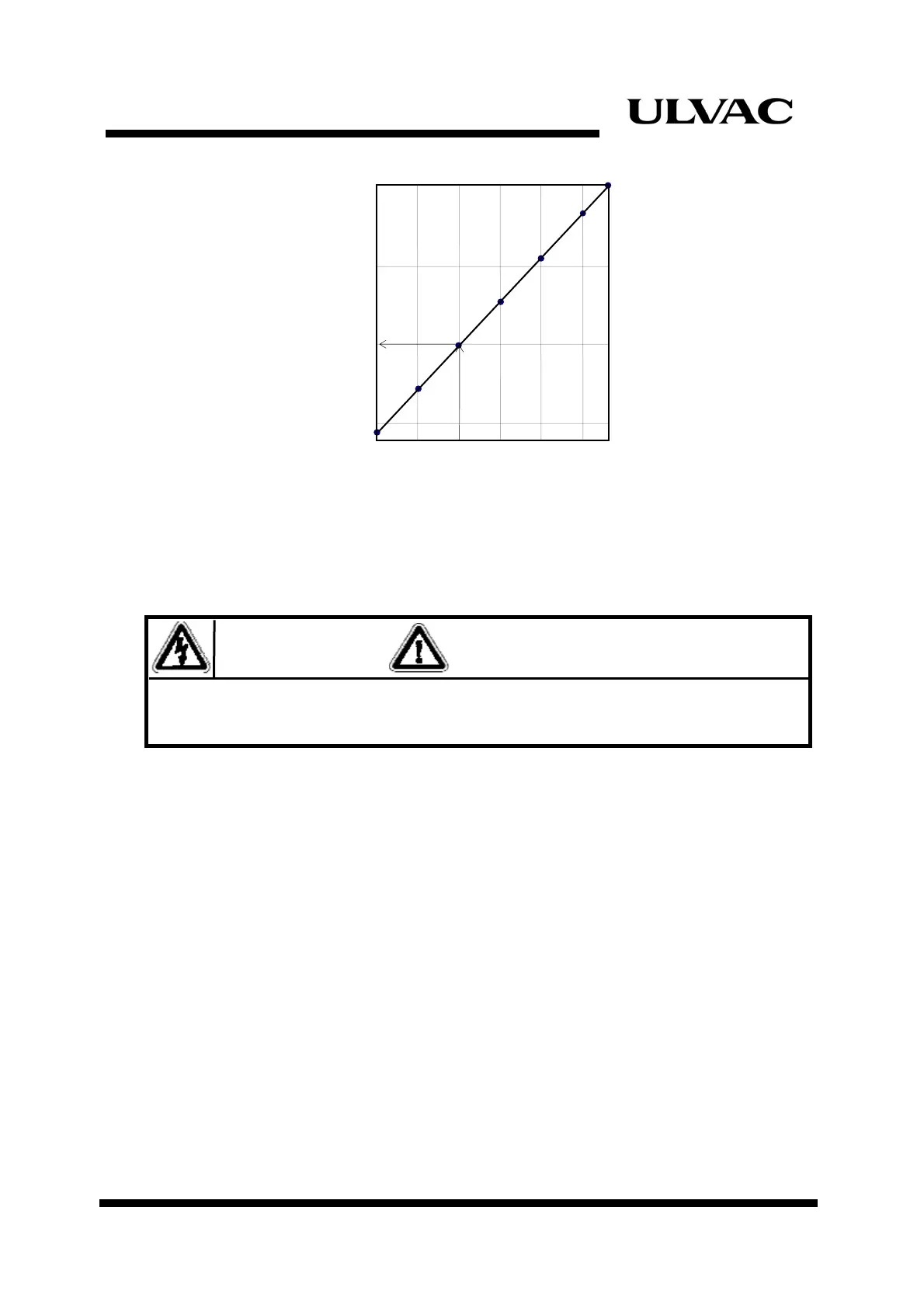
10 15 20 25 30 35 38
1.24
Temperature℃
Static Pressure
MPaG
1.16
1.20
1.28
1.12
Figure 3-4
Static Pressure and Temperature
3.5 Connecting Electrical Cables
WARNING
Do not connect the compressor to power supply until all wiring and connections are
completed.
1. Connecting the refrigerator cable
Connect the refrigerator input co he cryopump/super trap and
refrigerator connector on the compressor unit with the refrigerator cable.
nnector on t
2. Connecting the K thermocouple
Connect each end of the K thermocouple to the K terminal on the compressor unit.
Connect the red wire of K thermocouple to the (+) terminal.
3. Connect the ground.
4. Remote wiring (Refer to Appendix B-1,2)
Wire the REMOTE/RESPONSE and FAILURE OUT.
Set the REMOTE/LOCAL switch on the front panel as REMOTE.
5. RS232C wiring.
Wire RS232C (Refer to Appendix B-4)



 To Next Page