51
+ +
+
+ +
12.3
12.3
12.3 02.3 06.3 06.5
06.5
FR
CH
N
10
:
25
FR
CH
N
00.0
No operation
for 10 seconds
No operation
for 10 seconds
No operation
for 10 seconds
No operation
for 10 seconds
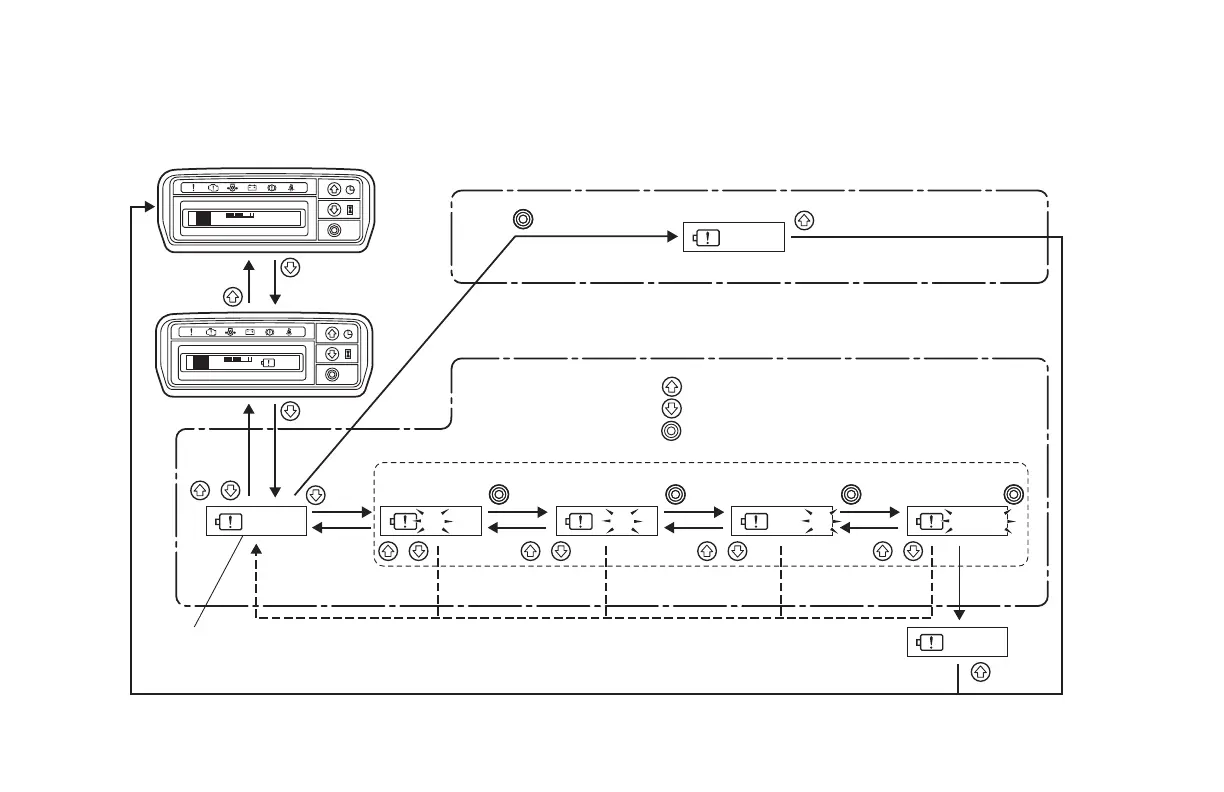
Press
and hold
Press
and hold
Setting completed
Setting completed
The time setting that was set before is displayed.
* To use the previous time setting again, press the button in order to set the same time as before.
Operations when changing the previous time setting
Operation when using the previous time setting again
Press and hold
Press the button to change the number up.
Press the button to change the number down.
Press the button to confirm the number for each digit.
Following is an explanation of how to set the time setting for the second and later times.
Example 1: Changing the time from 12.3 hours (previous setting) to 6.5 hours
Example 12: Using the same 12.3 hours setting (previous setting) again






 To Next Page