57
OPERATING CONTROLS
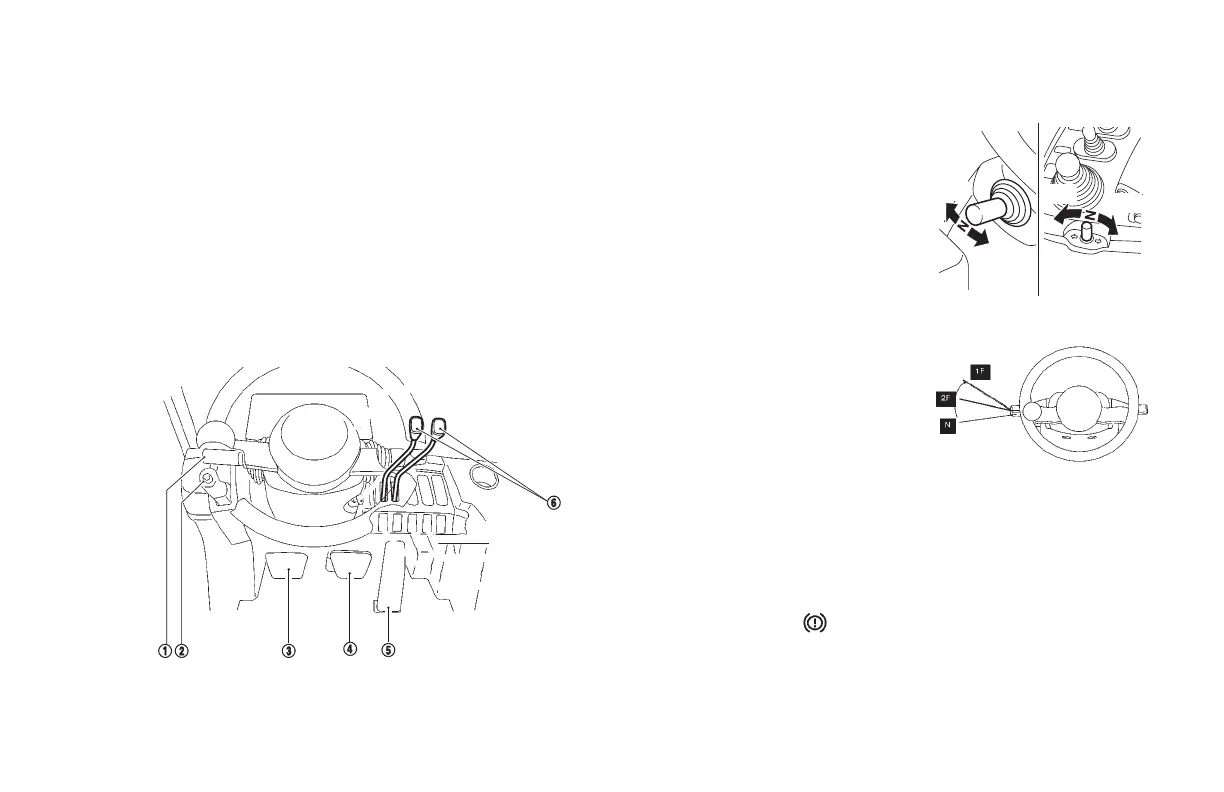
1. Selector lever
NOTE:
For forklifts with the optional joystick control, this switch is located on
the left side.
2. Parking brake lever
3. Inching brake pedal
4. Brake pedal
5. Accelerator pedal
6. Cargo-handling control lever(s)
SELECTOR LEVER
This lever is used to change the
driving direction of the lift truck
(forward or reverse). Push the lever
forward (up) away from you to drive
forward (forks leading), or pull the lever
backward (down) towards you to drive
backward (forks trailing). The neutral
position is at the midpoint.
The same operating method applies to
the optional ngertip control.
If the lift truck is equipped with the
Transmission Shift (SmoothShift)
interlock option, the transmission will
not shift direction at high travel speeds
or engine RPM's. Remove your foot
from the accelerator pedal or apply
brakes and shift when the transmission
shift (SmoothShift) indicator illuminates
(green). Refer to page 56.
NOTE:
• The engine cannot be started when the selector lever is in any
position other than the neutral position.
• The transmission will shift to neutral if the operator leaves the seat
with the ignition switch on.
• If the parking brake warning light is illuminated, the
transmission can not shift into forward or reverse. When the
selector lever is in the "F" or "R" position and the parking brake
is on, the display blinks. Release the parking brake and shift the
selector lever to the neutral (N) position and then shift it again to
forward (F) or reverse (R) in order to drive.
Forward
position
Reverse
position
Forward-Reverse lever
(Option: for ngertip lever
type)
Forward
position
Reverse
position
1 Speed
2 Speed





 To Next Page