56
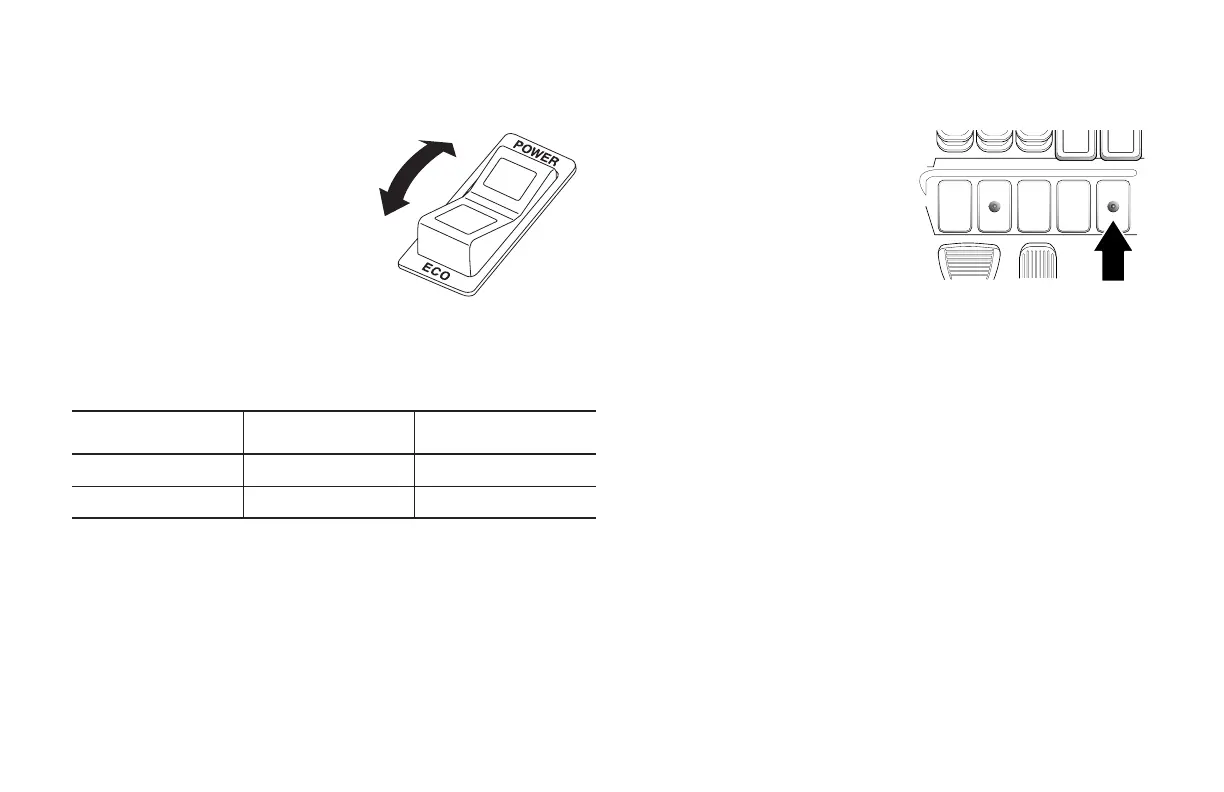
THROTTLE SENSITIVITY ADJUST SWITCH (OPTION)
This switch is an optional setting
switch for electronic control
gasoline, LPG and dual fuel lift
trucks. It allows you to switch
the starting acceleration between
power mode and economy
mode. Press the POWER side
of the switch to accelerate the
lift truck at a normal rate, or
press the ECO (economy) side to
accelerate the lift truck slowly.
The light on the side you depressed illuminates, indicating the mode
that is currently selected. You can switch from one mode to the other
as described below.
Switching operation During driving During a halt and ignition
switch OFF
From POWER to ECO Not possible Possible
From ECO to POWER Not possible Possible
NOTE:
Switching from the ECO mode to the POWER mode can only be done
by turning the ignition switch to the OFF position.
TRANSMISSION SHIFT (SMOOTHSHIFT) INDICATOR (GREEN -
OPTION)
The transmission will not shift
direction at high travel speeds or
engine RPM's. When the indicator
light turns off, the engine RPM will be
reduced, the transmission will stay
engaged, and the engine now acts
as an engine brake to slow down the
lift truck. Or, the operator may also
use the service brakes. When travel
speed has been reduced and your foot removed from the accelerator
pedal or brake is applied the indicator light illuminates (green), and the
transmission shifts. Depress the accelerator pedal to pick up speed in
the new direction.
POWER (power mode)
ECO (Eco mode)





 To Next Page